PSP8620311
Rev. E
41
6 — Control Programming
Firmware Upgrade
Versa-Tech
®
rmware upgrade procedure
NOTE: Hubbell Recommends recommends putting the NR (red) handle down
immediately prior to performing any firmware upgrades by radio.
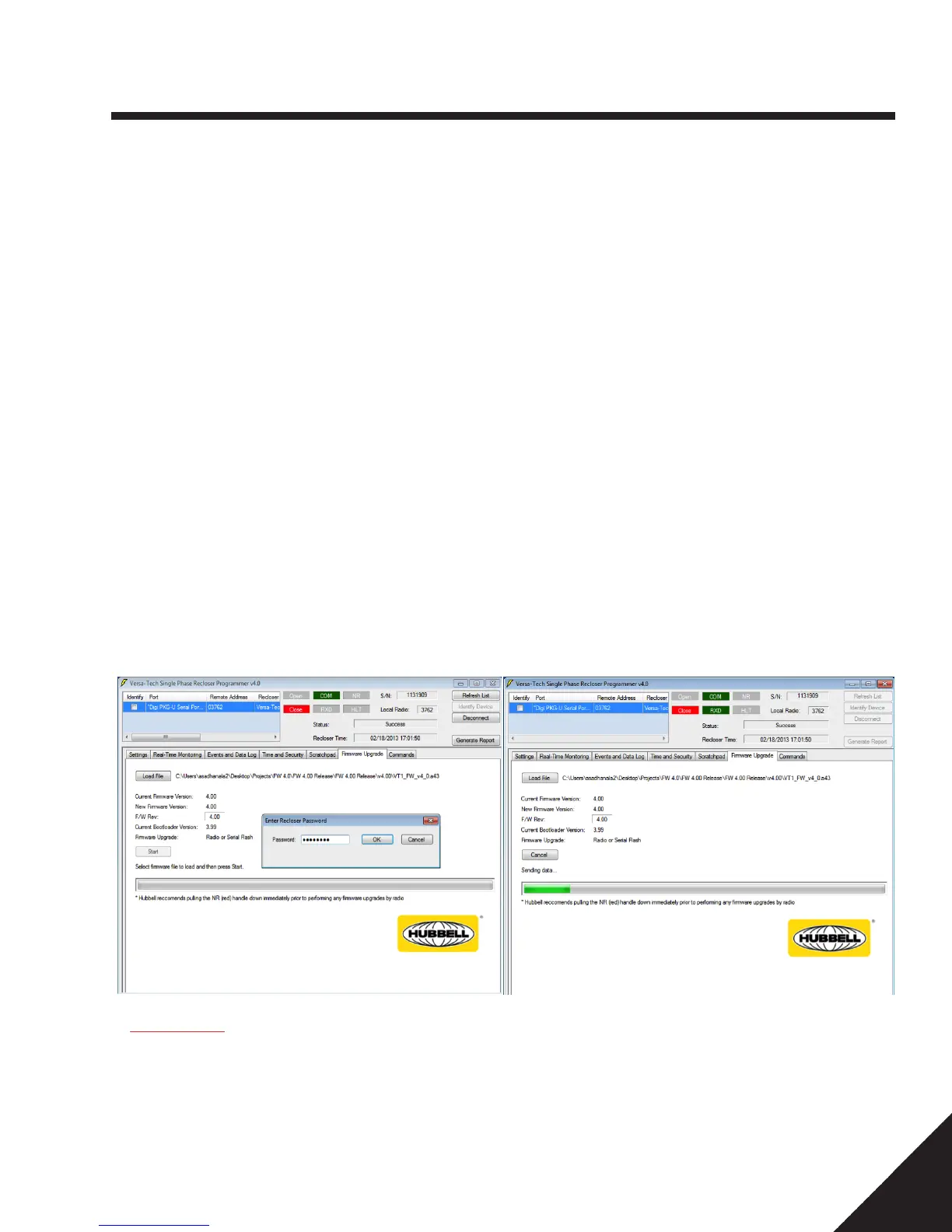
- Have the latest HPS supplied firmware version .a43 file saved in a known location on the computer being used to perform the upgrade.
- Establish wireless communications by opening the User Interface Version 4.50.15 or later.
- Double click on the appropriate COM Port to establish Wireless or Serial Communication as per section.
- Click on the “Firmware upgrade” Tab.
- Click the “Load File” button.
- Select the supplied .a43 file from the known location where it was stored.
- Click the “Start” button.
- Enter a valid security password and click OK.
- Allow the upgrade to continue to completion.
- You should receive a “Successful, Device is operational. Press OK.” confirmation directly above the progress meter.
NOTE: If upgrading to FW 4.xx, please refer to the Hubbell Power Systems website for the latest 4.xx
Upgrade Instructions.
IMPORTANT: While upgrading the control firmware wirelessly, system coordination from this device
will be interrupted for whole upgrade process while the non-volatile memory sector is written to. If
not bypassed i.e., left and in the circuit during this time, any faults that occur on the load side of the
recloser could be passed back upstream to a source side protective device. Bypassing the recloser
may be preferred by some utilities.


 To Next Page