27
Bottom Presentation
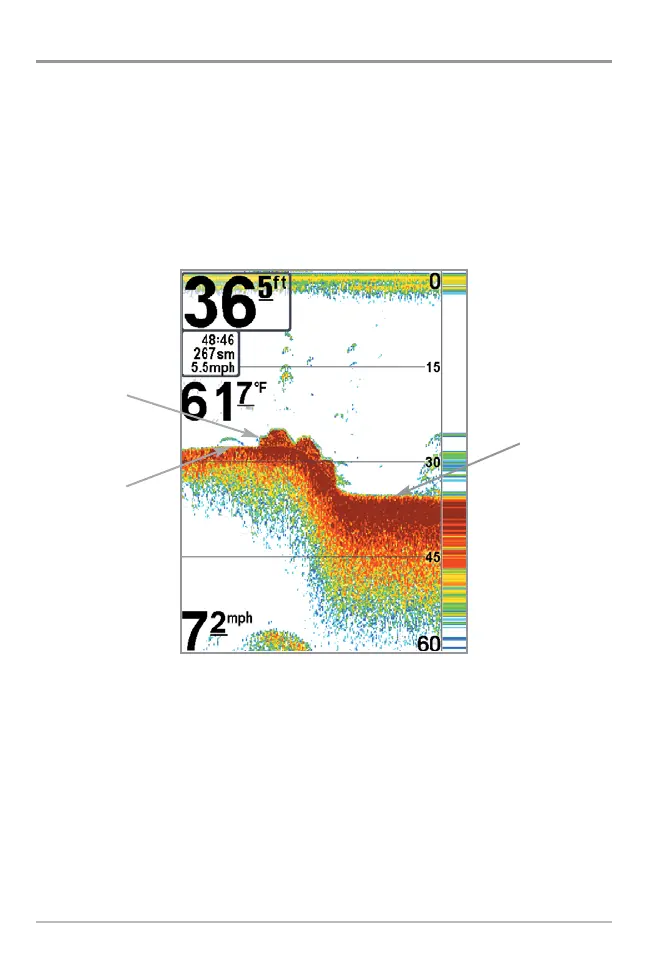
As the boat moves, the unit charts the changes in depth on the display to create
a profile of the Bottom Contour. The type of bottom can be determined from
the return charted on the display. A Hard Bottom such as compacted sediment
or flat rock appears as a thinner line across the display. A Soft Bottom such as
mud or sand appears as a thicker line across the display. Rocky Bottoms have
a broken, random appearance.
The sonar returns from the bottom, structure and fish can be represented as
either WhiteLine® or Structure ID®. See Sonar Menu Tab: Bottom View for
details on how to set the bottom view.
Bottom Contour Profile with RTS® Window
Rocky Bottom
Hard Bottom
Soft Bottom















 To Next Page