30
Sonar Zoom View
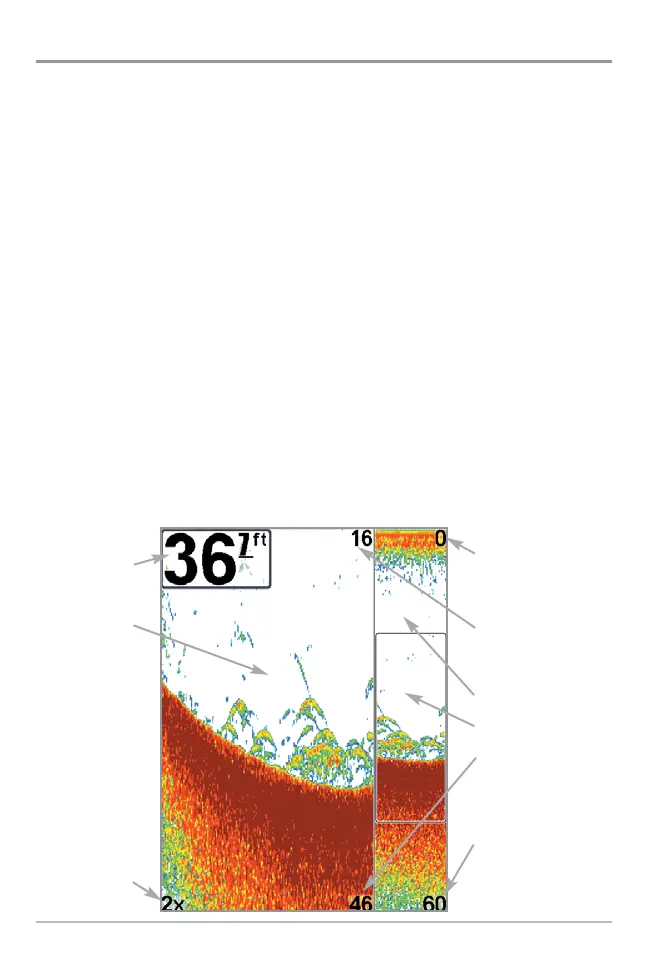
Sonar Zoom View increases the displayed resolution to separate sonar returns
that are very close together, such as those caused by fish suspended close to
the bottom or within structure. In Zoom View, the display is split to show a
narrow slice of the full range view on the right and the zoomed view on the left.
The full range view on the right also contains the Zoom Preview Box that shows
what part of the full range view is shown in zoom view on the left; the Zoom
Preview Box tracks the bottom in the full range view.
As the depth changes, the zoomed view updates automatically to display a
magnified image of the bottom. The Zoom Preview Box shows where the
zoomed view is in relation to the full range view. The Zoom Level, or
magnification, is displayed in the lower left corner and can be changed to suit
conditions. Upper and Lower Zoom Depth Range numbers indicate the depth of
the water which is being viewed.
Digital depth is displayed in the upper left hand corner. The digital readouts in
the Sonar Zoom View cannot be customized; therefore, information such as
water temperature and voltage are unavailable in the Sonar Zoom View.
Sonar Zoom View
Depth
Zoomed View
Zoom Level
Upper Depth Range,
Full Range View
Upper Depth Range,
Zoom View
Full Range View
Zoom Preview Box
Lower Depth Range,
Zoom View
Lower Depth Range,
Full Range View















 To Next Page