34
Snapshot and Recording View
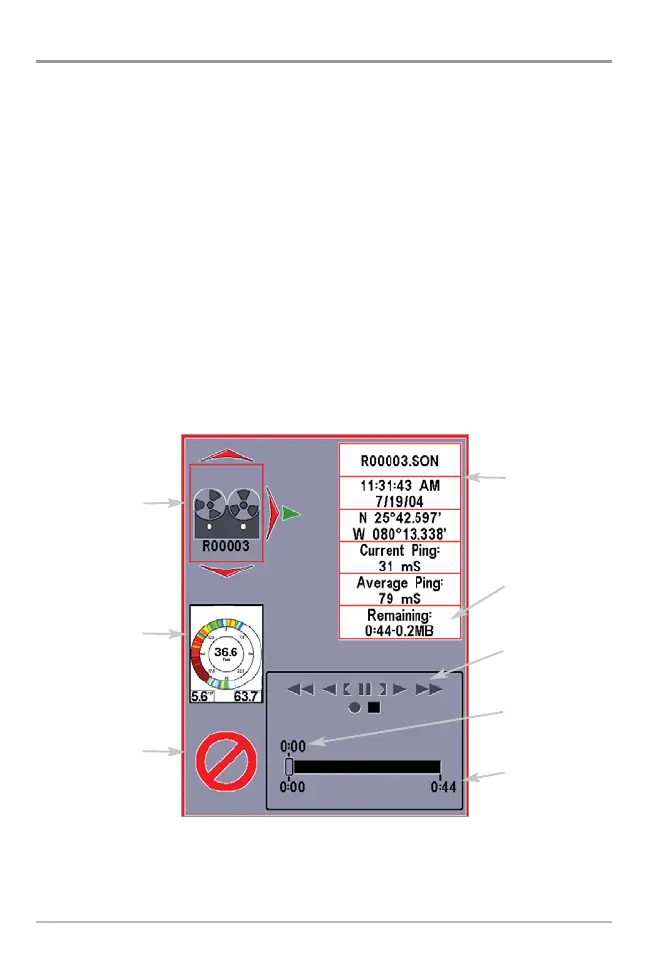
Snapshot and Recording View displays and allows you to view both screen
snapshot thumbnails and recording icons captured to an optional-purchase
MMC/SD card installed in your unit. In addition, when you are in the Snapshot
and Recording View, Start Recording, Stop Recording, Delete Image, Delete All
Images, Delete Recording, Delete All Recordings, Pings Per Second, Playback
Speed and Stop Playback are added to the X-Press™ menu.
The Snapshot and Recording View displays up to three screen snapshot
thumbnails or recording icons on the screen at a time; you may have to scroll
using the 4-WAY Cursor keys to see the whole list of thumbnails and/or icons
in this view. The selected thumbnail or icon will be highlighted with arrows.
NOTE: The speed of the screen capture or of the recording depends on the type of card you
use; in general, SD cards capture the screen faster than MMC cards do.
Snapshot and Recording View
Amount of space
used for this
recording
Information Box
Amount of
recording left
to play
Amount of
recording that has
been played
Snapshot
thumbnail
Recording icon
Unavailable icon
Recording
mode icons















 To Next Page