INSTALLATION
9
Inside Mount — Coupled Shades
■
If you ordered bracket covers. Mark
1
⁄
8
" in from each window jamb for both the motor
and idle brackets.
■
Shades without bracket covers. Mark
1
⁄
16
" in from each window jamb for both the
motor and idle brackets.
➤
The minimum depth required for mounting is 2¾". For fully recessed mounting, the
depth is 3¼".
IMPORTANT: The front edges of the installation brackets must be level and aligned to
eachother.
■
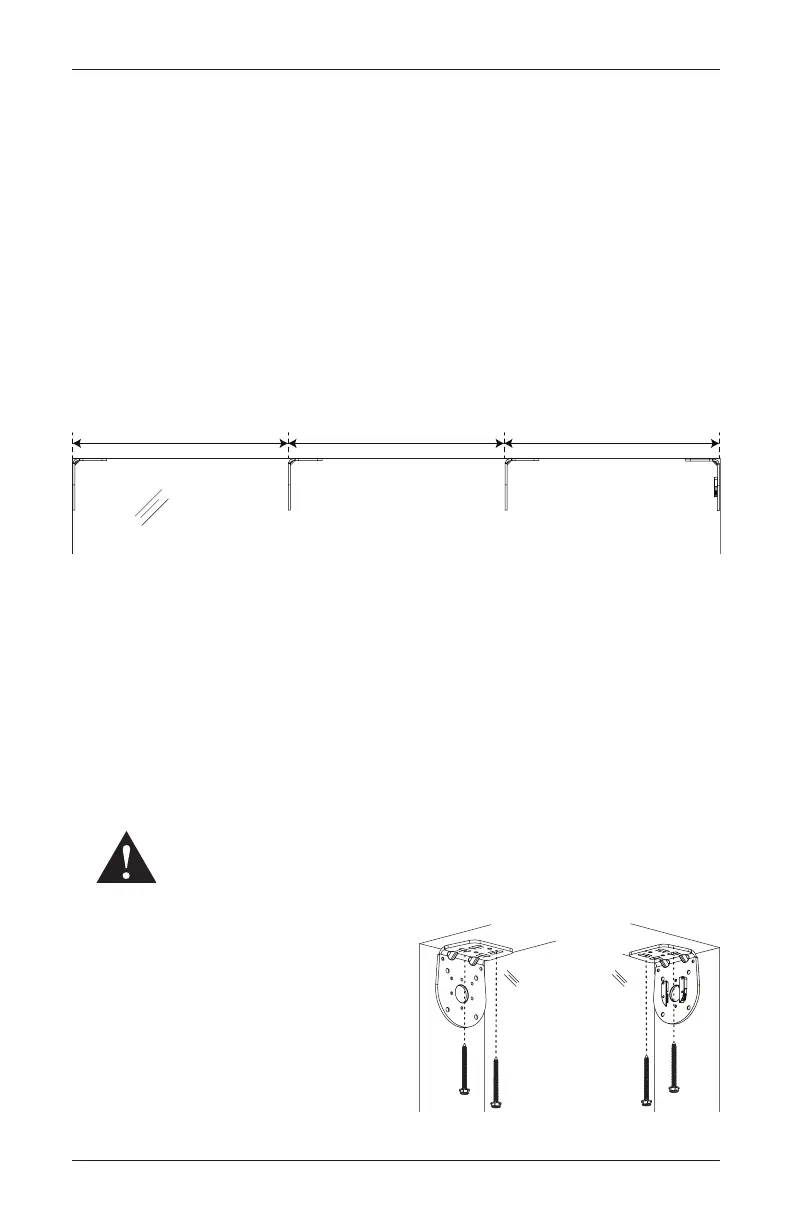
To mark the location for your intermediate brackets, start with the intermediate bracket
closest to the motor bracket. Measure the motor panel order width from the motor end
window jamb and make a mark.
■
For three or more coupled shades, the remaining intermediate brackets will be marked
using the middle panel(s) ordered width.
➤
Reference the first intermediate bracket mark when measuring and marking for the
next intermediate brackets.
➤
After the last intermediate bracket is marked, the distance from that bracket to the
idle end window jamb should be the end panel ordered width.
■
Place the outside edges of the brackets on the previously made marks, then mark each of
the screw holes.
■
Drill the screw holes using a
1
⁄
8
" drill bit.
WARNING: Product is heavy. Mount into wood/metal studs or into concrete
with concrete anchors. Drywall anchors are not recommended.
■
Use a level to check that the mounting
surface is level. Shim the brackets if
necessary.
■
Be sure all the intermediate brackets are
oriented so they face the motor bracket. See
bracket image above.
■
Attach the installation brackets using the
screws provided.
Idle
Bracket
Motor Panel Ordered WidthMiddle Panel Ordered WidthEnd Panel Ordered Width
Motor
Bracket
*Intermediate
Bracket
*Intermediate
Bracket
Window Opening
Idle Bracket Motor Bracket




 To Next Page