TROUBLESHOOTING
22
Problem
Rechargeable battery needs recharging.
Solution
There are two methods for charging the rechargeable battery wand — the
dual charging station or the single charger.
CAUTION: Rechargeable Battery Wand can only be charged with
Hunter Douglas provided charging options — alternative charging devices
may result in permanent damage.
Removing the Rechargeable Battery Wand from the Mount
■
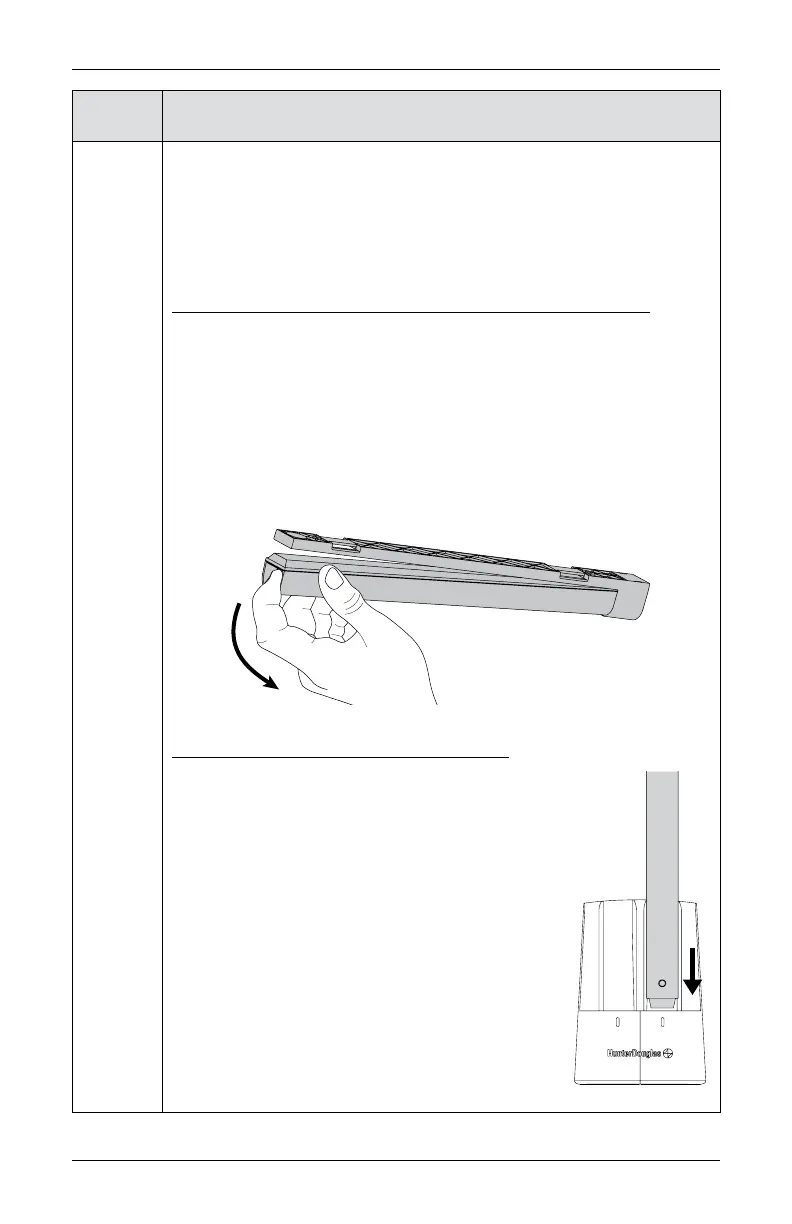
To safely remove the rechargeable battery wand from your shade, grasp
the end of the battery wand that is furthest away from the power socket.
CAUTION: Grasp the wand firmly prior to removal.
■
Using the indentation on the end of the battery wand, use your index finger to
pull the battery out of the mount.
NOTE: The mount should remain installed and plugged into the shade
cable during this process. You will simply remove the wand from
the mount.
Recharging Via the Dual Charging Station
■
Plug the dual charging station into a standard AC outlet.
■
Insert the nose of the rechargeable battery wand into
the dual charging station slot.
■
Battery snaps firmly into place. A red indicator light
confirms the battery wand is properly inserted and
is charging.
■
Once the battery is fully recharged, the light
indicator turns green. Charging may take up to
three hours, depending on battery level.
■
Remove the battery wand from the charger.
(Continued on next page.)









 To Next Page