Digital Refractor CDR-9000 45
his function is useful when explaining to customer with pointer at the
screen.
7) Buttons for Aux. Lenses
-
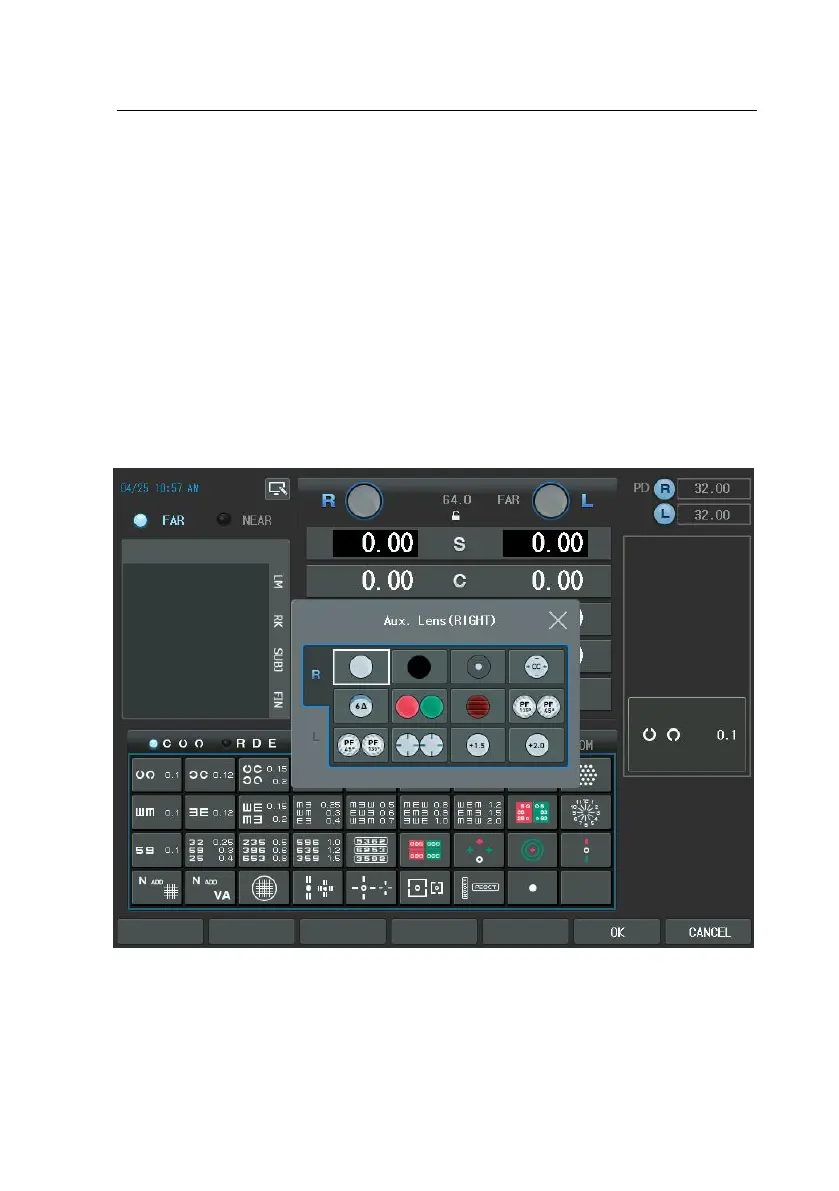
If “Aux. Lenses” is selected by lens touch button of the touch screen,
without changing the current state, auxiliary lenses can be placed in th
e right/left eyes. Remind that if there is any other auxiliary lens inserte
d previously, it is replaced with a newly selected auxiliary lens without
notice.
-
If you want to replace the “Aux. Lenses”, press the Lens button of the
Main touch screen. Then appear Aux. Lenses dialogbox. There is two ty
pes of the Right/Left Aux. Lenses. If you press the lens that wants to r
eplace in the dialogbox, will be replace Aux lens.
- There is a specific case that two lenses are appeared in one line at th
e same time when choosing lenses. This is not a fault but a special au
tomatic function provided by the system, which helps to select the righ
t/left lenses for user’s convenience. If you select the Polarized, Red/Gre



 To Next Page