11
3
BASIC OPERATION
3
■ Channel selection
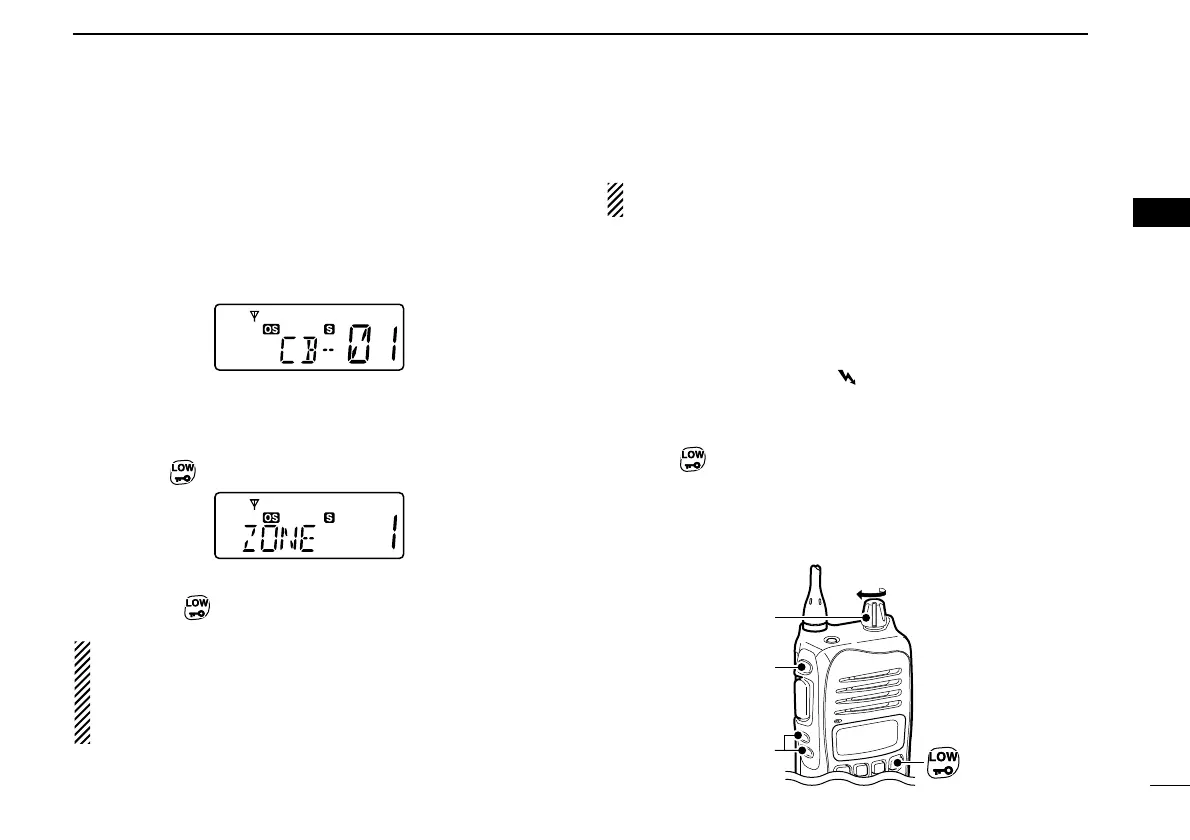
➥ Push [CH Up] or [CH Down] to select the desired channel.
• While pushing and holding [CH Up] or [CH Down], the displayed
channel changes continuously until channel 1 is selected.
• When channel 1 is selected, beeps are emitted.
• ‘CB-XX’ appears when the CB channel is selected and ‘RX-XX’
appears when the RX channel is selected.
DZone type selection
(Available only when more than two zones are set.)
q Push [Top]
(Function) to enter the function mode, and push
and hold
(Zone) for 2 sec. to enter the zone select mode.
w Push [CH Up] or [CH Down] to select the desired zone,
then push
(Zone) again to set.
NOTE:
‘CB-05,’‘CB-R5’ and ‘CB-35’ channels are used for the
emergency. And ‘CB-22’ and ‘CB-23’ channels are used for
telemetry and telecommand applications, so voice com-
munications are not available on these channels.
■ Receiving and transmitting
NOTE: Transmitting without an antenna may damage the
transceiver. See page 1 for accessory attachments.
Receiving:
q Rotate [VOL] to turn the power ON.
• If “T SQL” appears on the display, push and hold [Side1] for 2
sec. once or twice to cancel the tone squelch or pocket beep.
(pgs. 23, 24)
w Select the desired operating channel as at left.
• When receiving a signal, “” appears and audio is emitted
from the speaker.
• Further adjustment of [VOL] may be necessary at this point.
• Push [Side1] to toggle the monitor function ON and OFF.
e Push (RF Power) to select the output power if neces-
sary.
• “LOW” appears when low power is selected.
• Choose low power to conserve battery power, choose high
power for longer distance communications.



 To Next Page