11
3
BASIC OPERATION
■ Side tone function
When using a headset (user supplied), the transceiver outputs
your transmitted voice to the headset for monitoring. Connect
an optional headset to use this function
(The OPC-499 headset
adapter and headset are required). (p. 36)
D Setting the side tone level
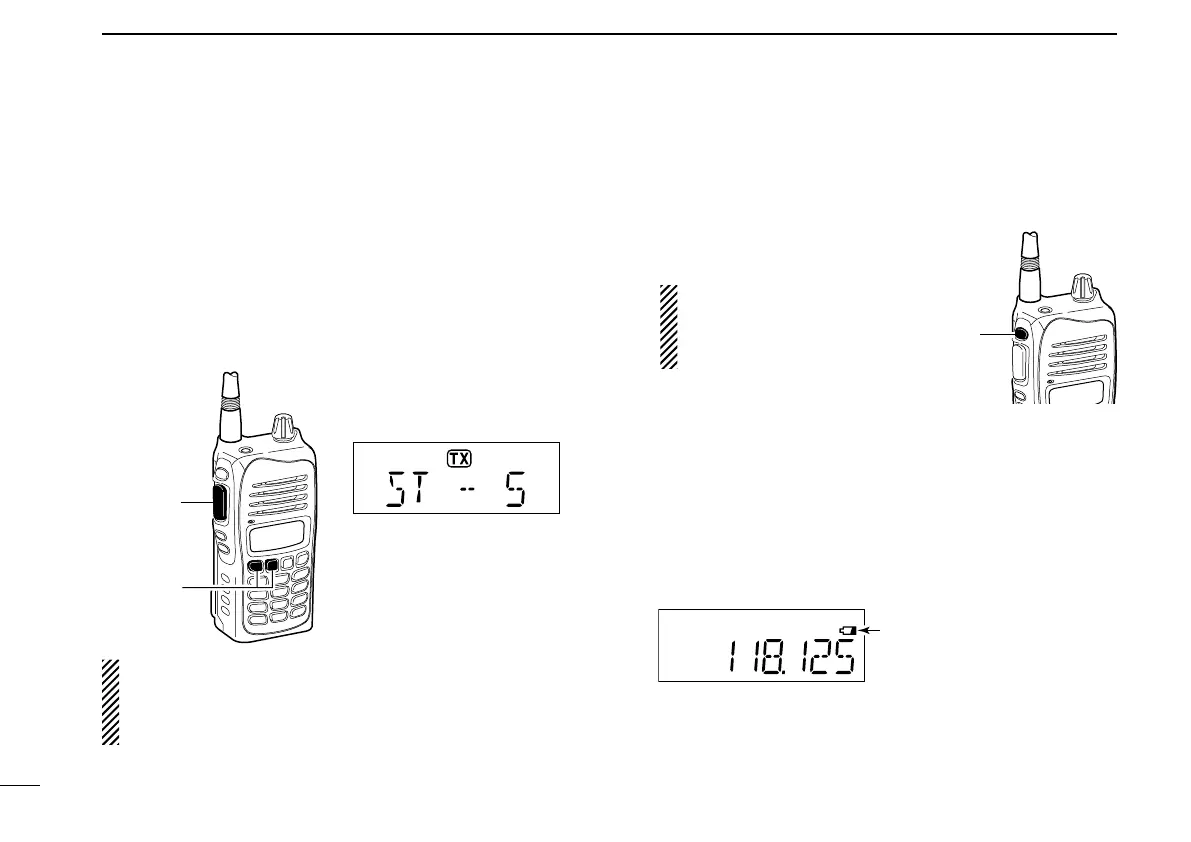
q Push [PTT] to transmit.
w While transmitting, push [Y]/[Z] to adjust the level.
• ‘ST--0’ is OFF and ‘ST--10’ is the maximum level.
WARNING! NEVER operate the transceiver with a head-
set at high volume or monitor levels for long periods of
time. If a ringing in your ears occurs, reduce the volume
or monitor level, or discontinue use.
■ LCD backlight
The IC-A15/S has an LCD backlight for convenience during
night time operation.
➥ Push [LIGHT] to turn the LCD
backlight ON or OFF.
IMPORTANT!
Turn OFF the LCD back-
light when no backlight is
necessary.
■ Low battery icon
The low battery icon appears or blinks when the battery
power has decreased to a specified level. The attached bat-
tery pack or battery case requires recharging or the battery
case cells need replacing.
If the batteries are not charging or replaced, even when the
low battery indicator blinks, a long beep sounds and then the
transceiver will be automatically turn OFF.
[PTT]
[Z]/[Y]
Side tone level is displayed
IMPORTANT!
Select ‘ST--0’ when a speaker
microphone is connected, oth-
erwise your voice will be heard
from the speaker during trans-
[LIGHT]
is nearly exhausted.
Blinks when battery re-
charging or replacing is
immediately necessary.


 To Next Page