34
8
POCKET BEEP AND TONE SQUELCH
8
■ Tone scan
By monitoring a signal that is being operated with pocket
beep, tone or DTCS squelch function, you can determine the
tone frequency or DTCS code necessary to open a squelch.
q Set the desired operating frequency or memory channel to
be checked for a tone frequency or code.
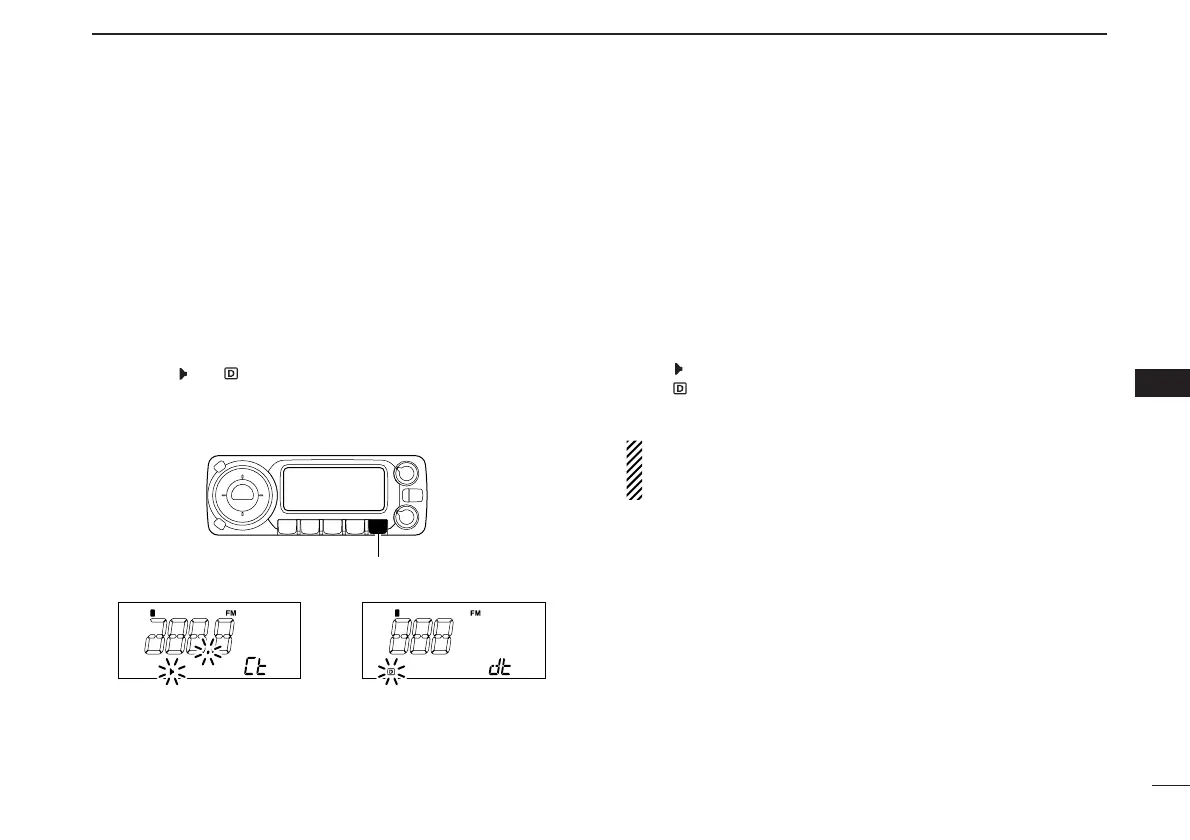
w Push and hold [MONI•T/T-SCAN] for 1 sec and rotate
[DIAL] to select the tone type, tone squelch or DTCS, to
be scanned.
•Either “ ” or “ ” appears.
e Push and hold [MONI•T/T-SCAN] for 1 sec. to start the
tone scan.
•To change the scanning direction, rotate [DIAL].
r When the CTCSS tone frequency or 3-digit DTCS code is
matched, the squelch opens and the tone frequency is
temporarily programmed into the selected condition such
as memory channel.
• The tone scan pauses when a CTCSS tone frequency or 3-digit
DTCS code is detected.
• The decoded CTCSS tone frequency or 3-digit DTCS code is
used for the tone decoder depending on the selected tone con-
dition or type in step w.
-“ ”: CTCSS tone decoder
-“ ”: DTCS tone decoder
t Push any switch to stop the scan.
NOTE: The decoded tone frequency is programmed tem-
porarily when a memory is selected. However, this will be
cleared when the memory channel is re-selected.



 To Next Page