48
9
DIGITAL MODE OPERATION
1
2
3
4
5
6
7
8
9
10
11
12
13
14
15
16
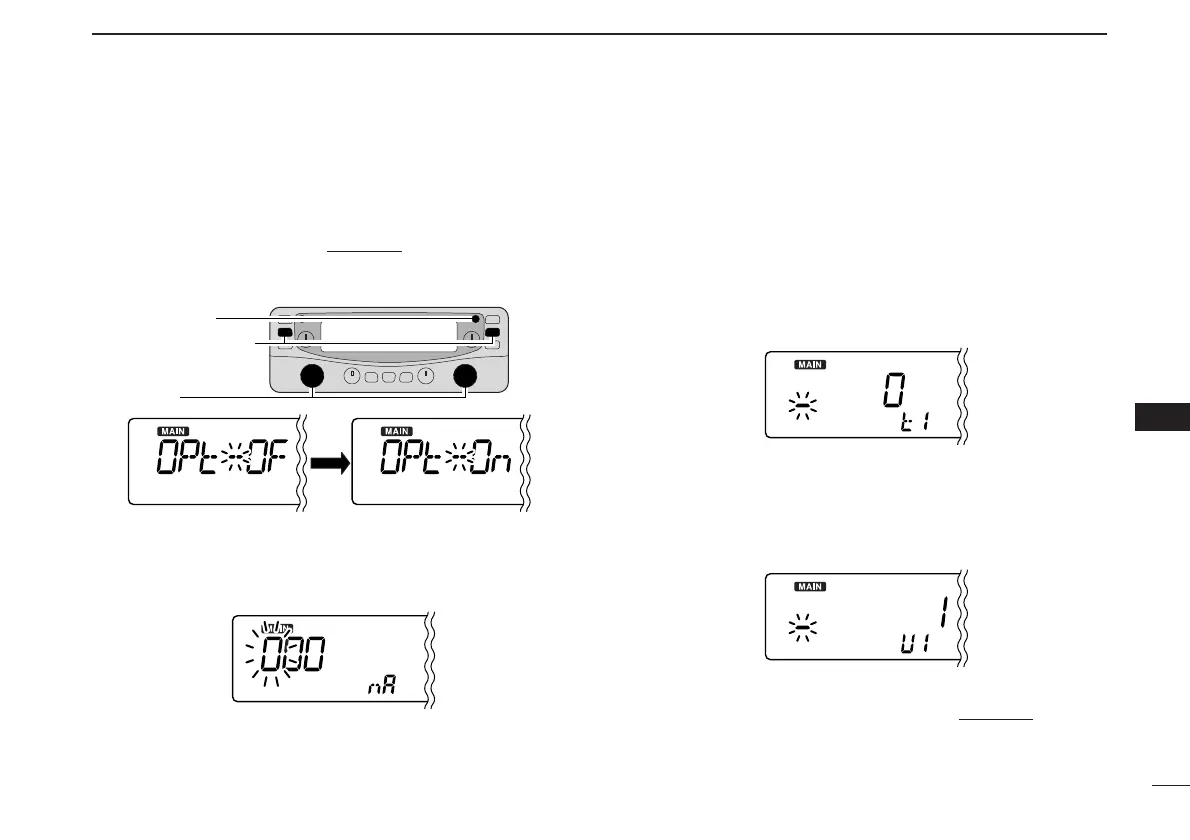
Sets the desired NAC code for P25 digital (NAC) squelch or
TGID/Unit ID for P25 digital (Selective) squelch operation.
q Push [SET•SKIP] to enter set mode
.
w Push
[SET•SKIP]
or [ATT•PRIO] several times until “OPt”
appears, then rotate main band’s [DIAL] to select “On.”
e Push
[SET•SKIP]
or [ATT•PRIO] several times until “
nA
”
appears.
• The 1st digit blinks.
• NAC code is selectable from 0–FFF.
r Rotate main band’s [DIAL] to select the desired code.
• Push [MODE•SCAN] or [MONI•T/T-SCAN] to move the cursor
to right or left, respectively.
t Push [MODE•SCAN] to select 2nd digit, then rotate main
band’s [DIAL] to select the desired code.
• 2nd digit blinks (1st digit stop blinking).
• Repeat this step for programming your NAC code.
y Push
[SET•SKIP]
or [ATT•PRIO] several times until “
t1
”
appears.
• The 1st digit blinks.
• TGID code is selectable from 0–65535.
u Repeat step r and t to program the TGID code.
i Push
[SET•SKIP]
or [ATT•PRIO] several times until “
U1
”
appears.
• The 1st digit blinks.
• Unit ID code is selectable from 1–9999999.
o Repeat step r and t to program the Unit ID code.
!0 Push any key for the main band to exit set mode
.



 To Next Page