47
D-STAR GUIDE
D-STAR OPERATION
■ Making a Simplex call
This section describes the simplex operation (through no repeater).
NOTE: The frequencies may be dierent, depending on the transceiver’s version.
Check for usable frequencies for your operating area.
What is a Simplex Call?
A simplex call is a direct call to another station on a single frequency, not using a
repeater.
Example: Making a simplex call on 445.670 MHz.
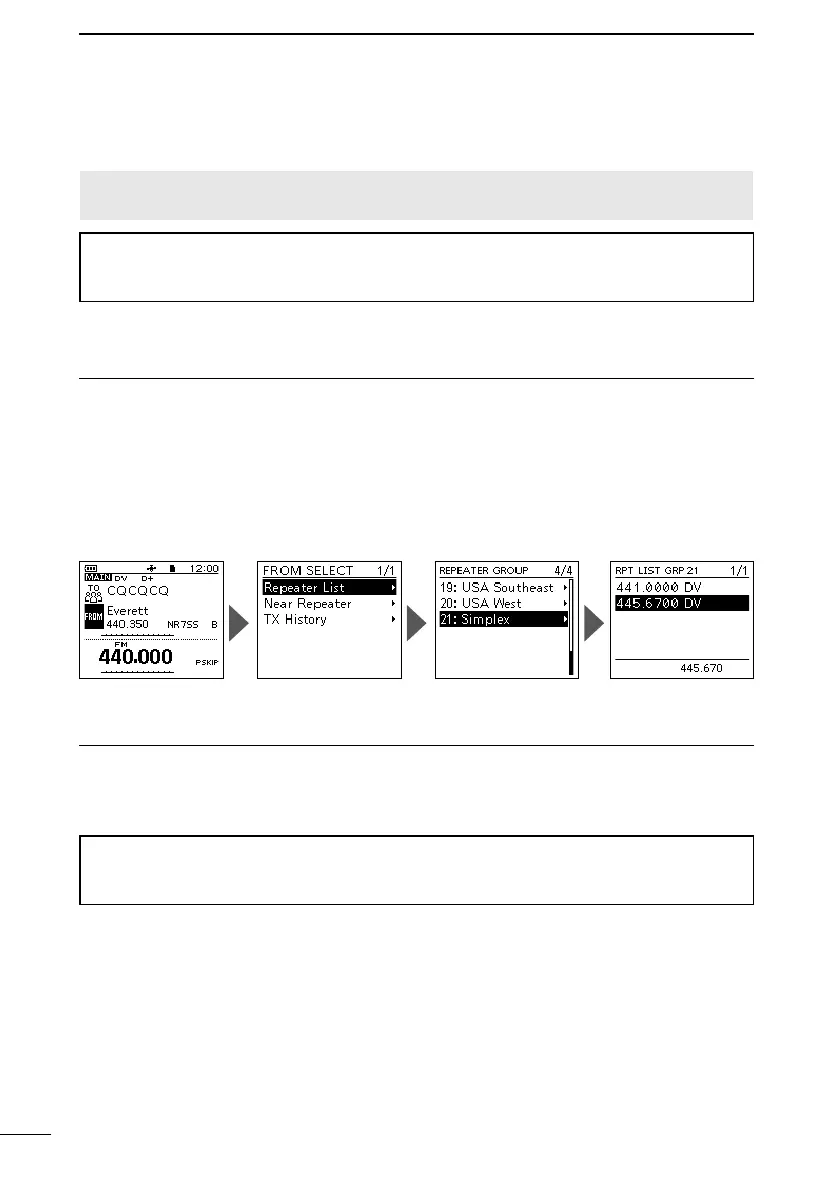
Step 1: Set “FROM” (Simplex channel).
1. Push D-pad() to select “FROM,” and then push [ENT].
2. Select “Repeater List.”
3. Select a “Simplex” group.
4. Select a frequency.
• Returns to the DR screen, and the selected frequency is displayed in “FROM.”
• “CQCQCQ” is displayed in “TO.”
If a station call sign is set in “TO,” select “Local CQ” in the TO SELECT screen.
Step 2: Hold down [PTT] to transmit.
1. Hold down [PTT] to transmit.
• The TX/RX indicator lights red while transmitting.
2. Release [PTT] to receive.
TIP: You can change the simplex frequencies on the MENU screen.
([MENU] > MEMORY > Repeater List)
See the Advanced manual for details.



 To Next Page