46
(6) Printer status
“Get Temperature” is to get and display the temperature of Thermal Print Head. When the
“Realtime Check” is ticked, it displays the current temperature of Thermal Print Head in real time.
“Get Status” is to get and display the printer status.
Please refer to the ‘SMART SDK manual’ for the status code.
4.4. Firmware update
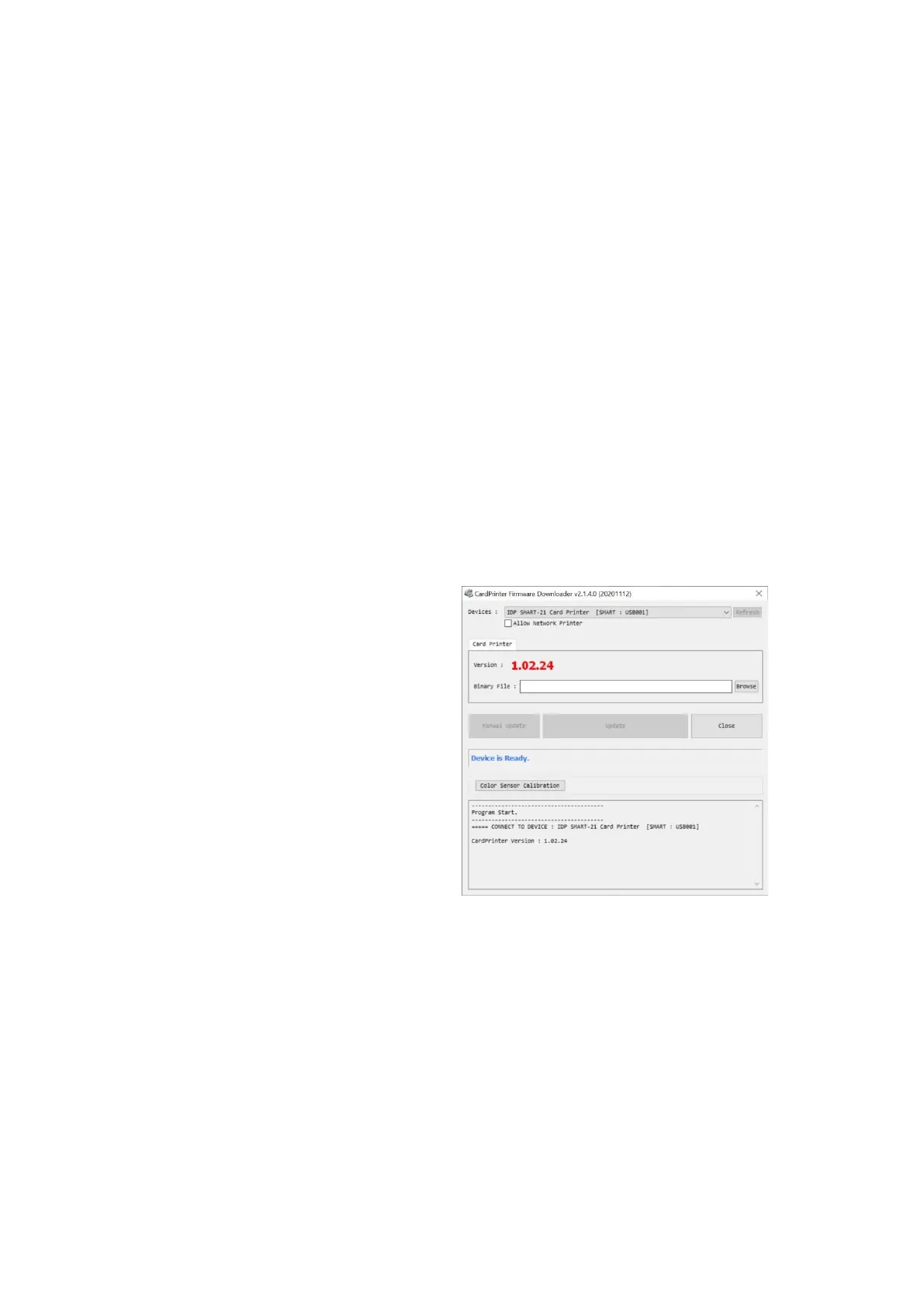
When you run the CardPrinterFirmware, you can see the pop-up window.
(1) CardPrinterFirmware Menu
Device: Select the local printer that you
want to upgrade.
Card Printer / Flipper / Laminator: Select
the device you want upgrade.
Device Version: Displays the current
firmware version of selected printer.
Binary File: Click “Browse” button and
select new firmware file to update.
Manual Update: It is used when you want
to update manually.
Update: Updates automatically. In
generally, we recommend updating
automatically.
Close: Exit.
Figure 56 Run CardPrinterFirmware



 To Next Page