ID TECH Kiosk V User Manual
Page | 15
8. Kiosk V Installation
This section provides information on how to install the Kiosk V on a kiosk.
8.1. Parts List
Verify that you have the following hardware for the installation of the Kiosk V:
• Kiosk V.
• USB Cable: a standard USB-C cable could be used for both data communication and power.
ID TECH also supplies these USB-C cables:
• 80185215-001 (Standard Straight, lock-in Connector Cable - USB-A to USB-C)
• 80185213-001 (Right-Angled, lock-in Connector Cable - USB-A to USB-C)
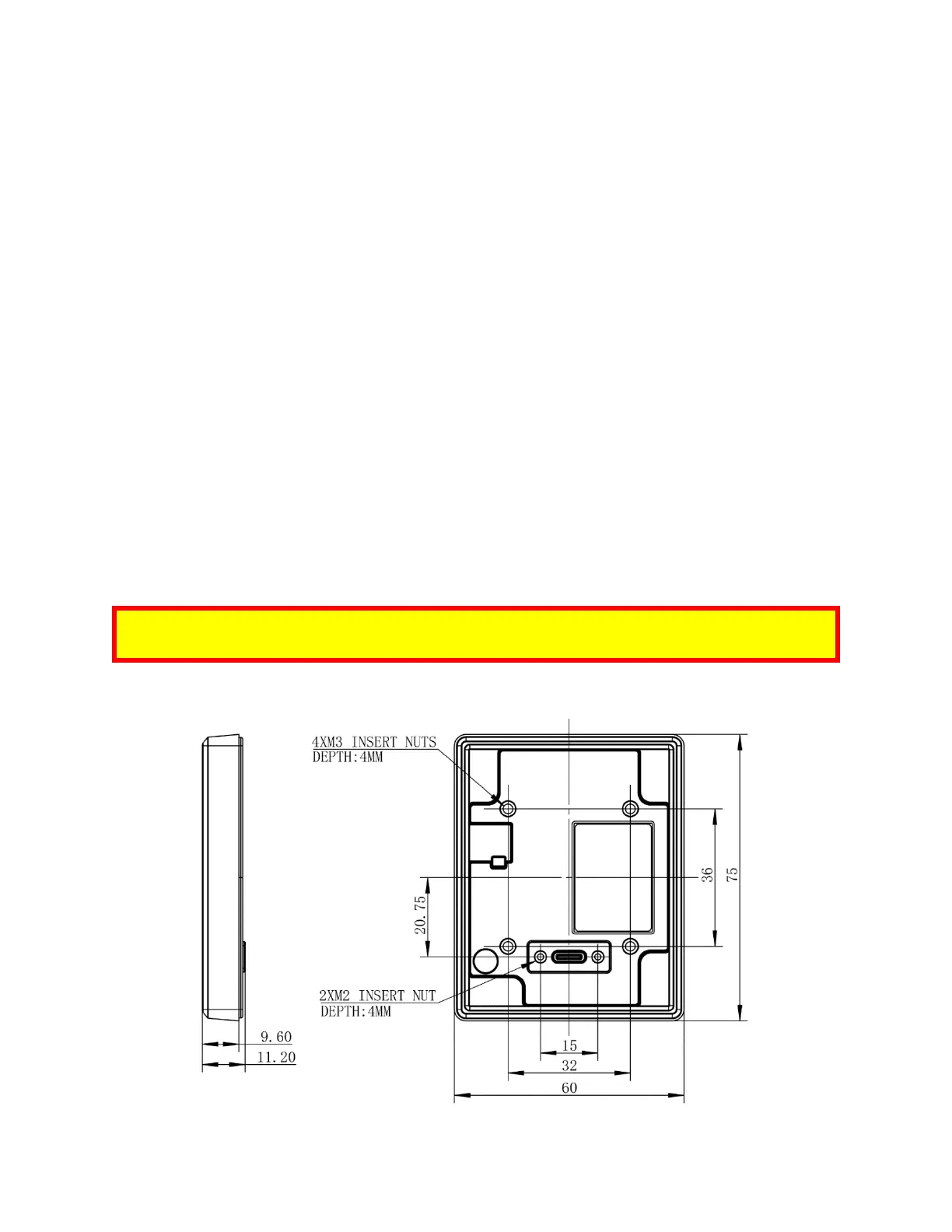
8.2. Mounting the Kiosk V
Warning: The RF field of the NFC antenna is sensitive to the proximity of metal. If you are mounting
the Kiosk V in a metal surface, you have three options:
• Mount with the RF emitting surface of the Kiosk V at least 1cm forward of any metal.
• Mount with the RF emitting surface of the Kiosk V at least 1cm behind any metal. This will
reduce the effective range of the antenna inside the Kiosk V.
• Mount flush with the metal but allow a minimum of 1cm distance from the metal.
Note: For safety reasons, make sure to mount the Kiosk V at a height no greater than two meters
from the floor.
Kiosk V Part# IDVK-5XX:














 To Next Page