Communicationp.28
2 RS485 Communication Port Connection
2.1 RS485 Connection (Standalone Unit)
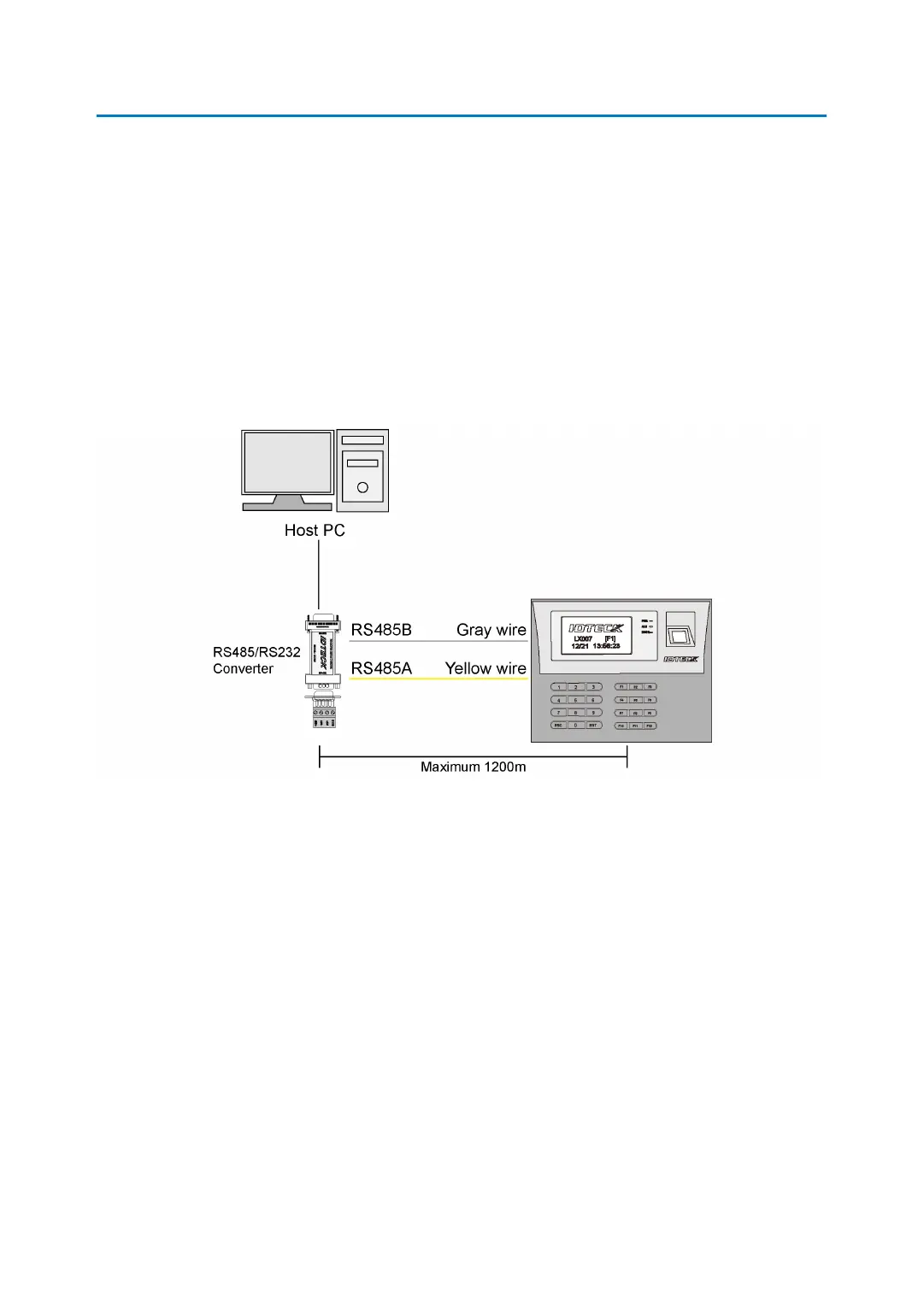
An RS485/RS232 converter is needed to use the RS485 communication between the LX007
and a host PC. Please follow the steps below.
1. Connect RS485-RTX (+) (Yellow wire) to RS485-A port of the converter.
2. Connect RS485-RTX (-) (Gray wire) to RS485-B port of the converter.
3. Plug the 9-pin connector (RS232) of the converter into the of the host PC.
4. Install and run the LX007 Application Software.
2.2 RS485 Connection (Multiple Units)
An RS485/RS232 converter is needed to use RS485 communication between multiple LX00
7 units and a host PC. Please follow the instructions below.
1. First, connect all RS485 ports of LX007 units in parallel.
(Max. of 32 LX007 Units can be connected)
I. Connect RS485-RTX (+) (Yellow wire) of one LX007 to RS485-RTX (+) (Yellow wir
e) of another LX007.
II. Connect RS485-RTX (-) (Gray wire) of one LX007 to RS485-RTX (-) (Gray wire) of
another LX007.
III. Set a unique Communication Address for each LX007.


 To Next Page