Setting Changesp.44
1.6 Reader #2 KEY Input
READER#2 KEY INPUT setting can be configured in the same way as READER#1 KEY INPUT
setting in the previous Section.
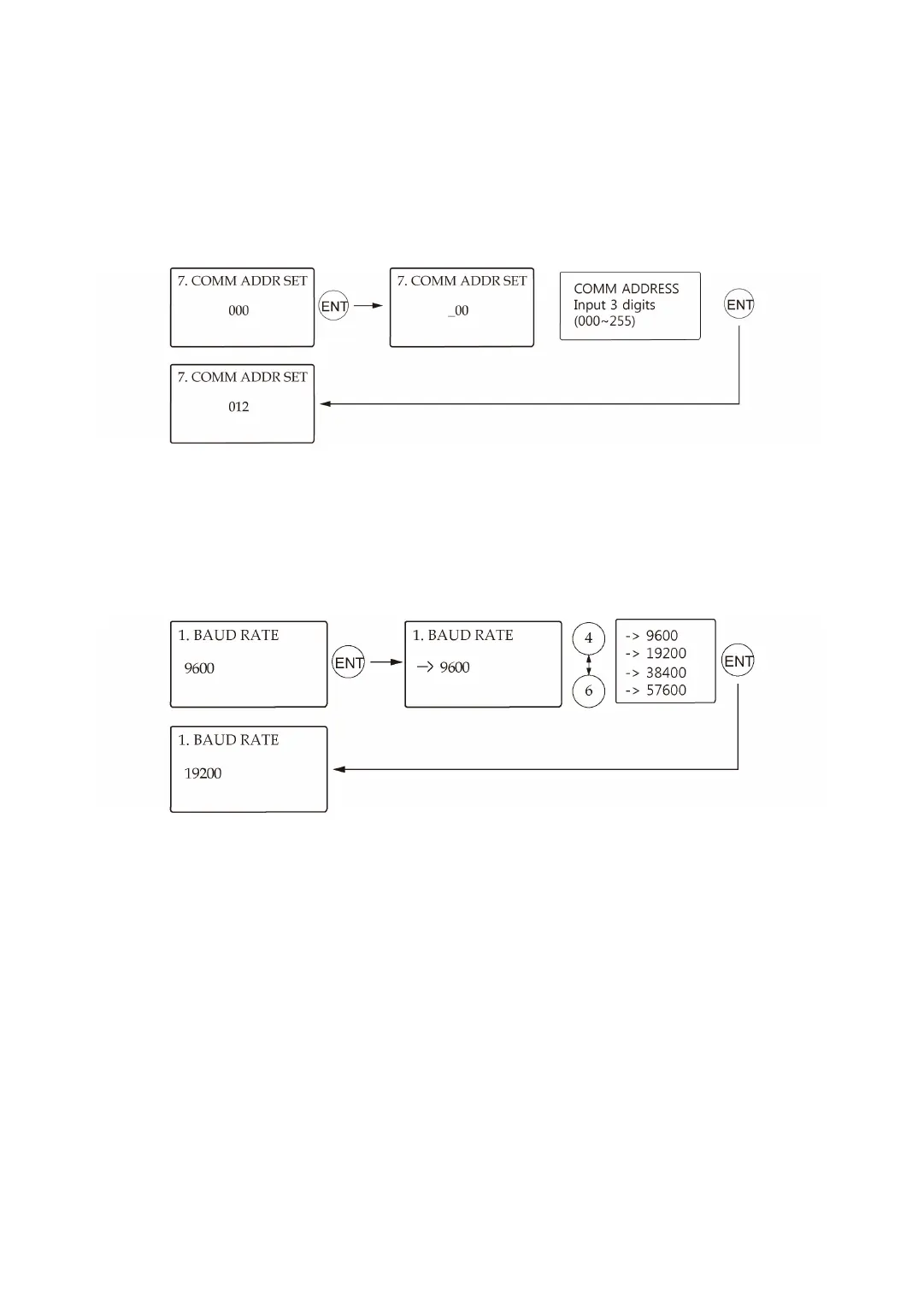
1.7 Communication Address Setting
The default Communication Address is “000”.Set a unique Communication Address for each
unit in the loop.
1.8 Baud Rate Setting
●
The LX007 supports different Baud Rates of 9600, 19200, 38400 and 57600bps. The re
commended Baud Rate is 57600bps. An incorrect Baud Rate setting will result in comm
unication errors. Note that you should always set the same Baud Rate for the same com
munication network.
●
If you have a communication problem, please check the followings;
○
Check the Communication Address for both the LX007 and the host PC in the Soft
ware.- Check the Baud Rate setting of both the LX007 and the host PC software.
○
Check the COM port and the cable.
○
Check the COM port settings of the host PC(Parity Bit: None, Data Bit: 8 bits, Stop B
it: 1 bit)



 To Next Page