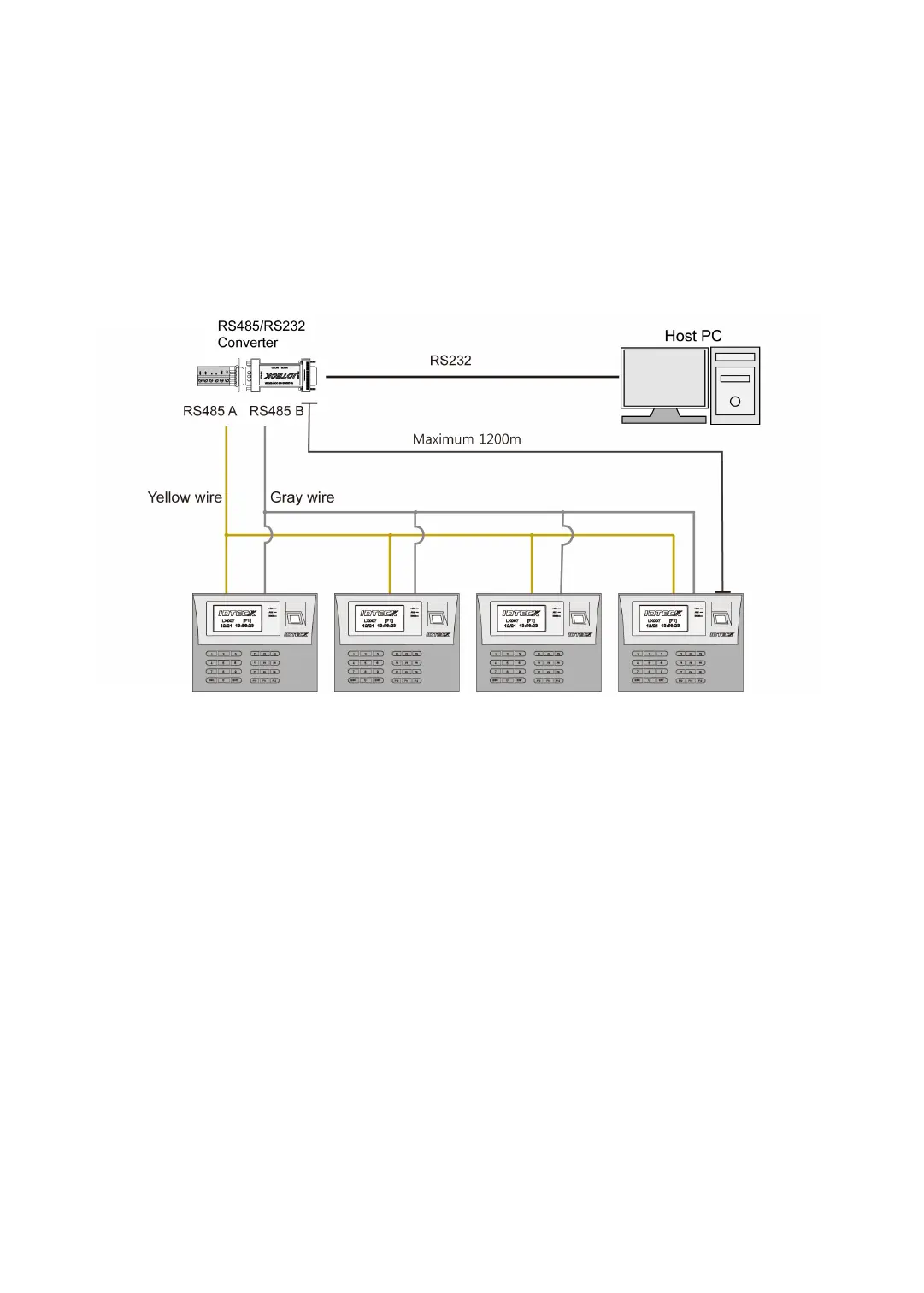
p.29RS485 Communication Port Connection
2. Second, connect one of the RS485 ports of the LX007 units to the RS485/RS232 conve
rter.
I. Connect RS485-RTX (+) (Yellow wire) of one LX007 to RS485-A port of the Conve
rter.
II. Connect RS485-RTX (-) (Gray wire) of one LX007 to RS485-B port of the Converter.
III. Plug the 9-pin connector (RS232) of the Converter into the COM port of the host
PC.
IV. Install and run the LX007 application software.
2.3 Connection (Optional)
An optional TCP/IP Module is needed for TCP/IP communication to the host PC. Follow the
next instruction.
1. Connect the LAN cable of the network system to the RJ45 jack of the LX007.
2. If you install multiple LX007 units and only one TCP/IP port is available, you may connec
t one LX007 to TCP/IP network and then connect all the LX007 units using the RS485
multiple communication as shown in the diagram below.
3. Set a unique Communication Address for each LX007.
4. Install and run the LX007 Application Software.



 To Next Page