p.33Language Setting
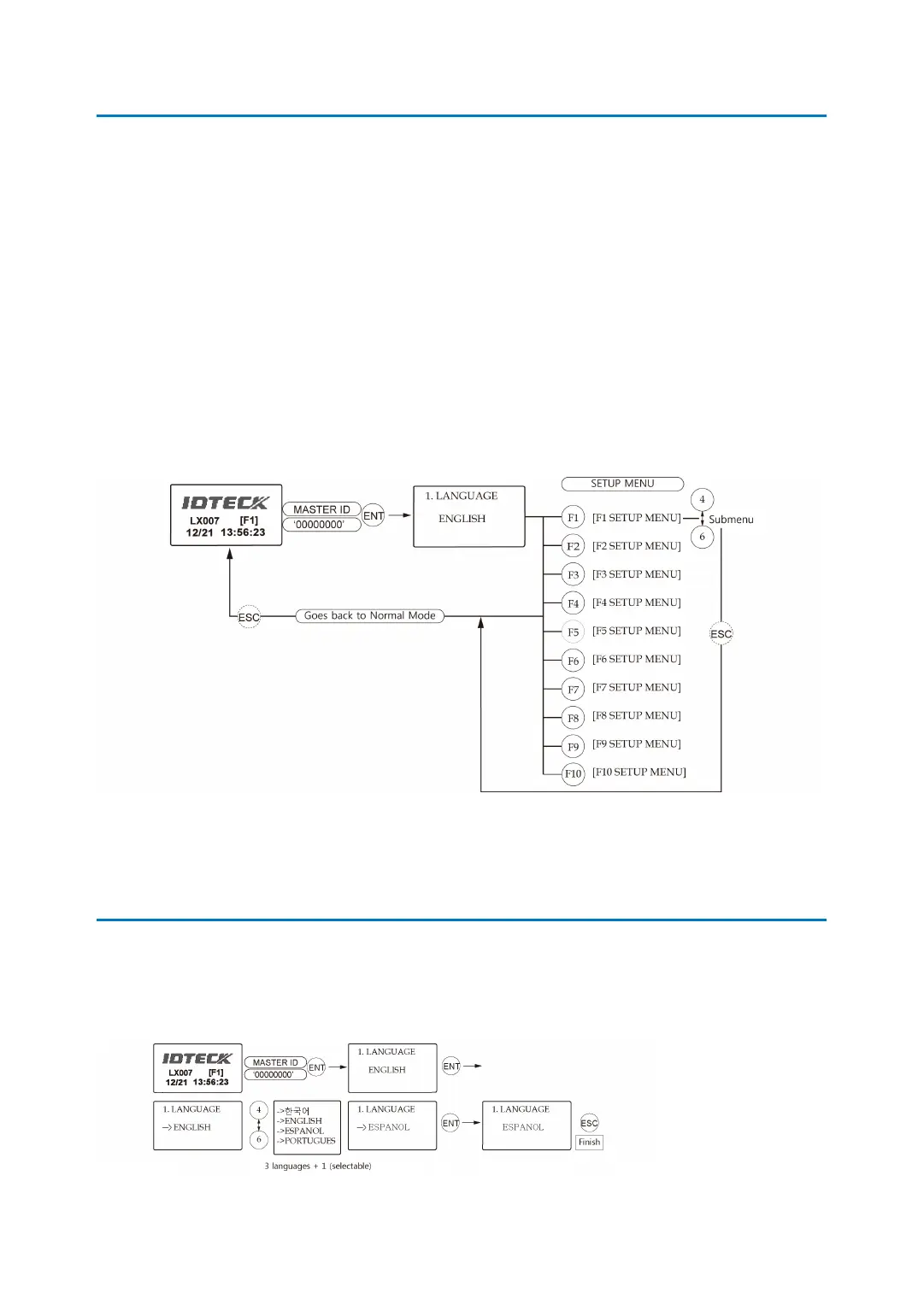
2 How to Enter the SETUP MENU
To set up the LX007 or to change the settings, you have to enter the SETUP MENU first. To
do so, press <0> key eight (or ten) times and <ENT> key on the keypad. (The Default Master I
D is ‘00000000’. For the LX007SR, it’s ‘0000000000’.)
There are 10 SETUP MENUS and you automatically enter [F1 SETUP MENU] first. You can m
ove to other SETUP MENUS by pressing <F1> to <F10> keys. For example, if you want to go t
o [F2 SETUP MENU], then press <F2> key. To enter [F5 SETUP MENU], press <F5> key, and s
o on and on. There are several SUBMENUS inside each SETUP MENU and you can scroll up a
nd down the SUBMENU by pressing <4> and <6> key. If you don’t press any key within 60 se
conds or if you press <ESC> key, the LX007 will exit the SETUP MENU and return to the nor
mal operating mode. You can change the Master ID in the [F7 SETUP MENU].
3 Language Setting
Select [LANGUAGE] in [F1 SETUP MENU] then press <ENT> key to select which language to
use. The steps below show how to choose Espanol, for example.



 To Next Page