UNO Synth
5 – Presets
21
5 – Presets
UNOSynthcontains100presets,eachwithitsownsequenceandsettings.
Thefirst20presetsarefactory,meaningthatitisnotpossibletooverwritethem.Also,thefirst20presetsare
usedfortheDEMO.
ThedemoitistheperfectwaytodiscoverthepowerfulfeatureoftheUNOsynthsimplybylistening.Toactivate
thedemo,pressARPandSEQsimultaneously.
5.1–LoadingaPreset
EverytimetheUNOsynthispoweredup,thelastpresetselectedisloaded.
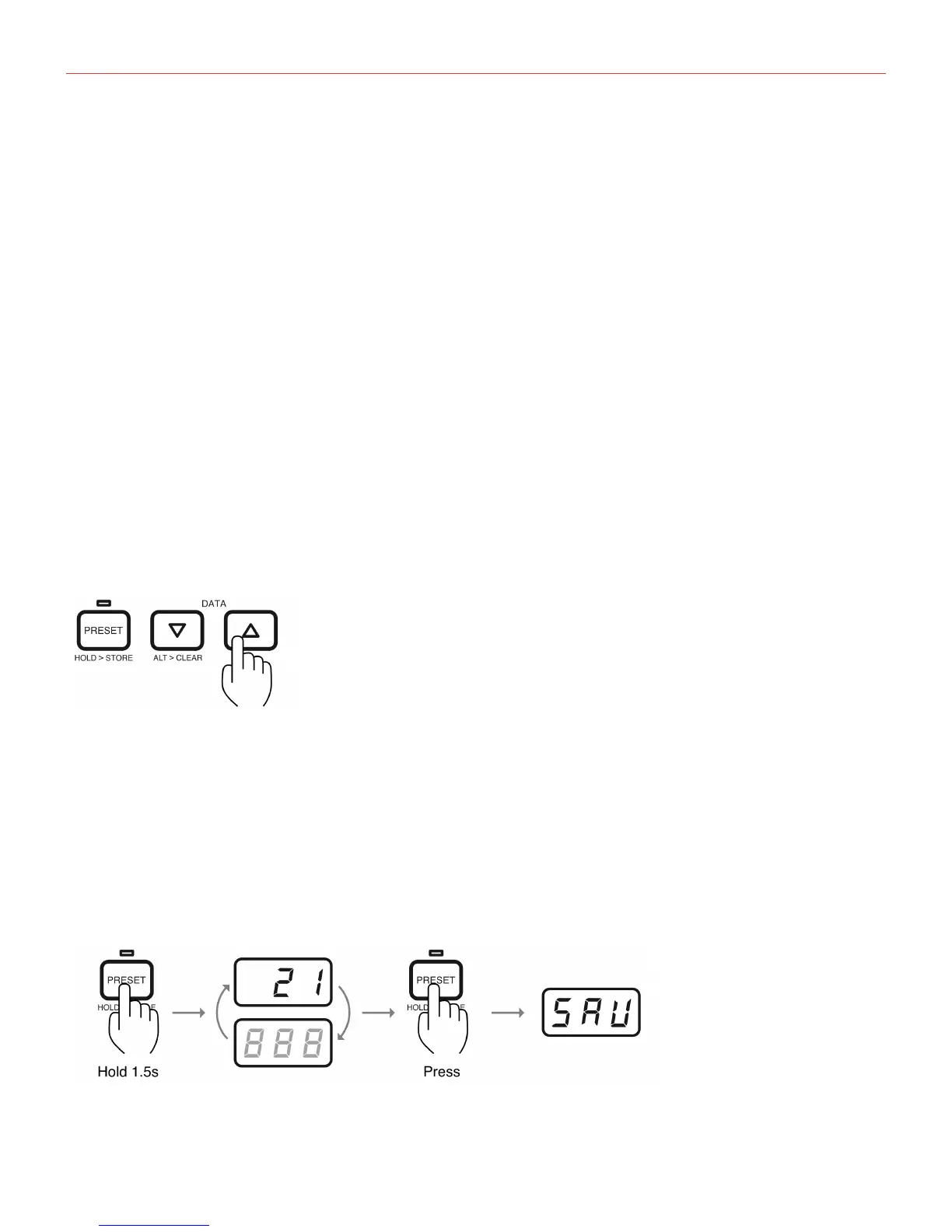
Toselectotherpresets,simplypressthePRESETbuttonandusethenthedatabuttonstoloadthedesired
preset.
5.2–StoreaPreset
Afterthepresethasbeenmodifiedandthedesiredsoundisreached,itispossibletosavethepresetsinthe
slotsbetween21and100.
Tosaveapreset,holdthePRESETbuttonfor1.5secondsuntilthepresetnumberblinksonthedisplay.
Tooverwritethecurrentpreset,simplypressPRESETagain,andthedisplaywillshow“SAV”andthepreset


 To Next Page