UNO Synth
5 – Presets
22
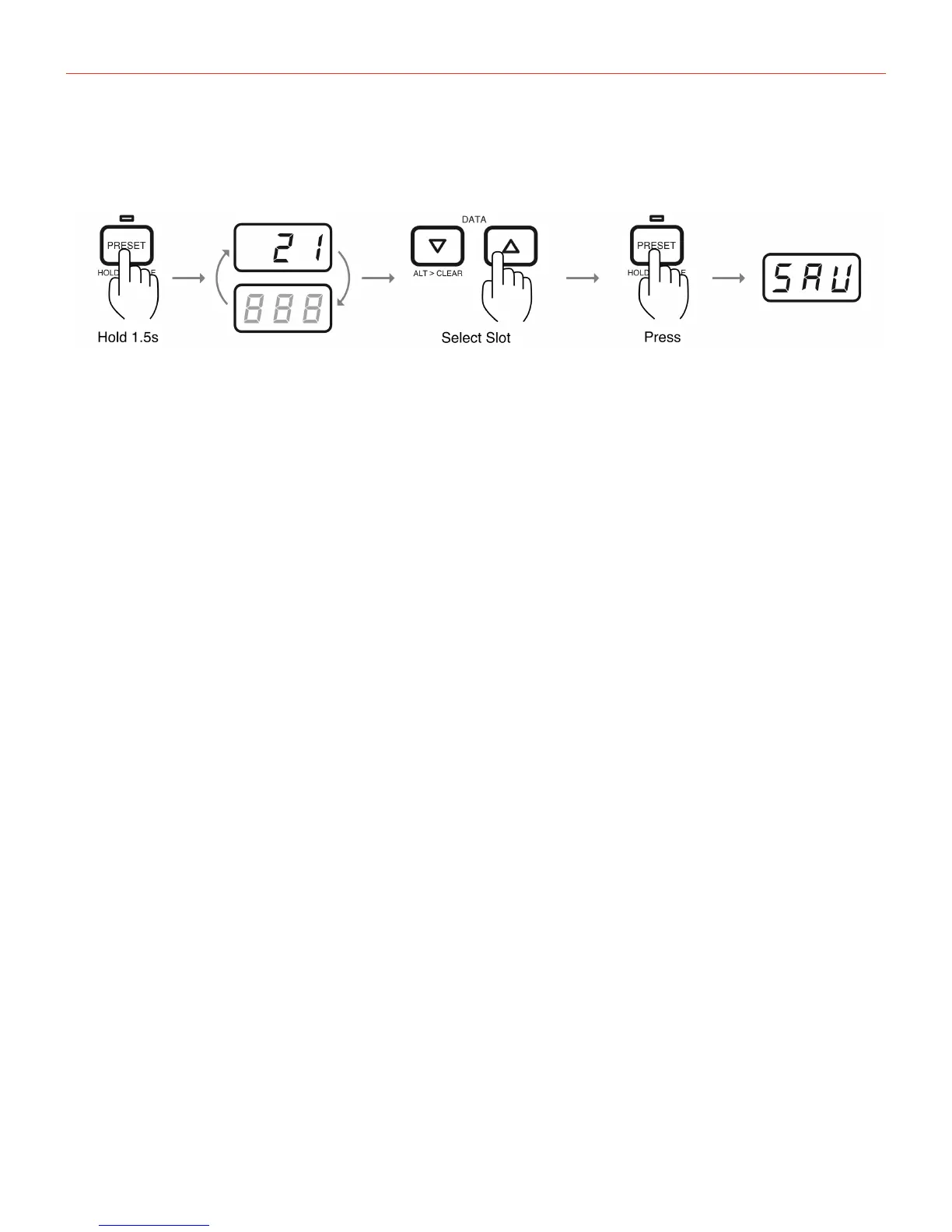
numberwillstopblinking.Tostorethepresetinanotherslot,selectthenewslotwiththedatabuttons,then
pressthePRESETagain.
Pleasenotethatpresetscannotbestoredonthefirst20location,andcannotbedeleted.
5.3–FactoryPresets
UNOSynthcomeswithacollectionof100ready-to-usepresetstoinspireyourcreativity.Thepresetscover
manygenresandstyles,andtheyareorganizedforeasybrowsingandmanagement.Thepresetsareorganized
usingthelastnumberofthepresetasshownhere:
1-SawBasses
2-SquareBasses
3-MixedBasses
4-Leads1
5-Leads2
6-Pads
7-Sweeps
8-Drones
9-Plucks
0-SoundEffects
Example:Preset51isaSawBass,andPreset90isasoundeffect.


 To Next Page