UNO Synth
7 – The Sequencer
27
Torecordaparameterchange,simplyturntheknobandinsertthedesiredparameterwiththedesiredvalue.
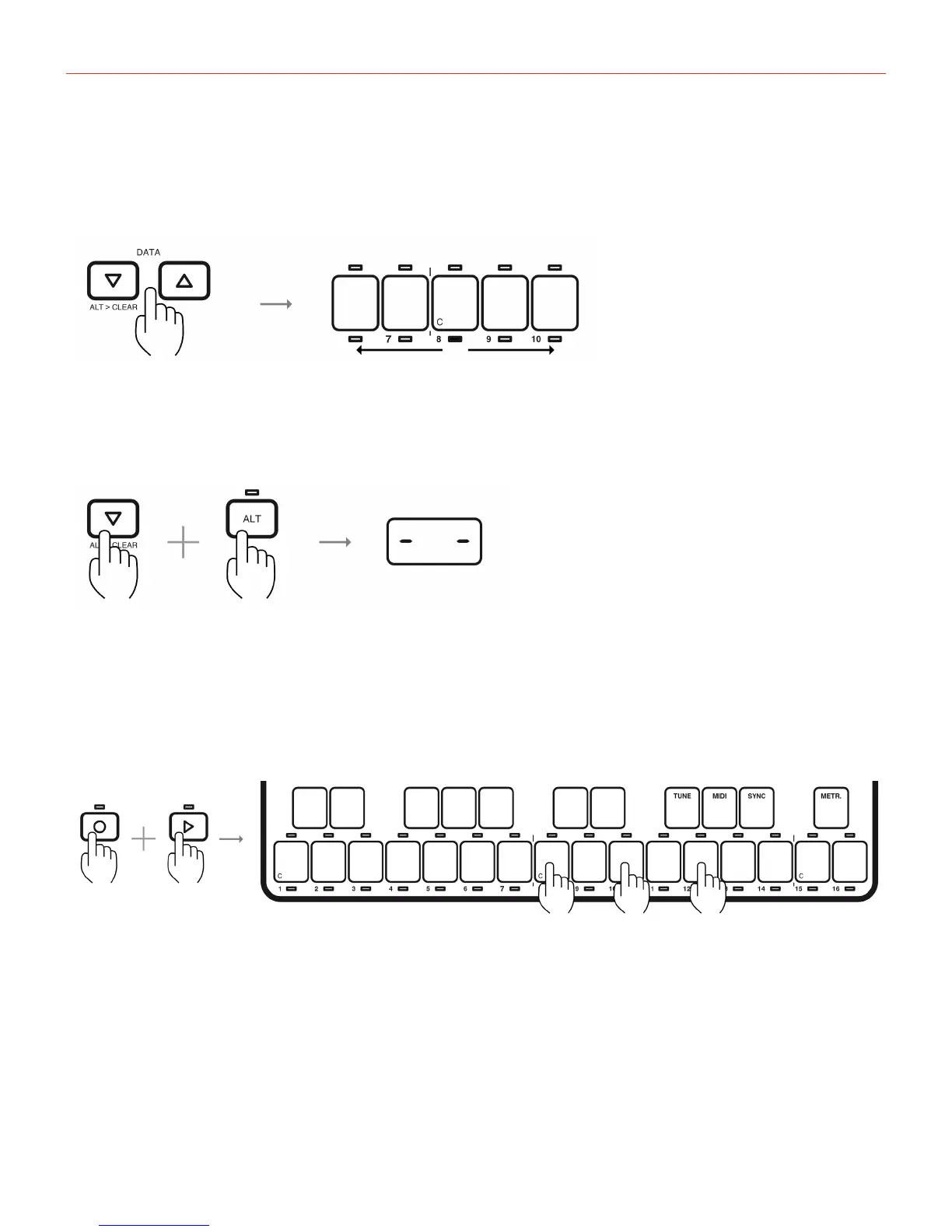
Usethedatabuttonstomovebetweensteps.Thecurrentstepwilllightbelowthekeyboard.
Todeleteastep,pressALT+DOWNtoemptythecurrentstep.Thestepwillblinkandthedisplaywillshowa
“doubleminus.”
ToexitStepRecording,simplypressRECagain.
7.2–Real-TimeRecording
Real-timeRecordingisthemostcommonandeasytousemethod.PressPlayandRectorecordthenotesand
parametersinreal-time.Thistypeofsequencingisthemostsimilarto“live”situationswhereyoujusthitrecord
andrecordon-the-fly.Plus,whileinthismode,alltheparametersmotionswillberecordedintoasmoothtypeof
recordingwhichmeansthatitwillincludeallthesinglevaluesofthemotions.Basicallyeveryparametermotion
youmakeonyourUNOSynthwillberecordedinthismode.
Whilethesequencerisinplaying,italwaysloops.Similarly,therecordingandtheoverdubbingofthenoteswill
alsocontinueuntilRECispressedagain.Exceptwhenrecordingparametersinstead,thesequencerecordsonly


 To Next Page