UNO Synth
7 – The Sequencer
28
oneiterationoftheloop,andthenitautomaticallystopsrecordingtoavoidoverlappingyourmotionevents.
Ametronomeisalsoavailableforreal-timerecordingintheALTsection.WhenisON,itwillplayonlywheninthe
sequencerisrecording,anditwillautomaticallystopwhenrecordingisstopped.
ToexitReal-TimeRecording,pressRECagain.
7.3–StepEditRecording
StepRecordingisavailablewhenALT+RECispressed.Itisavailableregardlessofwhetherthesequenceris
playing.Thegoalofthismodeistogiveyoutheabilitytobypassthekeyboardandpreciselyselectandcraft
sequencesofonlyparameters,creatingreallyexperimentalsoundswithprecision.
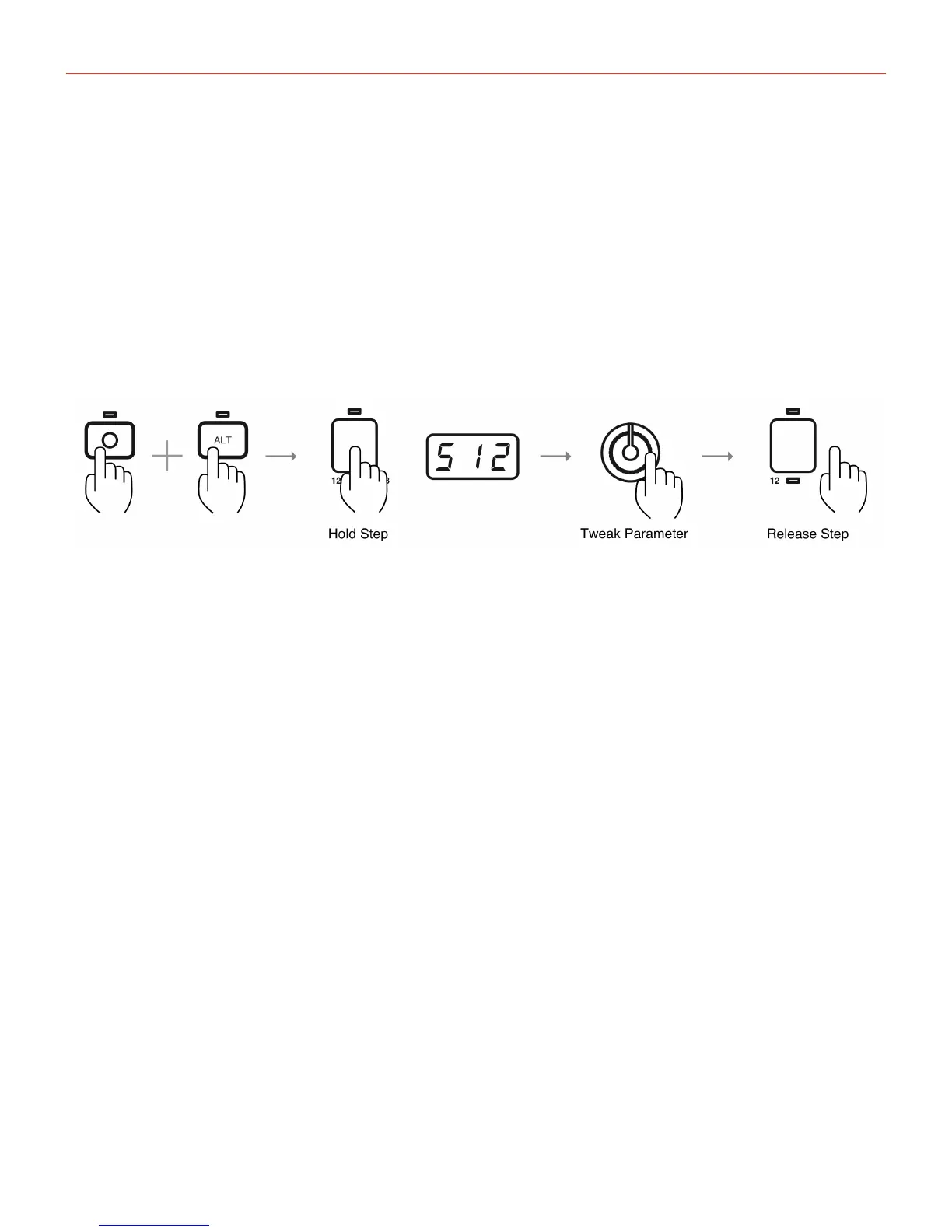
Let’sstartfromthebeginning.PressALT+REC,andthe2buttonswillstartblink.Thekeyboardisnowbypassed
soitispossibletoeditonlythesoundparameters.
Nowholdastep,bypressingandholdingoneofthe16“white”keys.Thisshowsthenumberofthestepinthe
displaytoindicatethatthestepisselectedandreadytobeedited.
Torecordadesiredparameter,simplyholdthestepandadjusttheparameter.Oncereleased,theparametersis
saved.
Todeleteastepinthismode,simplypressthedownbutton.
ToexitStepEditRecording,pressRECagain.


 To Next Page