UNO Synth
7 – The Sequencer
26
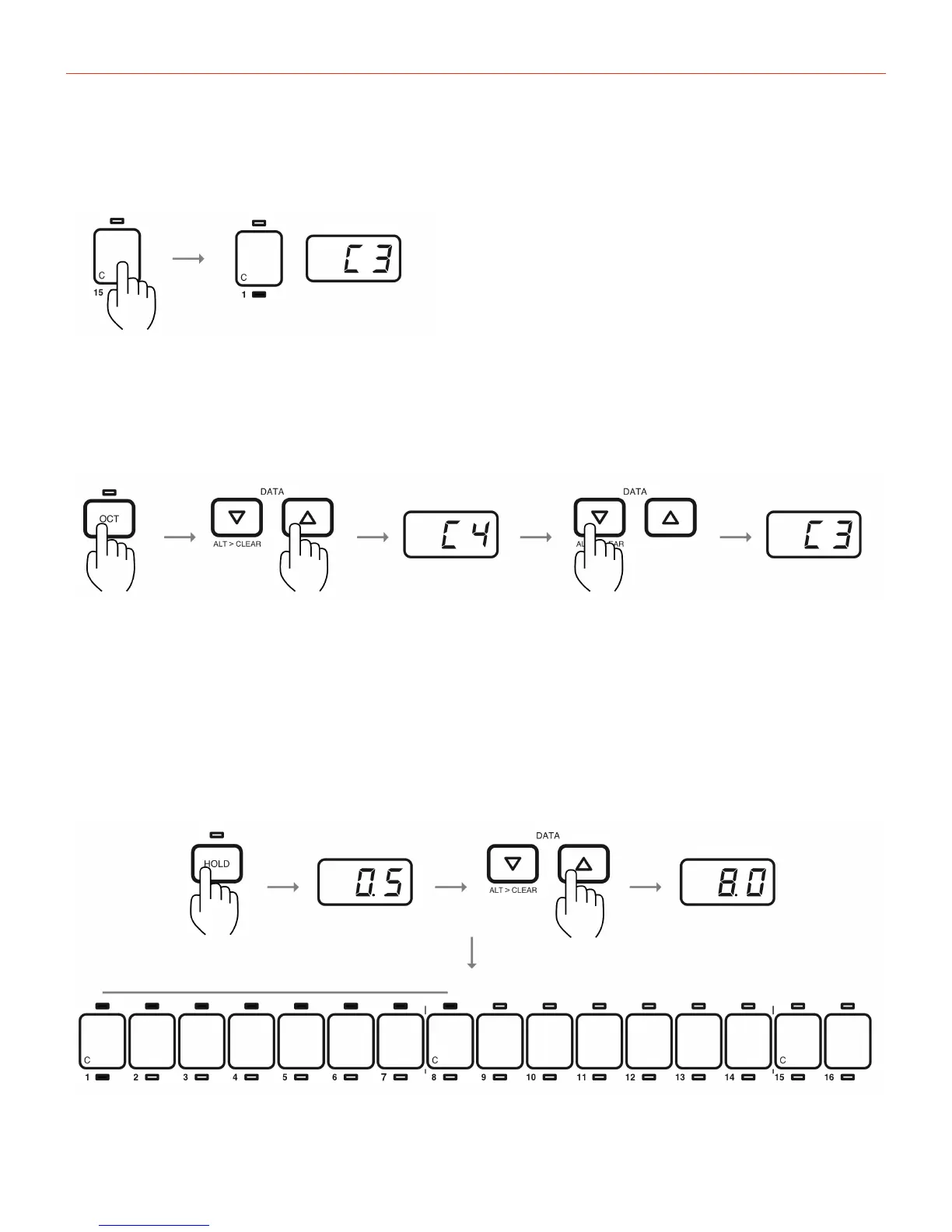
Torecordanote,pressthedesirednoteonthekeyboard.Thedisplaywillshowthenameofthenote,andthe
stepwillstopblinkingandwilllightsolid.Tochangethenoteforthestep,simplyplayanothernote
Tochangetheoctave,pressOCTandselectthedesiredoctavewiththedatabuttons(thesynthwillplaythe
noteeachtimetheoctaveischanged).Whentheselectionisdone,pressOCTagaintogobacktotheeditingof
thestep.
Tochangethedurationofthenote,pressHOLD.Thedefaultlengthis0.5,halfastep.
Usethedatabuttonstoselectalengthupto16steps.
TheLEDsabovethestepsequencershowthedurationofthenotechanging.Changingthelengthofastep
givesyouthepossibilitytocreatemusicallegatonoteswhenoverlappingoneastepwithanother.


 To Next Page