24
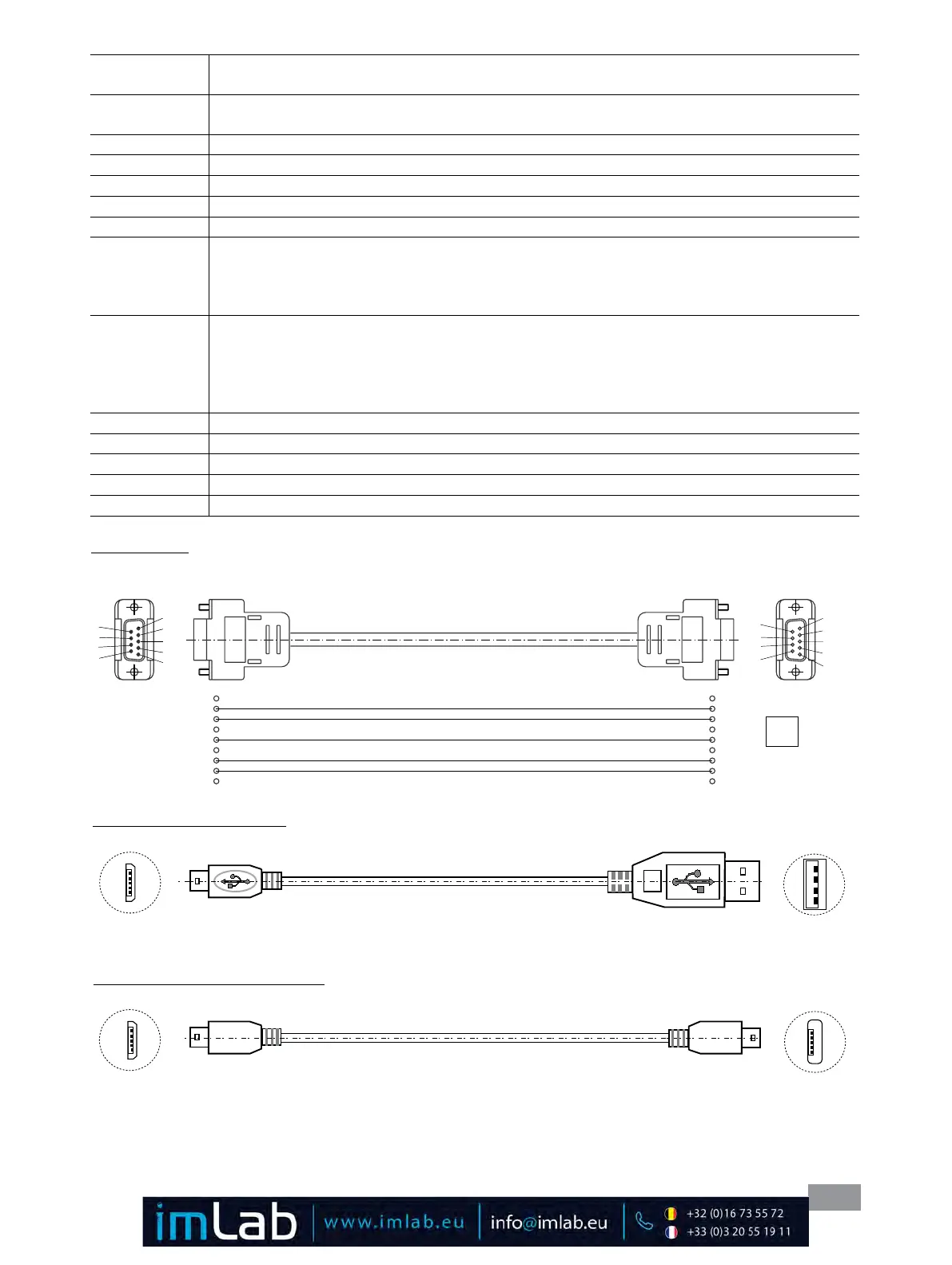
PC 1.1 Cable:
This cable is required to connect RS 232 port (9) to a PC�
1
2 RxD
3 TxD
4
5 GND
6
7 RTS
8 CTS
1
RxD 2
TxD 3
4
GND 5
6
RTS 7
CTS 8
PC
1
2
3
4
5
9
8
7
6
5
4
3
2
1
Fig. 29
Fig. 30
USB micro B
USB A
A
USB 2.0
Kabel
A - Micro B:
This cable is required to connect USB interface (10) to a PC�
Fig. 31
USB 2.0 Kabel Micro A - Micro B:
This cable is required to connect the WiCo to station�
USB Micro B
USB Micro A
IN_TMODE
Read temperature control 0: internal control
1: external control
OUT_SP_1 xxx
Set the internal setting temperature XXX (
if 0: internal control
)
Set the external setting temperature XXX (if
1: external control
)
OUT_SP_12@n
Set the WD safety temperature with echo of the set (defined) value�
OUT_SP_4 xxx
Set the pump speed XXX
OUT_SP_42@n
Set the WD-safety speed with echo of the set (defined) value�
OUT_TMODE_0
Set to Internal temperature control
OUT_TMODE_1
Set to External temperature control
OUT_WD1@n
Start the watchdog mode 1 and set the time for the watchdog to n (20���1500) seconds�
Echo of the Watchdog time�
During a WD1-event, the heating and pump functions are switched off�
This command needs to be send within the watchdog time�
OUT_WD2@n
Start the watchdog mode 2 and set the watchdog time to n (20���1500) seconds�
Echo of the watchdog time�
During a WD2-event, the set temperature is changed to the WD safety temperature and the pump set
speed is set to the WD safety speed�
This command needs to be send within the watchdog time�
RESET
Reset the PC control and stop the device functions�
START_1
Start the heating function
START_4
Start the pump function
STOP_1
Stop the heating function
STOP_4
Stop the pump function








 To Next Page