11 Image Vault
®
PRO Command
3.7 32Camera/480 FPS Model: Video & Audio Capture, Monitor Output
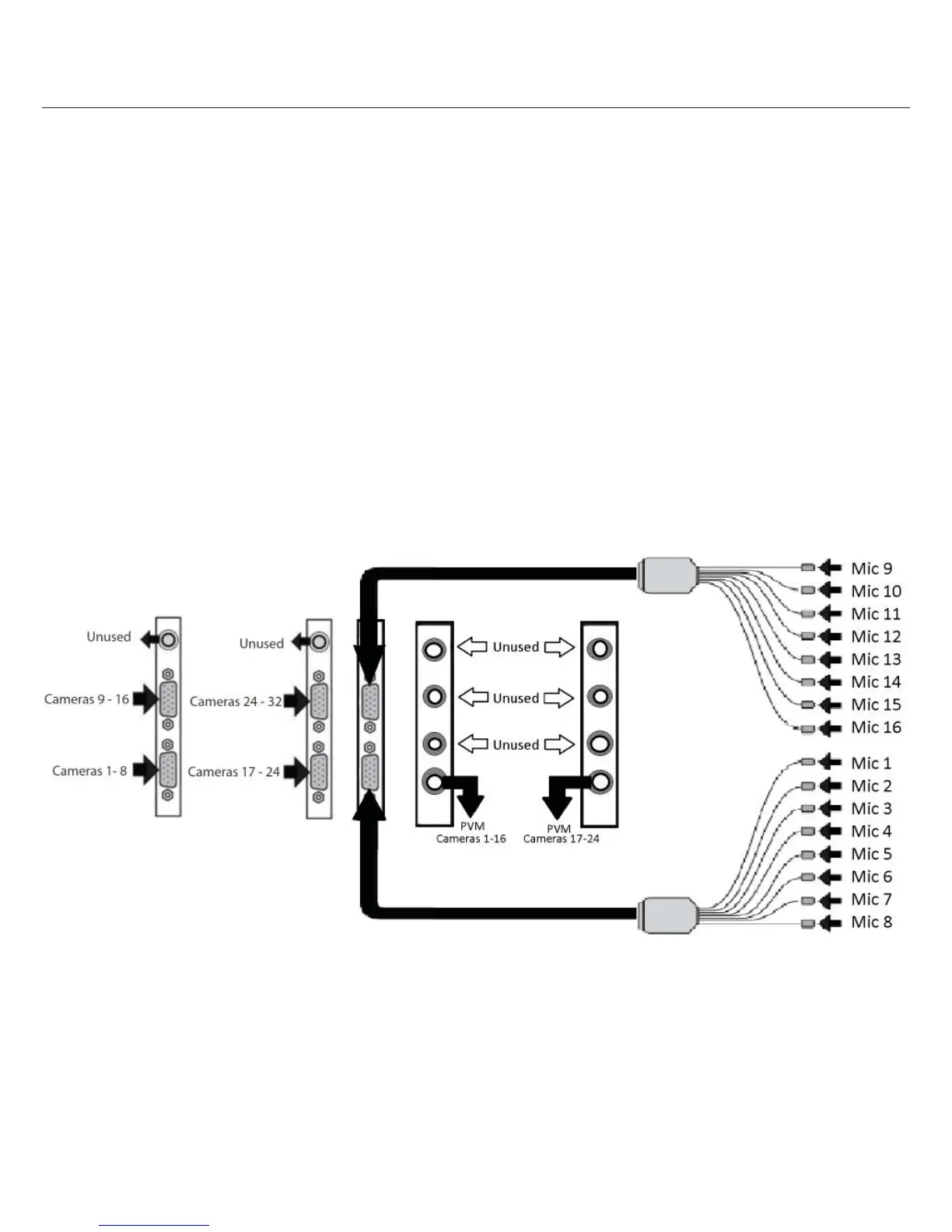
Video In: Connect up to 32 NTSC video cameras to the BNC connectors on the video input breakout cables. The camera input break-
out cables are connected to the DB15 ports to the left. The top-left connector inputs of the rst card are for cameras 1 to 8. The
bottom-left connector inputs of the rst card are for cameras 9 to 16. The top-left connector inputs of the second card are for cameras
16 to 24. The bottom-left connector inputs of the second card are for cameras 25 to 32.
Audio In: Connect up to 16 line level audio microphones to the RCA connectors on the microphone breakout cables. Connect these
breakout cables to the DB15 ports to the right. The bottom-right connector inputs are for Mic 1 to Mic 8. The top-right connector
inputs are for Mic 9 to Mic 16. Each microphone input is associated with 2 camera inputs. Mic 1 is associated with cameras 1 and 2, Mic
2 is associated with cameras 3 and 4 and so on.
Video Out: Two Public View Monitor (PVM) output is provided. The bottom BNC output on the rst card will provide one cycling out-
put that will cycle through inputs 1 through 16. The bottom BNC output on the second card will provide one cycling output that will
cycle through inputs 17 through 32.



 To Next Page