45 Image Vault
®
PRO Command
7.6 Transaction Data Triggered Recording
A Data Rule is a virtual recording trigger based on speci c data being captured from any Data Device source. Up to 16 Data Rules may
be de ned (Section 7.5) to trigger video recording based on speci c words, phrases, or value ranges. Note: Data Device Setup (Section
7.5) must be completed before the Rules as described in this section will function. To set up Data Rules select “Data Device Rules” from
the Status menu.
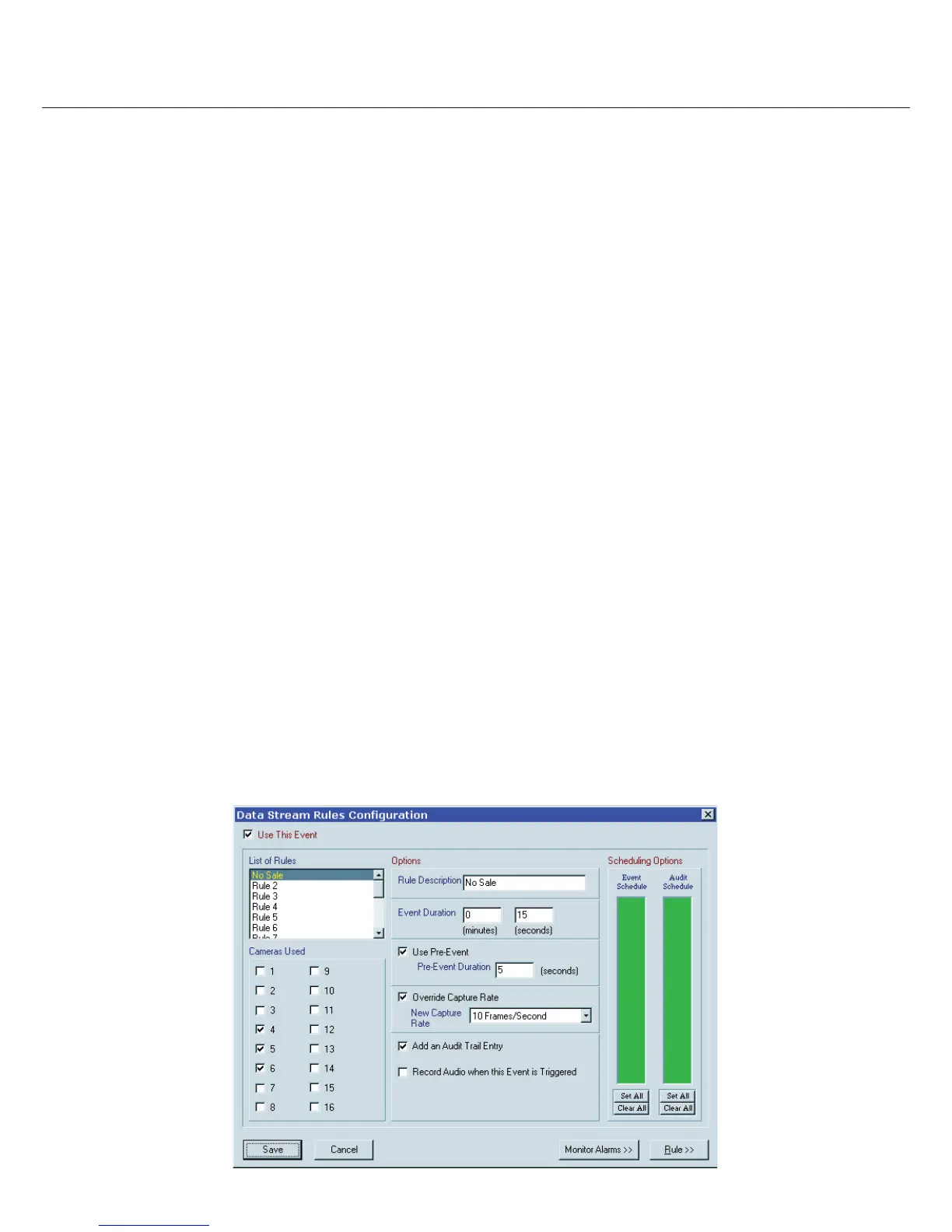
Using Rules: Select the Rule to con gure and enable “Use This Event.” Enter a meaningful “Rule Description” for the rule. Enable cam-
eras to record when the Rule is triggered. Adjust the “Event Schedule” to restrict the hours when the Rule is active.
Pre/Post Recording Time: “Event Duration” is how long after the rule is triggered until the speci ed cameras stop recording. En-
able “Use Pre-Event” recording and enter a time to record images captured immediately before each event.
Capture Rate: Use the “Override Capture Rate” to cause faster than normal recording when the rule is triggered.
Audit Entries: Every time the rule is triggered an audit entry will be generated if you enable “Add an Audit Trail Entry.” Use the “Audit
Schedule” to limit audit entries to only those hours when you want to track activity.
Audio Recording: You may enable audio recording when the rule is triggered.
Monitor Alarm: The “Monitor Alarm” feature will cause the local VGA monitor to go full screen on a selected camera (Live Monitor
Mode only) for a speci c time whenever the rule is triggered.
Rule Builder Wizard
Rules are be triggered by a speci c ASCII text string or numeric value in a range. To con gure Data Rule criteria click the “Rule” button
on the Data Stream Rules Con guration dialog. The Rule Builder wizard will guide you through the process. (It is strongly
recommended you print out samples of the items you want to use as triggers before you set up your Rule conditions.)
Up to four conditions may be set for each Rule. The de nition you establish for a speci c triggering condition is the condition’s criteria.
Any condition may be de ned by one of three types of criteria:
1. Any Time A Transaction Occurs: This is generic criteria that causes the Rule to be activated any time any data is captured by
any source.
2. A Speci c Value is Found: You may de ne up to four words or phrases for this type of criteria. You may further lter captured
data by using a Token Phrase to qualify the data. You may also add an exclusion, such as exclude the word Sub when looking
for Total thus nding only the word Total and ignoring Sub Total.
3. A Value Inside or Outside a Range of Values is Found: You may de ne a range as inclusive, exclusive, greater than or less than.
You may further lter data captured by using a Token Phrase to qualify the data.



 To Next Page