10
PLAYING MUSIC FROM
THE SOUNDSERVER
This chapter explains how to use the NP200 to browse
the music library on your SoundServer and play selected
tracks.
This chapter assumes you have set up an appropriate
Ethernet connection between the NP200 and your
SoundServer. For more information see
Connecting to an
Ethernet network
, page 7.
PLAYING MUSIC FROM THE LIBRARY
• Set the NP200 source to server, by pressing the
AUDIO INPUT AUDIO INPUT
AUDIO INPUT AUDIO INPUT
AUDIO INPUT key on the front panel or the
MUSIC SERVER MUSIC SERVER
MUSIC SERVER MUSIC SERVER
MUSIC SERVER key on the remote control.
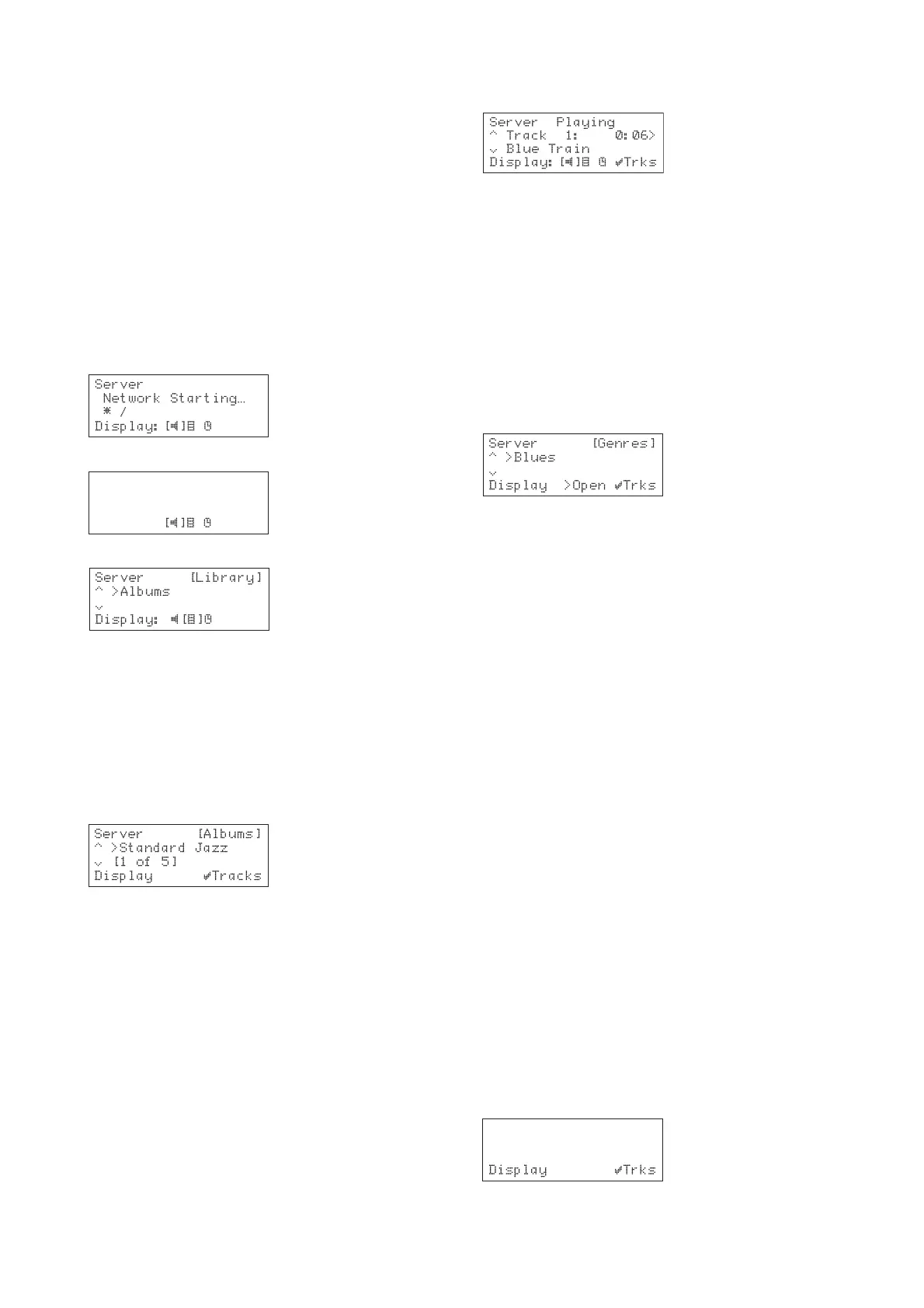
The display shows:
After a short delay the display will show:
Server Ready
[S2000]
Press DISPLAY
Display:
• Press the
DISPLAYDISPLAY
DISPLAYDISPLAY
DISPLAY key to switch to browse mode:
To browse the library by album
Either:
• Use the a or v keys if necessary to highlight the
AlbumsAlbums
AlbumsAlbums
Albums option in the
Library MenuLibrary Menu
Library MenuLibrary Menu
Library Menu.
• Press the »
SELECTSELECT
SELECTSELECT
SELECT key to confirm your selection.
Or:
• Press the
ALBUM ALBUM
ALBUM ALBUM
ALBUM key on the remote control.
The display shows the albums available in your library:
• Press the a or v keys to step between albums or
press the appropriate letter on your remote
control to jump directly to that position in the
list.
• Press the »
SELECT SELECT
SELECT SELECT
SELECT key to display the tracks in the
currently selected album.
• Press the »
SELECT SELECT
SELECT SELECT
SELECT key to start playing from the
first track.
To select a particular track from this albumTo select a particular track from this album
To select a particular track from this albumTo select a particular track from this album
To select a particular track from this album
• Use the a or v keys to step between tracks, or
press a key on the remote control to jump to the
track number.
• Press the »
SELECT SELECT
SELECT SELECT
SELECT key to play the currently
selected track.
The display shows
PlayingPlaying
PlayingPlaying
Playing:
• Press the »
SELECT SELECT
SELECT SELECT
SELECT key to return to browsing the
tracks in this album.
To browse the library by artist or genre
Either:
• Use the a or v keys if necessary to highlight the
ArtistsArtists
ArtistsArtists
Artists or
Genres Genres
Genres Genres
Genres option in the
Library Library
Library Library
Library menu.
• Press the »
SELECT SELECT
SELECT SELECT
SELECT key to confirm your selection.
Or:
• Press the
ARTIST ARTIST
ARTIST ARTIST
ARTIST or
GENREGENRE
GENREGENRE
GENRE key on your remote
control.
The display shows the artists or genres available in your
library:
Artists and genres are displayed in alphabetical order.
• Press the a or v keys to step between artists or
genres, or press the appropriate letter on your
remote control to jump directly to the item in the
list beginning with that letter.
• Press the »
SELECT SELECT
SELECT SELECT
SELECT key to display the tracks by
the selected artist or in the selected genre.
To select a particular albumTo select a particular album
To select a particular albumTo select a particular album
To select a particular album
• Press the }
key to display a list of albums by the
currently selected artist or in the currently
selected genre.
• Use the a or v keys to step between albums.
• Press the »
SELECT SELECT
SELECT SELECT
SELECT key to display the currently
selected album.
• Press the »
SELECT SELECT
SELECT SELECT
SELECT key to start playing from the
first track.
To select a particular track from this albumTo select a particular track from this album
To select a particular track from this albumTo select a particular track from this album
To select a particular track from this album
• Use the a or v keys to step between tracks, or
press a key on the remote control to jump to the
track number.
• Press the »
SELECT SELECT
SELECT SELECT
SELECT key to play the currently
selected track.
To browse the library by playlist
Either:
• Use the a or v keys if necessary to highlight the
PlaylistsPlaylists
PlaylistsPlaylists
Playlists option in the
Library Library
Library Library
Library menu.
• Press the »
SELECT SELECT
SELECT SELECT
SELECT key to confirm your selection.
Or:
• Press the
PLAYLISTPLAYLIST
PLAYLISTPLAYLIST
PLAYLIST key on your remote control.
The display shows the playlists you have defined:
Server [Playlists]
^ >Sarah's List
§ [1 of 4]
Note: Note:
Note: Note:
Note: If you have not yet created any playlists the list will
be empty.


 To Next Page