6
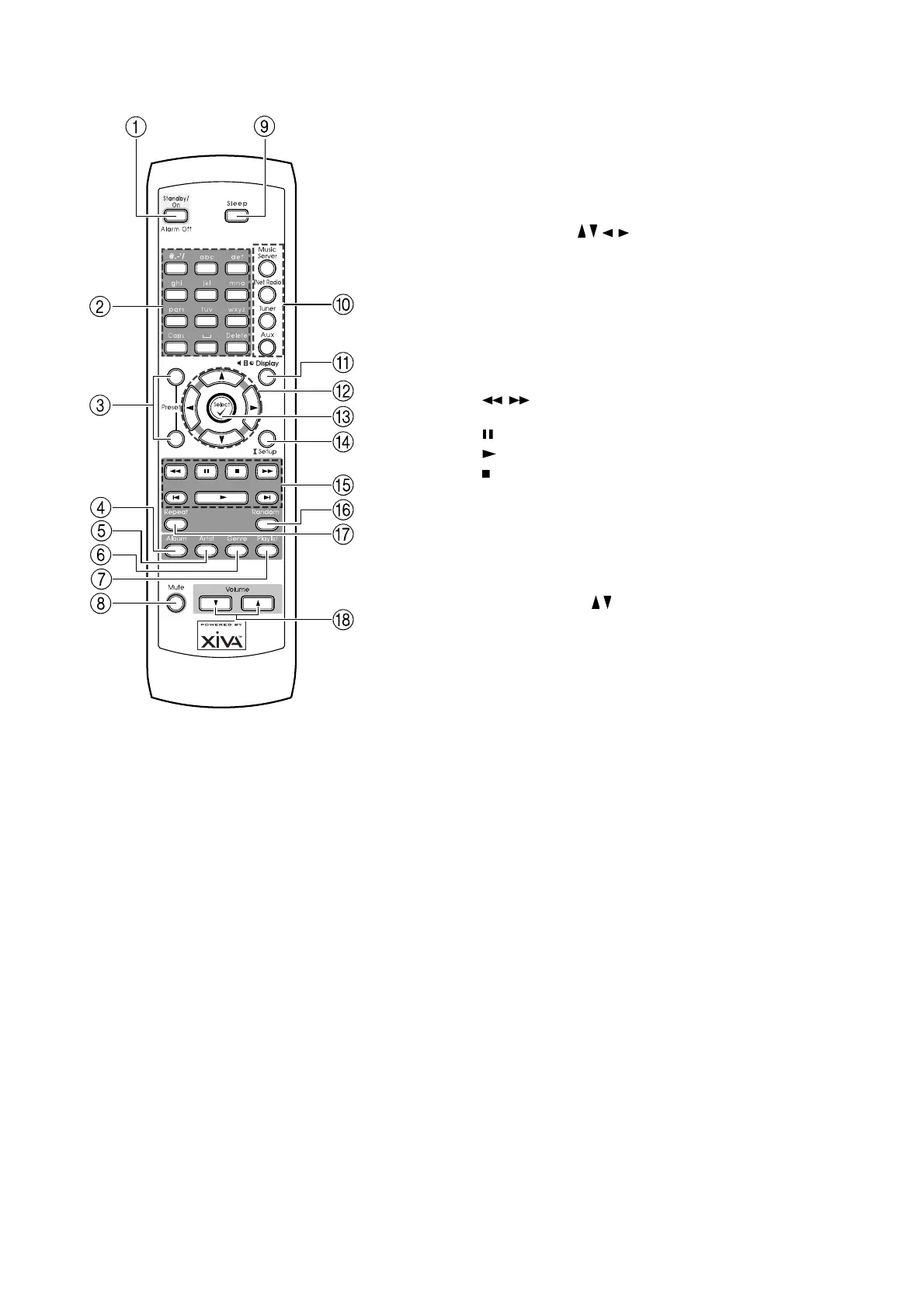
REMOTE CONTROL
1 STANDBY/ON key
Turns on the NP200 or places it in Standby mode. When
the NP200 is in Standby mode, you can use this key to
turn off the alarm.
2 Numeric keys
Selects one of the preset stations or the track you want
to play. When entering text, you use these keys to type
in letters and special characters.
3 PRESET Up/Down keys
Navigates through radio presets.
4 ALBUM key
Browses by Album when connected to a SoundServer.
5 ARTIST key
Browses by Artist when connected to a SoundServer.
6 GENRE key
Browses by Genre when connected to a SoundServer.
7 PLAYLIST key
Browses by Playlist when connected to a SoundServer.
8 MUTE key
Mutes or unmutes the sound.
9 SLEEP key
Sets the sleep function.
10 MUSIC SERVER/iNetRADIO/TUNER/AUX
keys
Selects an input source. The
MUSIC SERVERMUSIC SERVER
MUSIC SERVERMUSIC SERVER
MUSIC SERVER key selects
the SoundServer. The
TUNER TUNER
TUNER TUNER
TUNER key toggles between FM
and AM.
11 DISPLAY key
Changes the display mode.
12 Cursor / / / keys
Locate a selection.
13 SELECT key
Selects the currently displayed option.
14 SETUP key
Selects Setup mode, which allows you to change the
NP200 configuration.
15 Operation keys
, keys Fast-rewinds or fast-forwards the
current track.
(Pause) key Pauses the playback.
(Play) key Starts playback.
(Stop) key Stops the playback.
”,’ keys Moves to the previous or next track.
16 RANDOM key
Plays the selected track list at random.
17 REPEAT key
Repeats the selected single track or track list.
18 VOLUME / keys
Adjust the volume.
To change the remote control code
You can control up to three NP200s in the same location
by setting each of their remote controls to a separate
code.
• Hold the
STANDBY STANDBY
STANDBY STANDBY
STANDBY key on the remote control
and press the
SELECT SELECT
SELECT SELECT
SELECT key.
• Release these keys simultaneously.
• Within 5 seconds after releasing the keys, enter
the appropriate mode (1, 2 or 3) using the
numeric keys.
The default code is 1 for both the remote control and
NP200.
After changing the remote control code, make sure that
the remote control code on the NP200 is set to the same
code as the remote control; see
Changing the remote
control code to resolve conflicts
, page 18.


 To Next Page