15
USING THE CLOCK AND
TIMER
The NP200 includes a built-in digital clock, that shows
the time and date.
You can also set an alarm, that will play a selected
SoundServer track or radio preset at a specified time. A
snooze feature allows you to postpone the alarm by 5
minutes.
Finally, a sleep timer automatically puts the NP200 to
standby after up to 90 minutes.
SETTING THE CLOCK
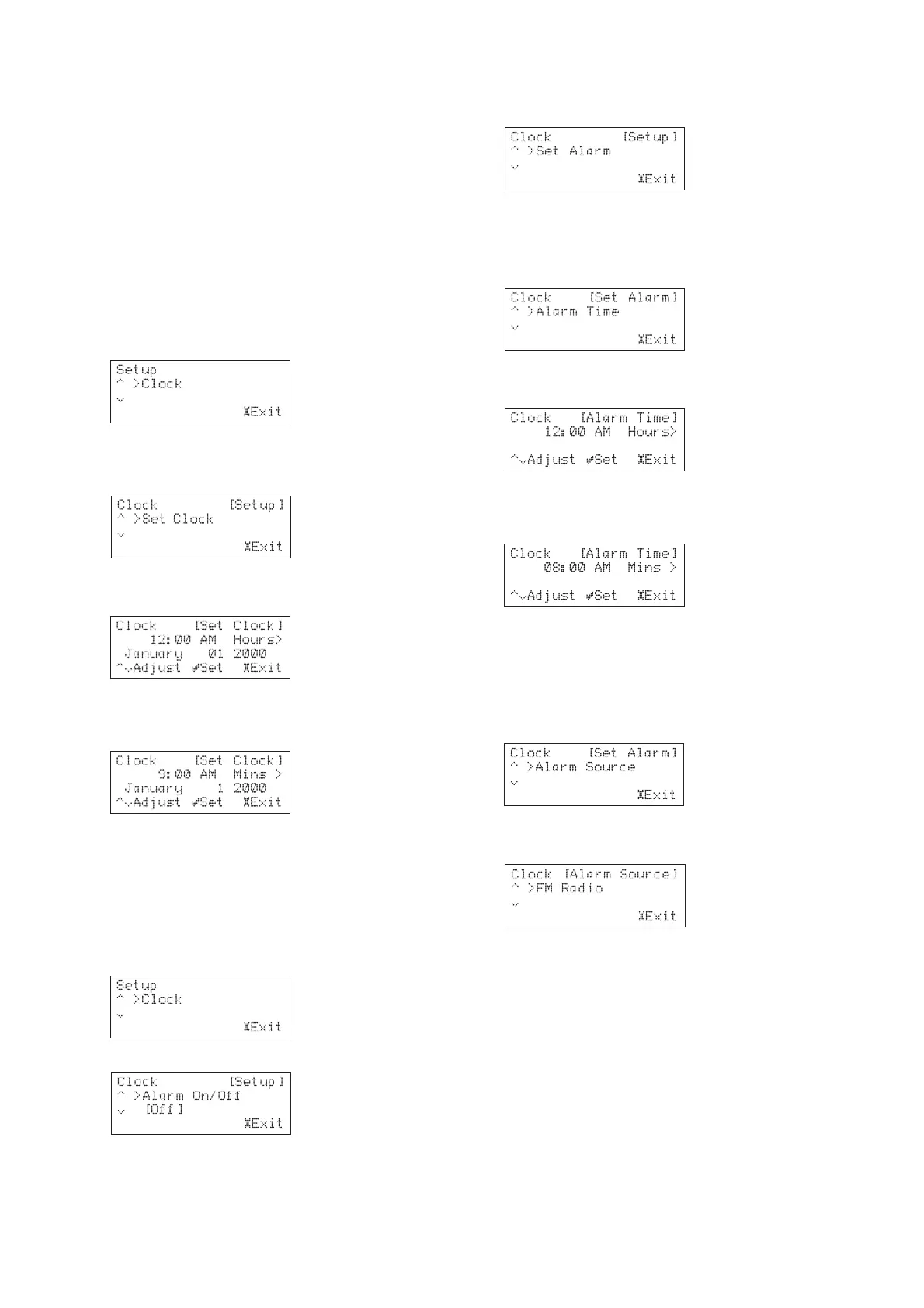
• Press the £
SETUP SETUP
SETUP SETUP
SETUP key to display the Setup
menus:
• Press the »
SELECT SELECT
SELECT SELECT
SELECT key.
• Press the a or v keys to display
Set ClockSet Clock
Set ClockSet Clock
Set Clock in the
display area:
• Press the »
SELECT SELECT
SELECT SELECT
SELECT key.
The display prompts you to set the hours:
• Use the a and v keys to set the hours.
• Press the } key to enter a minute setting for the
clock:
• Use the same procedure to set the minutes, AM/
PM, month, day, and year.
• Press the »
SELECT SELECT
SELECT SELECT
SELECT key to save the settings.
• Press the £
SETUP SETUP
SETUP SETUP
SETUP key to exit from the setup
menus.
SETTING THE ALARM
• Press the £
SETUP SETUP
SETUP SETUP
SETUP key to display the setup menus:
• Press the »
SELECTSELECT
SELECTSELECT
SELECT key:
• Use the a and v keys to display the
Set AlarmSet Alarm
Set AlarmSet Alarm
Set Alarm
option:
• Press the »
SELECT SELECT
SELECT SELECT
SELECT key to select it.
To set the alarm time
• Use the a and v keys to display the
Alarm TimeAlarm Time
Alarm TimeAlarm Time
Alarm Time
option:
• Press the »
SELECT SELECT
SELECT SELECT
SELECT key to select it.
The display prompts you to set the hours:
• Use the a and v keys to set the hours.
• Press the } key to enter a minute setting for the
clock:
• Use the same procedure to set the minutes and
AM/PM.
• Press the »
SELECT SELECT
SELECT SELECT
SELECT key to save the settings.
To set the alarm source
• Use the a and v keys to display the
AlarmAlarm
AlarmAlarm
Alarm
Source Source
Source Source
Source option:
• Press the »
SELECT SELECT
SELECT SELECT
SELECT key to select it.
The display prompts you to select the playback source:
• Use the a and v keys to select from the
following options:
Internet radio stationInternet radio station
Internet radio stationInternet radio station
Internet radio station – by selecting this option you will
be prompted to select a preset station to use as the
alarm.
AM/FM radio stationAM/FM radio station
AM/FM radio stationAM/FM radio station
AM/FM radio station – by selecting this option you will
be prompted to select a preset station to use as the
alarm.
ServerServer
ServerServer
Server – you may select a particular track from the
SoundServer library to use as the alarm. Once this
option has been selected you will be prompted to locate
a track to play.
Once you have selected a radio preset or a SoundServer
track for an alarm source press the »
SELECTSELECT
SELECTSELECT
SELECT key to save
the settings.


 To Next Page