5
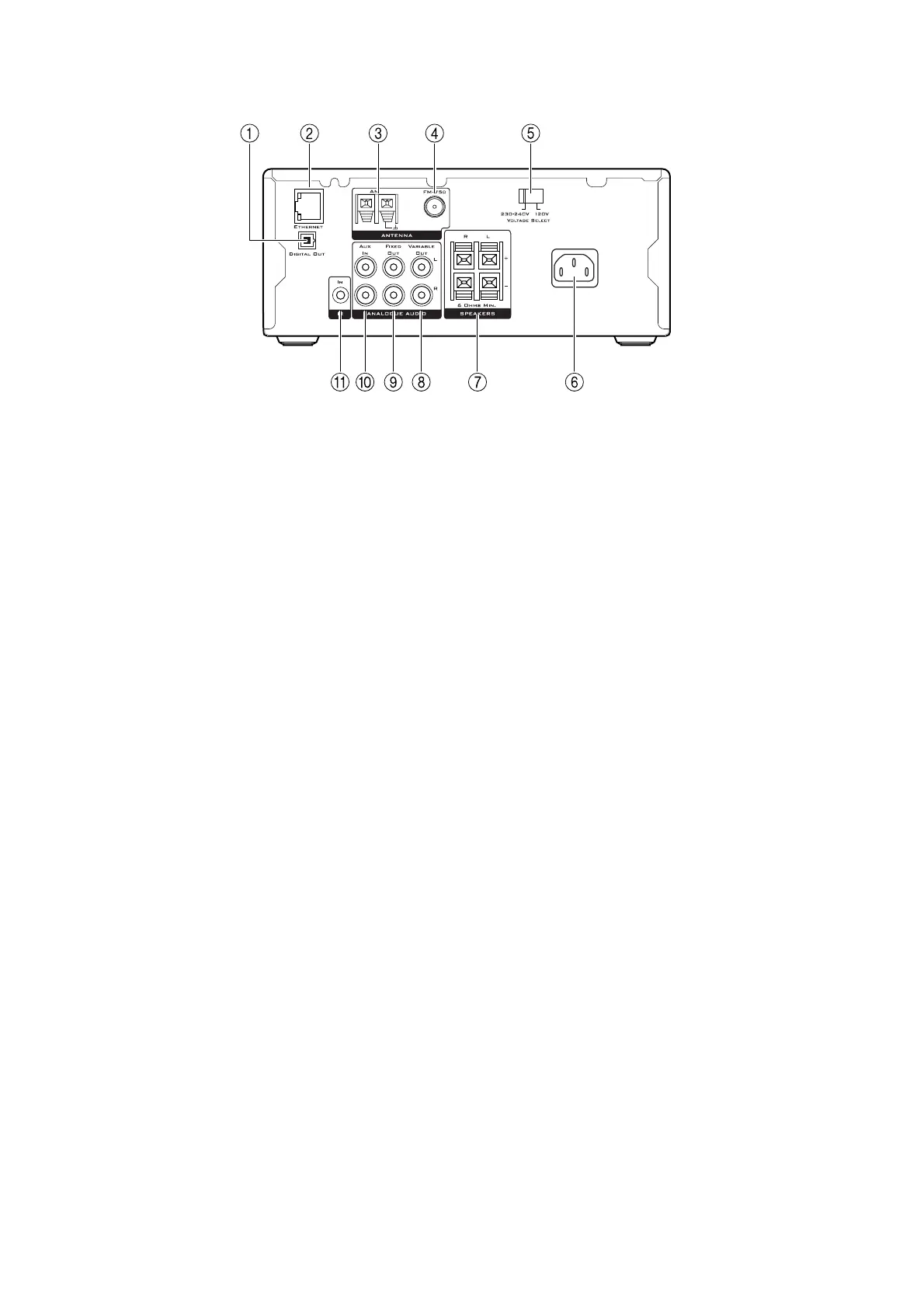
1 DIGITAL OUT
Digital optical audio output.
2 ETHERNET
Connects to a SoundServer and the Internet via an
Ethernet network.
3AM
Connects to the AM radio antenna.
4FM
Connects to the FM radio antenna.
5 MAINS VOLTAGE SELECTOR
Selects the mains voltage.
6 MAINS CONNECTOR
Connects to mains power.
REAR VIEW
7 SPEAKERS
Connect to the speakers.
8 VARIABLE OUTPUT
Line phono output to connect to an amplifier without
volume control.
9 FIXED OUT
Fixed-level line phono output.
10 AUX
Line phono input.
11 IR IN
Allows you to connect an external infra-red sensor, to
relay the remote control signals to the NP200 when
mounted in an inaccessible location, such as in a cabinet.


 To Next Page