4
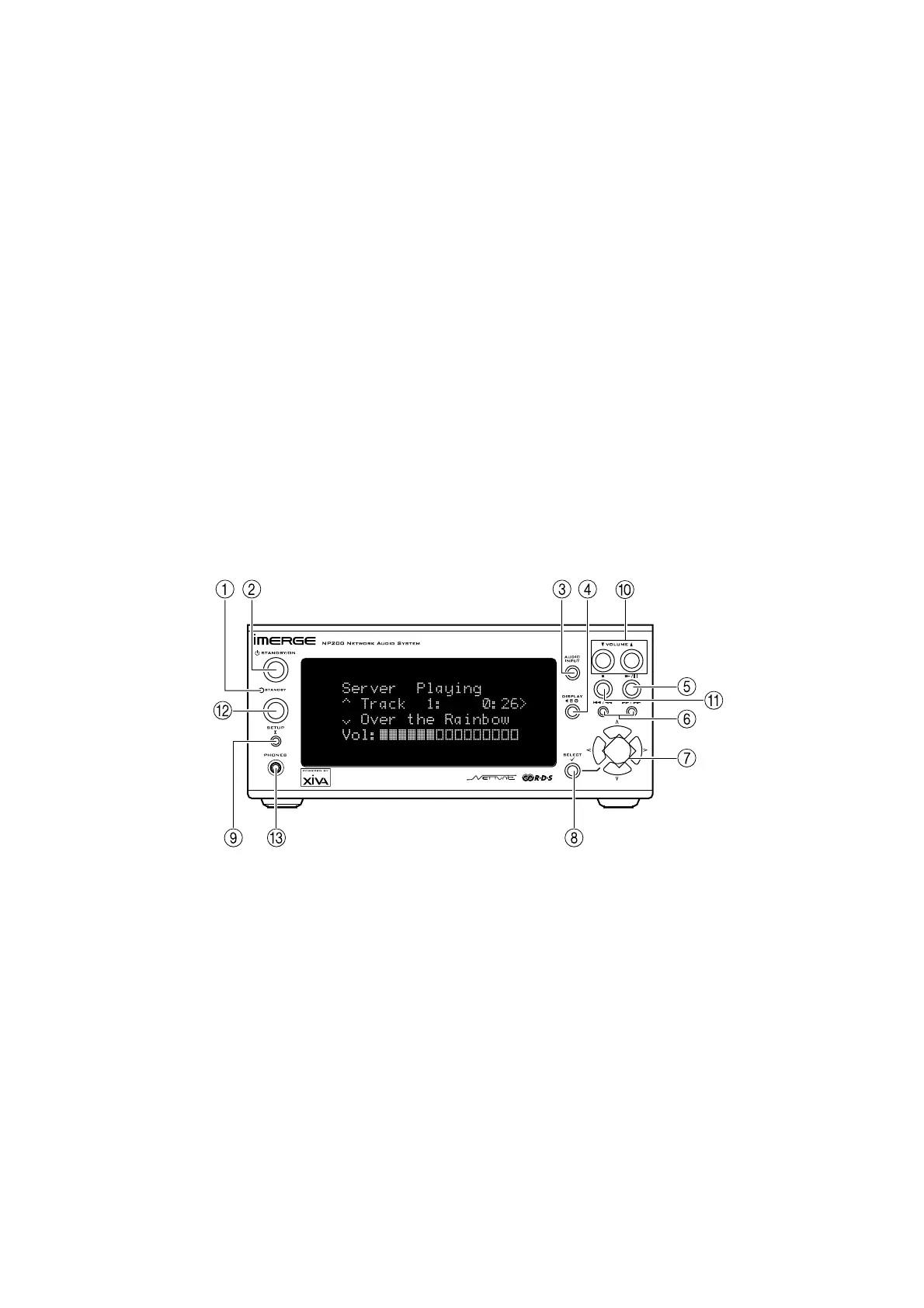
1 STANDBY indicator
Lights when the NP200 is in Standby mode.
2 STANDBY/ON key
Switches the power mode between Standby and On.
3 AUDIO INPUT key
Changes the playback source.
4 DISPLAY key
Changes the displayed information.
5 Play/Pause key
Starts or pauses playback.
6 ”/¯ and ˘/’ Skip keys
Moves to the previous or next track. Holding down these
keys either fast-forwards or fast-rewinds the current
track.
7 Cursor Up/Down/Right/Left keys
Use these keys to navigate through settings, change a
value, or move to another menu.
8 SELECT key
Selects the currently displayed option.
9 SETUP key
Selects Setup mode which allows you to change the
NP200 configuration.
10 VOLUME keys
Decrease/increase the volume.
11 STOP key
Stops playback.
12 cREMOTE CONTROL SENSOR
Receives signals from the remote control.
13 aPHONES socket
Socket for connecting headphones.
INTRODUCTION
Welcome to the NP200 from Imerge. The NP200 is the
ideal companion to your SoundServer, enabling you to
access your entire music library from any room in your
home over a standard Ethernet network.
Extend your music collection
You can connect up to six NP200 Network Audio Systems
to your SoundServer, to provide access to your entire
music collection from any room in your home. Its
convenient four-line display provides similar information
to the SoundServer display, allowing you to select
albums and tracks, or search by artist or genre, using
either the front panel or the remote control supplied
with the NP200.
Minimum installation
The NP200 connects to the SoundServer via a single
Ethernet connection, making it straightforward to
extend your system, especially in houses where each
room already has Ethernet wiring.
A complete hi-fi system in a box
The NP200 includes a stereo power amplifier and
preamplifier, so all you need is a pair of loudspeakers to
create a complete hi-fi system in each room. Alternatively
it provides fixed and variable level analogue outputs,
and an optical digital output, allowing it to be connected
to an existing system such as an AV amplifier. The NP200
also includes an audio input, to allow you to connect a
source such as an MD player.
Built-in Internet, AM, and FM radio
The NP200 includes a built-in Internet radio, using
Imerge XiVA-Net to access lists of Internet radio stations
classified according to genre, subgenre, location, and
language. With the addition of suitable aerials the NP200
can also receive AM and FM stations, using RDS
information where available to display radio data such as
the FM station name.
Clock, timer, and alarm
Finally the NP200 includes a built-in clock, and
convenient timer and alarm features allow you to use it
as an alarm clock. A sleep feature can switch off your
music automatically after a delay.
CONTROLS AND CONNECTIONS
FRONT VIEW


 To Next Page