7
CONNECTING YOUR
NP200
NoteNote
NoteNote
Note: You should ensure that the mains connection is
removed from the unit before making any of the
connections below.
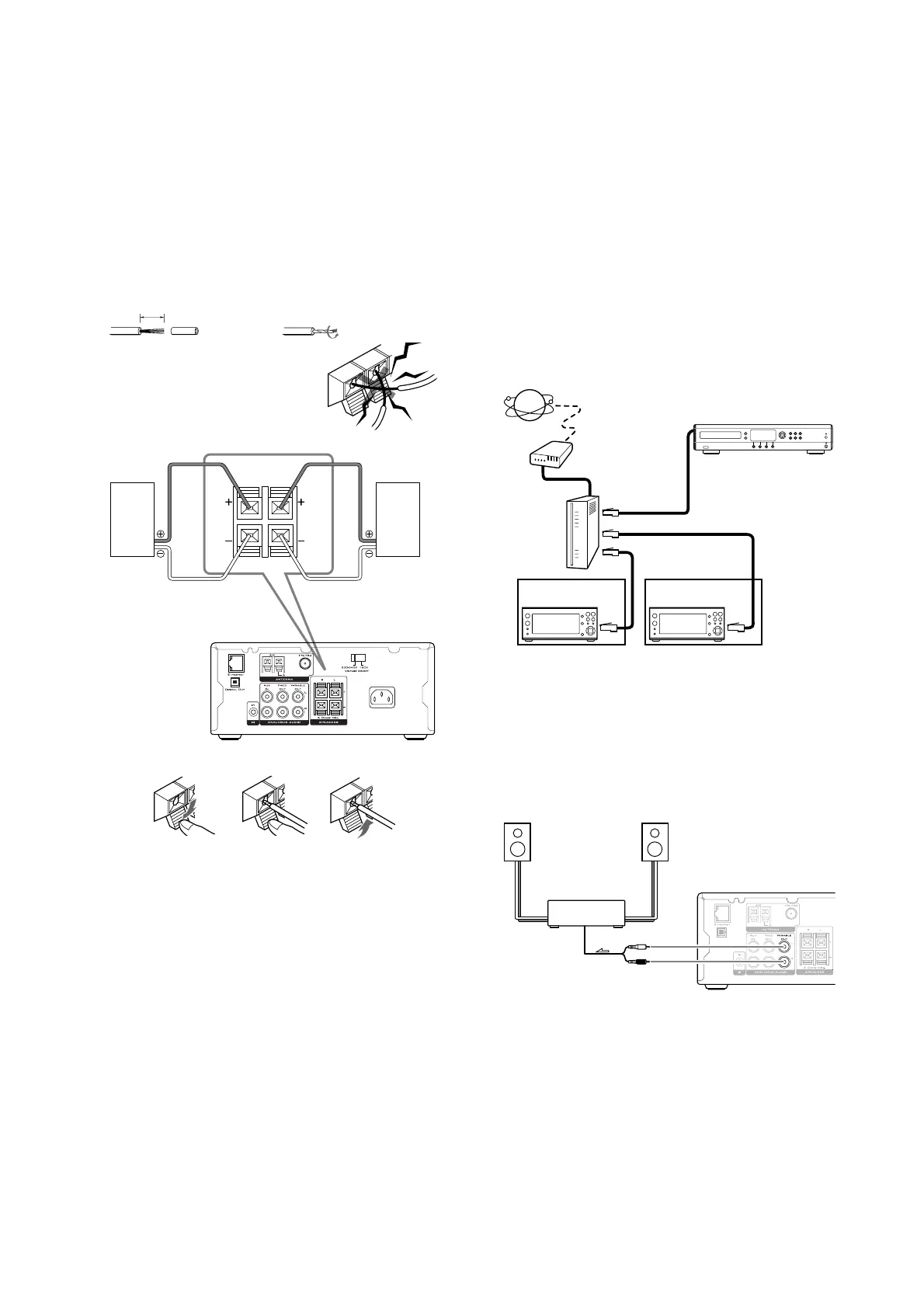
CONNECTING LOUDSPEAKERS
NoteNote
NoteNote
Note: The load impedence of each speaker must be at
least 6Ω.
1. Strip 15mm from 2. Twist the stripped
the end of each cord: end of the cord:
15mm
NoteNote
NoteNote
Note: To prevent damage to
circuits never short circuit the
positive (+) and negative (-)
speaker wires.
SPEAKERS
(
6 OHMS MIN.
)
R
L
Right
Speaker
NP200
Left
Speaker
(1 (2 (3
• Press down the lever (1 .
• Insert the wire into the hole (2 .
• Release the lever to complete the connection (3 .
CONNECTING TO AN ETHERNET NETWORK
An Ethernet connection is required by your NP200 in
order to connect to a SoundServer and to be able to
access a high speed internet connection.
The diagram below shows the simplest configuration for
providing these connections.
Broadband ModemBroadband Modem
Broadband ModemBroadband Modem
Broadband Modem – the modem in this configuration is
a device for providing an internet connection via a high
speed leased line e.g. Cable modem, xDSL modem or
terminal adapter.
To access the Internet you typically need to make a
contract with an Internet Service Provider (ISP). Each ISP
has differing modem requirements and you should
contact them to determine which modem is required for
your internet connection.
Router Router
Router Router
Router – The router acts as a gateway between the
devices on your network and the modem in order to
allow several devices to access the internet
simultaneously. The router may also provide additional
functionality which is reccommended for this
installation:
DHCP ServerDHCP Server
DHCP ServerDHCP Server
DHCP Server – A DHCP Sever enables devices on a
network to request network configuration information
automatically. Without a DHCP Server you will need to
manually configure each device with network settings -
you will need some knowledge of networking in order to
do this.
10/100BaseT switch10/100BaseT switch
10/100BaseT switch10/100BaseT switch
10/100BaseT switch – the switch allows the devices on the
network to communicate with each other. This function
is required in order for the NP200 to communicate with
the SoundServer.
These devices may also be provided separately.
Modem
Internet
To the WAN side
To LAN side port
To LAN side port
Router
SoundServer
NP200
NP200
Room 1
Room 2
If you do not have a DHCP Server available refer to the
Advanced Settings
chapter on page 17 for more
information on configuring you Ethernet Settings
manually.
CONNECTING THE NP200 TO A POWER
AMPLIFIER
• Connect the VARIABLE OUT socket to the input
of the power amplifier, using a phono lead:
Power
amplifier
signal


 To Next Page