8
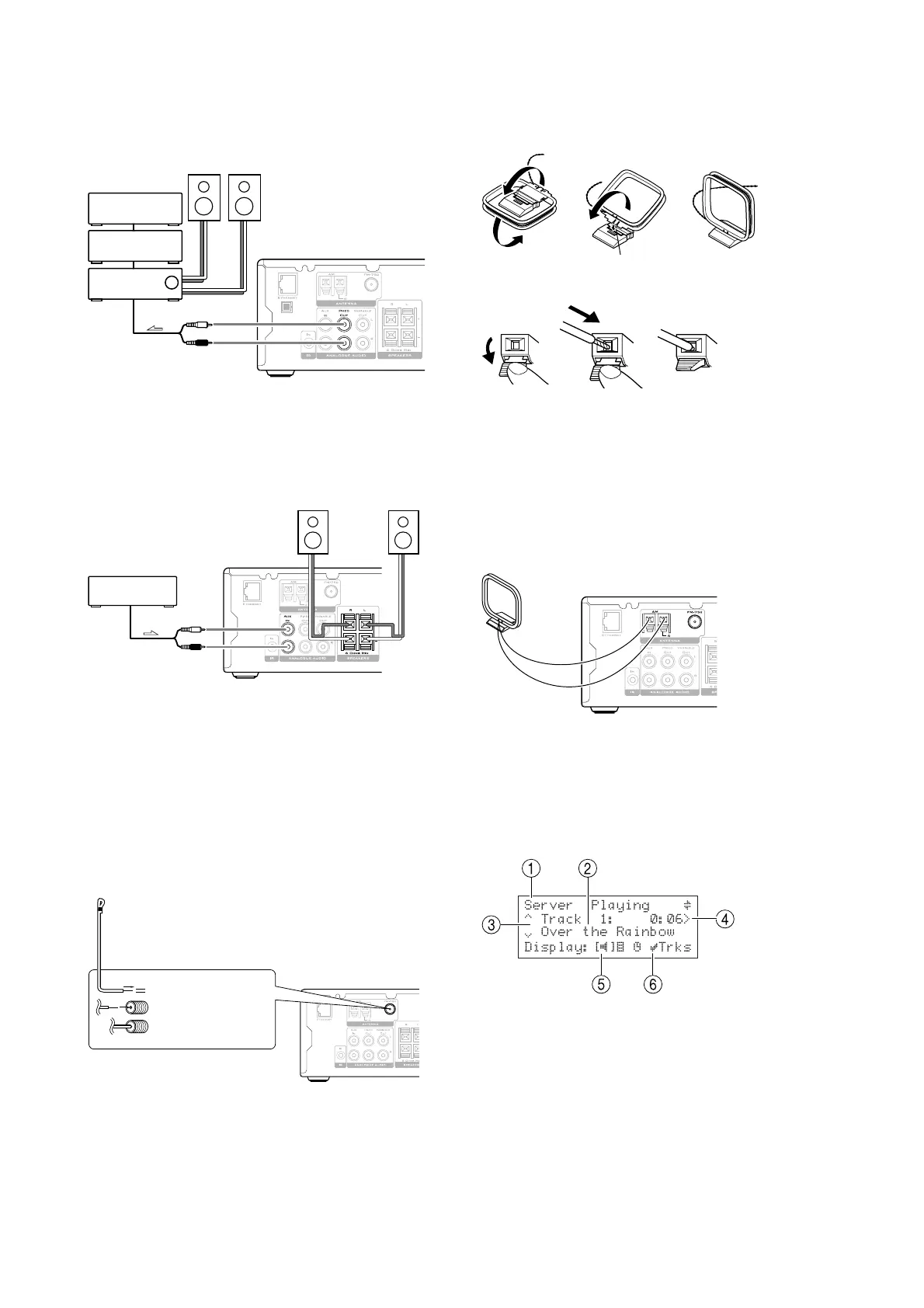
CONNECTING THE NP200 TO AN
INTEGRATED AMPLIFIER
• Connect the FIXED OUT sockets to the line input
of the integrated amplifier, using a phono lead:
Integrated
amplifier
CD player
CD recorder
signal
CONNECTING A SOURCE TO THE NP200
You can connect an external source, such as a CD player,
to the NP200.
• Connect the line output from the source to the
AUX IN sockets on the NP200, using a phono
lead:
MiniDisc
signal
CONNECTING FM AND AM AERIALS
To use the NP200 to receive FM or AM radio you need to
connect appropriate aerials.
NoteNote
NoteNote
Note: refer to the
Important Safety Instructions
at the
start of this guide for information relating to the use of
outdoor antennae.
To connect the FM aerial
The supplied FM antenna is for indoor use only.
• Move the antenna until the clearest signal is
received:
Remove the insulation
at the tip of the cable,
and insert the cable
securely, fully to the
end of the exposed tip.
If reception is poor in your location use an outdoor FM
antenna to improve signal strength.
To connect the AM aerial
• Assemble the loop antenna as shown in the
illustration:
Insert into the hole.
• Connect it to the NP200 as follows:
(1 (2 (3
• Press down the lever (1 .
• Insert the wire into the hole (2 .
• Release the lever to complete the connection (3 .
The AM loop antenna is for indoor use only. Set it in the
direction and position where you receive the clearest
sound. Place the aerial as far away as possible from other
electrical devices such as TVs, PCs, power cords, and
speaker cables.
For better reception use an outdoor antenna, connected
to the left-hand connector.
FRONT PANEL DISPLAY
The following diagram shows the key features of a
typical NP200 display:
1 Indicates the title of the current screen.
2 Title of the current selection.
3 Indicates that you can use the a or v keys to
browse up and down the current menu list.
4 Indicates that you can press the } key to change
the time display.
5 Current display mode; changes between play,
browse, or clock mode.
6 Indicates that you can press the »
SELECTSELECT
SELECTSELECT
SELECT key to
browse by tracks.


 To Next Page