12
LISTENING TO RADIO
The NP200 lets you connect over the Ethernet to a wide
range of Internet radio stations, that broadcast music
and other programs in a variety of languages by
streaming audio over the Internet.
The NP200 uses the XiVA-Net Internet radio catalogue
from Imerge to let you search for radio stations by
Genre, SubGenre, Location, or Language.
With suitable aerials, the NP200 can also receive FM and
AM radio broadcasts. On FM the Radio Data System
displays the station name and other information.
LISTENING TO INTERNET RADIO
• Press the
AUDIO INPUTAUDIO INPUT
AUDIO INPUTAUDIO INPUT
AUDIO INPUT key on the front panel
until the display shows iNet Radio.
Or:
• Press the
iNet RADIOiNet RADIO
iNet RADIOiNet RADIO
iNet RADIO key on the remote control.
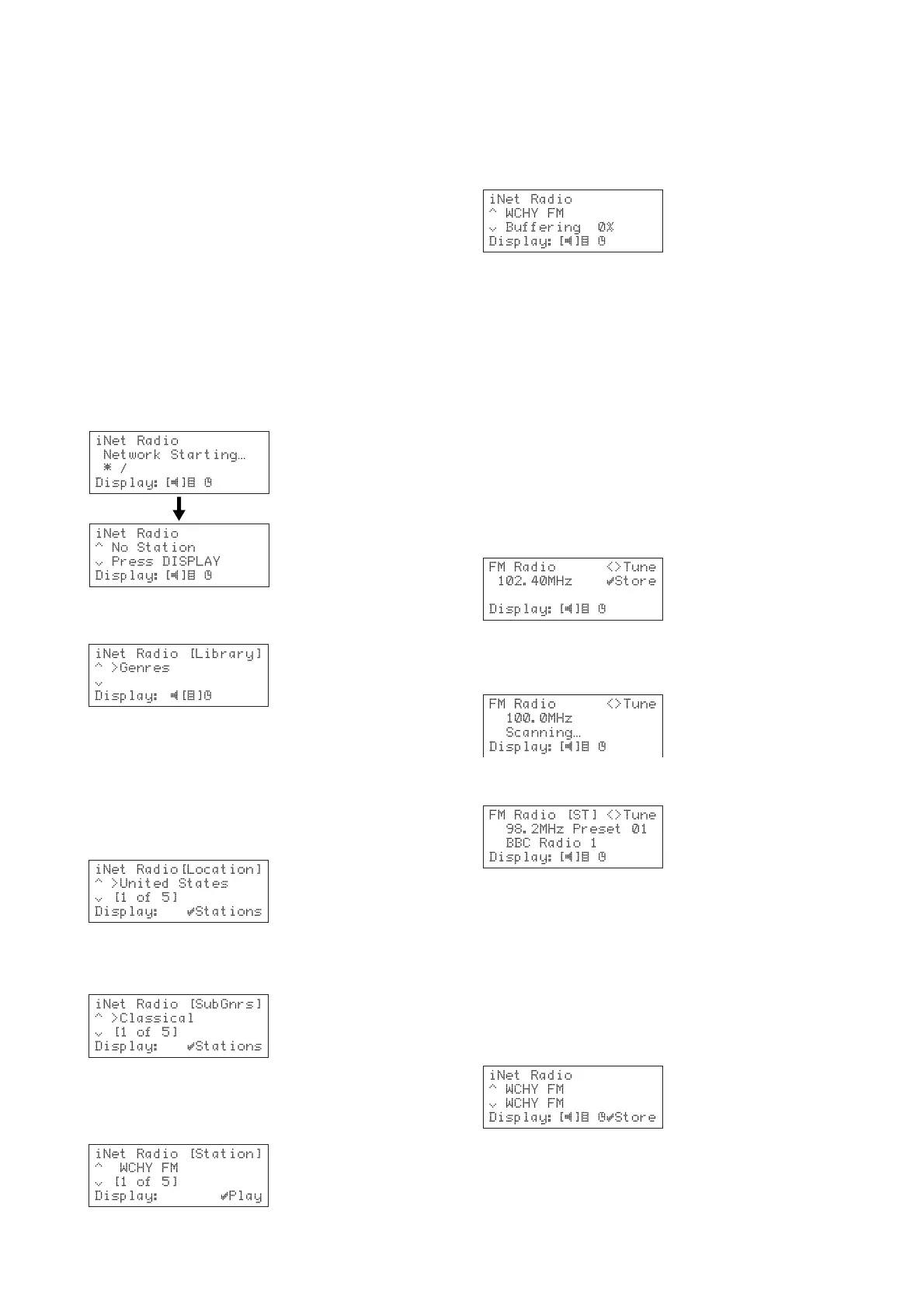
The display shows:
• Press the
DISPLAY DISPLAY
DISPLAY DISPLAY
DISPLAY key to browse for a station.
The display shows.
To browse the stations by genre, location or
language
• Use the a or v keys if necessary to highlight the
GenresGenres
GenresGenres
Genres,
LocationLocation
LocationLocation
Location, or
LanguageLanguage
LanguageLanguage
Language.
• Press the »
SELECTSELECT
SELECTSELECT
SELECT key to confirm your selection.
• Use the a or v keys to step between the items
you selected:
• Press the »
SELECTSELECT
SELECTSELECT
SELECT key to select the current item.
In the case of
Genres Genres
Genres Genres
Genres there is an additional
Sub GenresSub Genres
Sub GenresSub Genres
Sub Genres
menu:
• Use the a or v keys to step between sub genres,
and press the »S
ELECT kELECT k
ELECT kELECT k
ELECT key to select one.
The display then shows a list of Internet radio stations in
the sub genre, location, or language you selected:
• Press the a or v keys to step between stations.
• Press the »S
ELECT ELECT
ELECT ELECT
ELECT key to play the selected
station.
There is a delay while the NP200 connects to the station
and buffers the data:
The station will then start to play.
If the Internet radio station service is not available the
display willl show
Stream Access ErrorStream Access Error
Stream Access ErrorStream Access Error
Stream Access Error or
No StreamNo Stream
No StreamNo Stream
No Stream.
To change the displayed information
With some Internet radio stations you can display
information about the station using the a or v keys.
LISTENING TO FM/AM RADIO
To tune manually to a station
• Press the
AUDIO INPUTAUDIO INPUT
AUDIO INPUTAUDIO INPUT
AUDIO INPUT key until the display
shows
FM RadioFM Radio
FM RadioFM Radio
FM Radio or
AM RadioAM Radio
AM RadioAM Radio
AM Radio.
When using the remote control press the
TUNER TUNER
TUNER TUNER
TUNER key
until the display shows
FM RadioFM Radio
FM RadioFM Radio
FM Radio or
AM RadioAM Radio
AM RadioAM Radio
AM Radio.
• Press the { or } key to select the frequency of
the station you want to listen to:
To scan for a station on FM
• Hold down the { or } key until the display shows
Scanning…Scanning…
Scanning…Scanning…
Scanning….
The radio will scan up or down in frequency and stop at
the next station:
DEFINING PRESET STATIONS
The NP200 allows you to save your favorite stations with
names, and select them again at any time. You can store
up to 40 FM and AM stations, and 20 Internet radio
stations.
NoteNote
NoteNote
Note: Preset stations are only retained for 2 weeks if you
disconnect the NP200 from the power.
To define a preset
• Tune to the station you want to save:
• Press the »
SELECTSELECT
SELECTSELECT
SELECT key.


 To Next Page