Selecting Functions 5-7
5
Min. Factory
Name Setting range unit setting
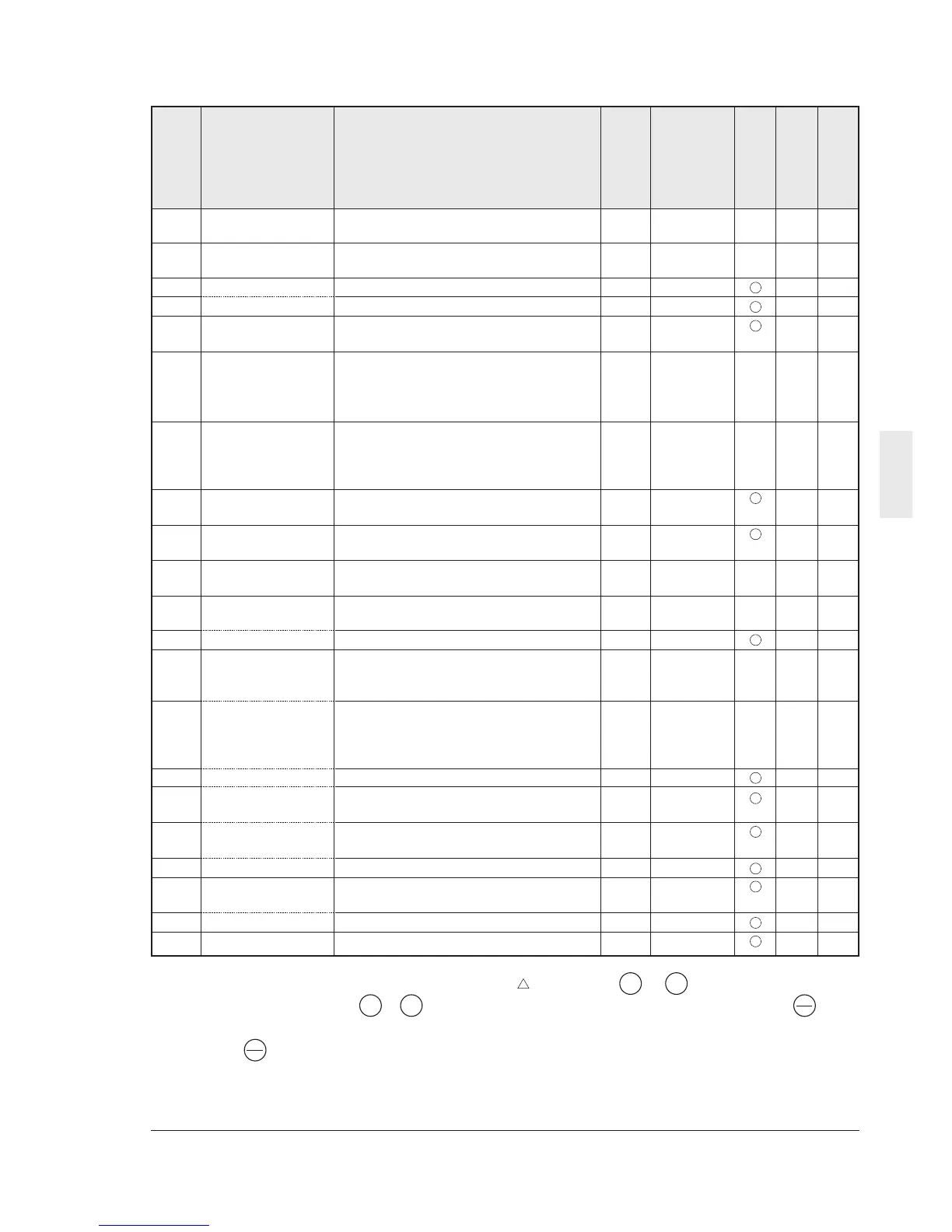
H01 Total operation time Monitor only 10h 0 - 0
H02 Trip history Monitor only - ---- -
H03 Data initializing 0: Manual set value 1 0 X 0
(Data reset) 1: Return to factory set value
H04 Auto-reset (Times) 0: Inactive 1 to 10 times 1 time 0 0
H05 (Reset interval) 2 to 20s 1s 5 0
H06 Fan stop operation 0: Inactive 1 0 0
1: Active
H07 ACC/DEC pattern 0: Linear acceleration/deceleration 1 0 X 0
(Mode select). 1:S-curve acceleration/deceleration (weak)
2:S-curve acceleration/deceleration (strong)
3: Non-linear
H09 Start mode 0: Inactive 1 1 X 0
(Rotating motor1: Active (only when Auto-restart after
pickup mode) momentary power failure mode)
2: Active (All start mode)
H10 Energy-saving 0: Inactive 1 0 0
operation 1: Active
H11 Dec mode 0: Normal 1 0 0
1: Coast-to-stop
H12 Instantaneous 0: Inactive 1 1 X 0
overcurrent limiting 1: Active
H13 Auto-restart 0.1 to 5.0s 0.1s 0.1 X 2
(Restart time)
H14 (Frequency fall rate) 0.00 to 100.0Hz/s
0.01Hz/s
10.00 4
H20 PID control 0: Inactive 1 0 X 0
(Mode select) 1: Forward operation
2: Reverse operation
H21 (Feedback signal) 0: Terminal 12 (0 to +10 Vdc) input 1 1 X 0
1: Terminal C1 (4 to 20 mA) input
2: Terminal 12 (+10 to 0 Vdc) input
3: Terminal C1 (20 to 4 mA) input
H22 P (Gain) 0.01 to 10.00 times (1 to 1000%)
0.01 time
0.10 4
H23 I (Integral time) 0.0: Inactive 0.1s 0.0 2
0.1 to 3600s
H24 D (Differential time) 0.00: Inactive 0.01s 0.00 4
0.01 to 10.0s
H25 (Feedback filter) 0.0 to 60.0s 0.1s 0.5 2
H26 PTC thermistor 0: Inactive 1 0 0
(Mode select) 1: Active
H27 (Level) 0.00Å`5.00V 0.01V 1.60 4
H28 Droop operation -9.9Å`0.0Hz 0.1Hz 0.0 3
Function code
Change during
operation
RS485 Data format
User setting
H: High performance functions
Description of change during operation
: The data changed by the or key takes
effect on the inverter operation. However,
press the key to store the new data.
V
V
: Press the or key to change the data.
The new data takes effect after the key is
pressed to store the data.
X : The data can be changed only while the
inverter is stopped.
V
V
FUNC
DATA
FUNC
DATA



 To Next Page