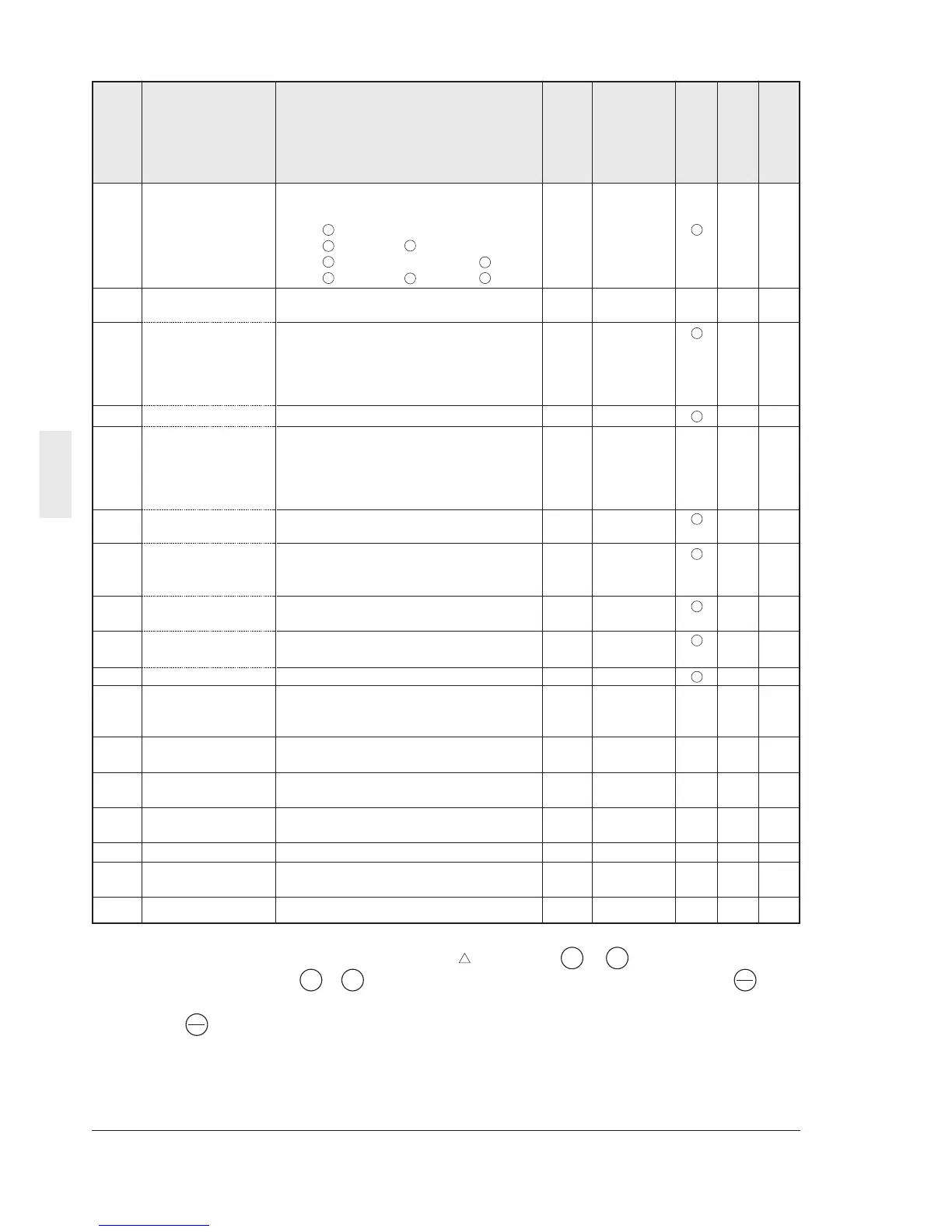
5-8 Selecting Functions
5
Min. Factory
Name Setting range unit setting
H30 Serial link Monitor, Frequency , Operation
(Function select)
setting command
0: X X 1 0 0
1: X
2: X
3:
H31 RS485 1 to 31 1 1 X 0
(Address)
H32 (Mode select on 0: Immediate Er8 1 0 0
no response error) 1: Er8 after interval set by timer
2: Retry in interval set by timer (Er8 after
failure to restore)
3: Continuation of operation
H33 (Timer) 0.0 to 60.0s 0.1s 2.0 2
H34 (Baud rate) 0:19200[bit/s] 1 1 0
1:9600
2:4800
3:2400
4:1200
H35 (Data length) 0:8bit 1 0 0
1:7bit
H36 (Parity check) 0: None 1 0 0
1: Even parity
2: Odd parity
H37 (Stop bits) 0: 2 bits 1 0 0
1: 1 bit
H38 (No response error 0: Not detected 1s 0 0
detection time) 1 to 60s
H39 (Response interval) 0.00 to 1.00s 0.01s 0.01 4
H40 Maximum Monitor only
degree C
--0
temperature
of heat sink
H41 Maximum Monitor only A - - 6
effective current
H42 Main circuit Monitor only 0.1% - - 0
capacitor life
H43 Cooling fan Monitor only 10h - - 0
operation time
H44 Inverter ROM version Monitor only - - - 0
H45 Keypad panel Monitor only - - - 0
ROM version
H46 Option ROM version Monitor only - - - 0
Function code
Change during
operation
RS485 Data format
User setting
Description of change during operation
: The data changed by the or key takes
effect on the inverter operation. However,
press the key to store the new data.
V
V
: Press the or key to change the data.
The new data takes effect after the key is
pressed to store the data.
X : The data can be changed only while the
inverter is stopped.
V
V
FUNC
DATA
FUNC
DATA



 To Next Page