iNetVu Troubleshooting Guide - 1201 Flyaway
c. If we are getting voltage from the 7000 controller, we will need to test voltage on the Control
Cable. Reconnect the motor cable to the controller. Disconnect the Control Cable from the base
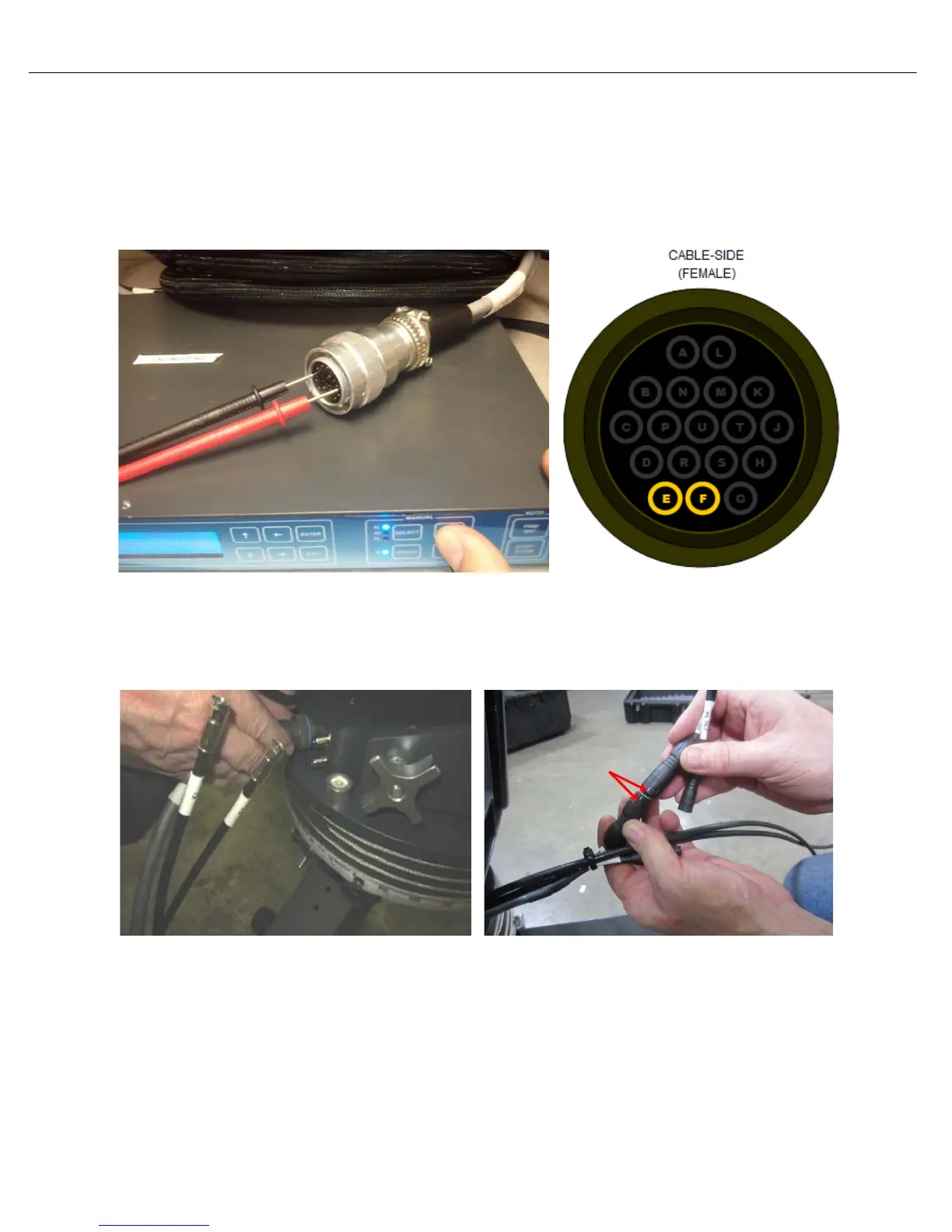
plate of the platform. Place the volt meter leads on pins E and F of the Control Cable. Using the
7000 controllers front panel, select Polarization with HI SPEED ON and hold +. Are you getting
24VDC? If no voltage is shown, it concludes the Control Cable needs to be replaced. Contact C-
Com Technical Support for further assistance.
d. If we are getting voltage from the controller cable, reconnect the Control Cable to the platform.
e. Verify the Polarization Motor Cable is securely connected and the two white groves align as seen
below.
Polarization Motor Cables
f. Reseat this cable and try to move the platform on Polarization. If the platform does not move the
Polarization motor may have failed. Contact C-Com Technical Support for further assistance.



 To Next Page