iNetVu Troubleshooting Guide - 1201 Flyaway
Powering the LNB from the 7000 Controller
Powering the LNB from the Modem
ERR_0X8915: RF IS TOO LOW
Status Definitions:
Step 1:
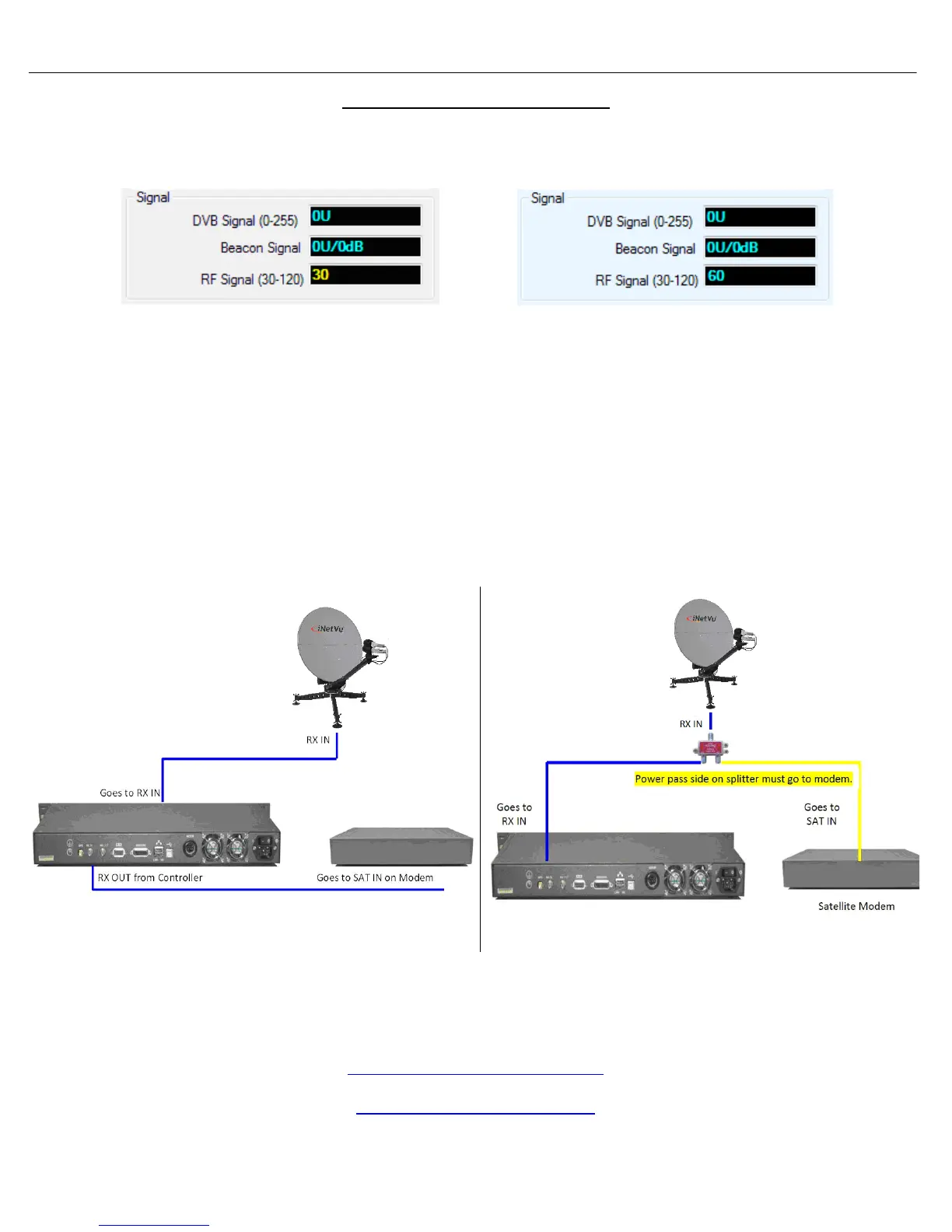
• Verify the physical RX connections are properly connected by referring to the diagrams below.
• If the RX connection was corrected, please refer to the Controls screen to determine if the RF
signal is in a normal state.
• If RF is still in YELLOW/RED continue troubleshooting your configuration.
Powering LNB from the Controller
Powering LNB from the Modem
(Abnormal Sate)
This indicates the controller is not
detecting power at the LNB. You will
be unable to deploy the dish in this
state and will receive ERR_0x8915:
RF is too low.
RF Signal in Cyan/Blue Color: (Normal
State)
This indicates the controller is detecting
power at the LNB which is normal
behavior. The value should always be in
this color format whether the unit is off or
on satellite. The value itself will
decrease/increase but our main focus is
to always have it in this state.



 To Next Page