iNetVu Troubleshooting Guide - 1201 Flyaway
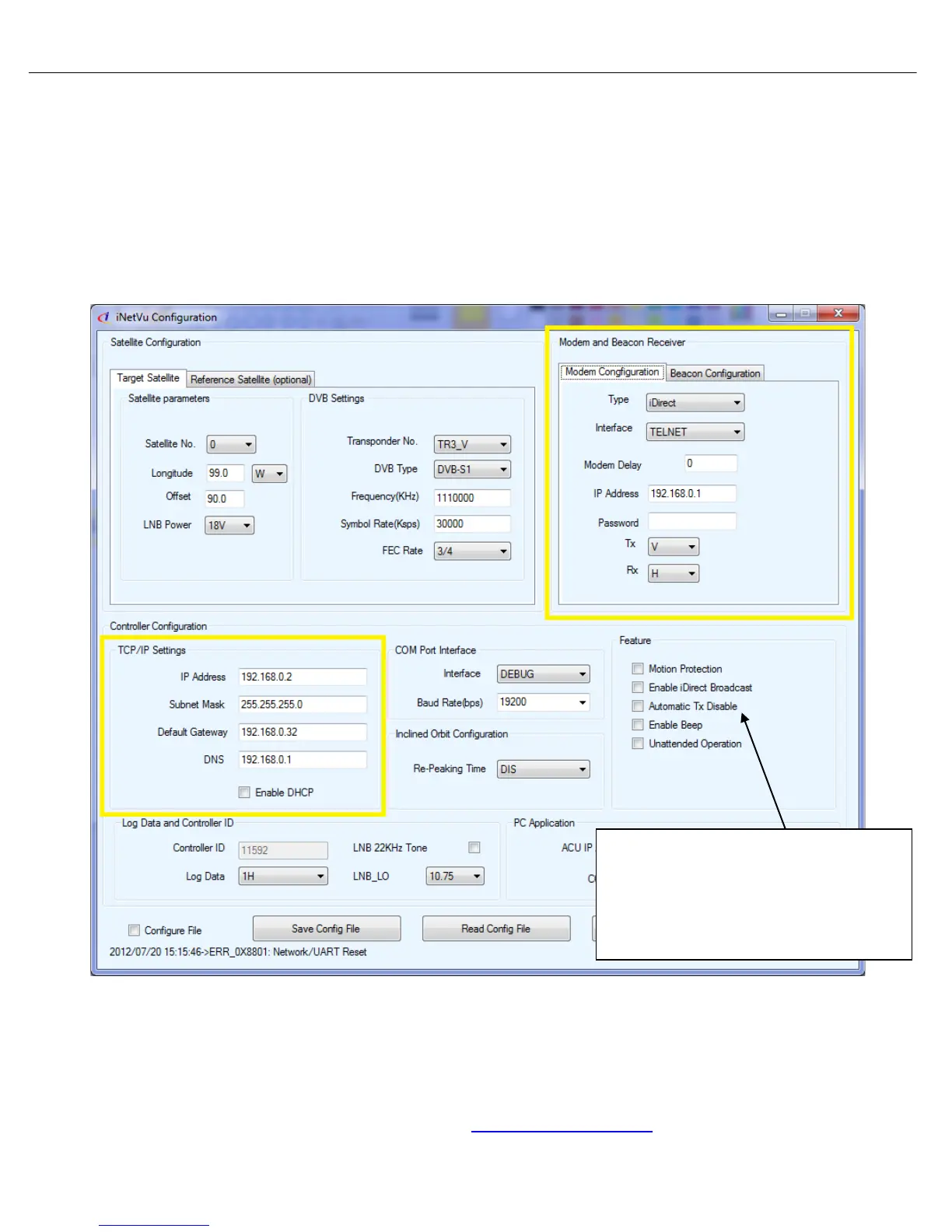
3. To troubleshoot an IP (HTTP, TELNET, UDP, SNMP) configuration:
• Verify the controller and modems IP and (Password/CD-KEY if required) are correct.
• Try to ping the modem.
• Connect the Modem directly to the Controllers Ethernet port bypassing any routers, hubs or
switches.
• Attempt to login to the modem via Telnet. This will verify IP address and Password.
• Swap out the Ethernet cable.
TCP/IP Connection Software Configuration (HTTP, TELNET, UDP, SNMP)
4. You may experience an issue were the transmitter is being automatically disabled. This will
occur when Automatic Tx Disable is turned on and there is a intermittent communication
issue between the controller and the connecting device. Bypass any routers, hubs or switches
and connect directly to the controller with a new Ethernet cable. This should resolve the issue
and indicate you have a routing or cabling failure.
Please contact C-COM Technical Support at
support@c-comsat.com for further assistance.
If this checkbox is selected, the controller
will automatically disable the transmitter if a
reset is done to the modem during
transmission and communication between
the controller and modem is re-established.



 To Next Page