iNetVu Troubleshooting Guide - 1201 Flyaway
Error 0x9008 - PL Jam Error
1. If the Mobile Platform doesn’t physically move
Possible Causes:
• 7000 Controller
• 5 Amp Fuse
• Flyaway Control Cable
• Internal Wiring
• Polarization Motor
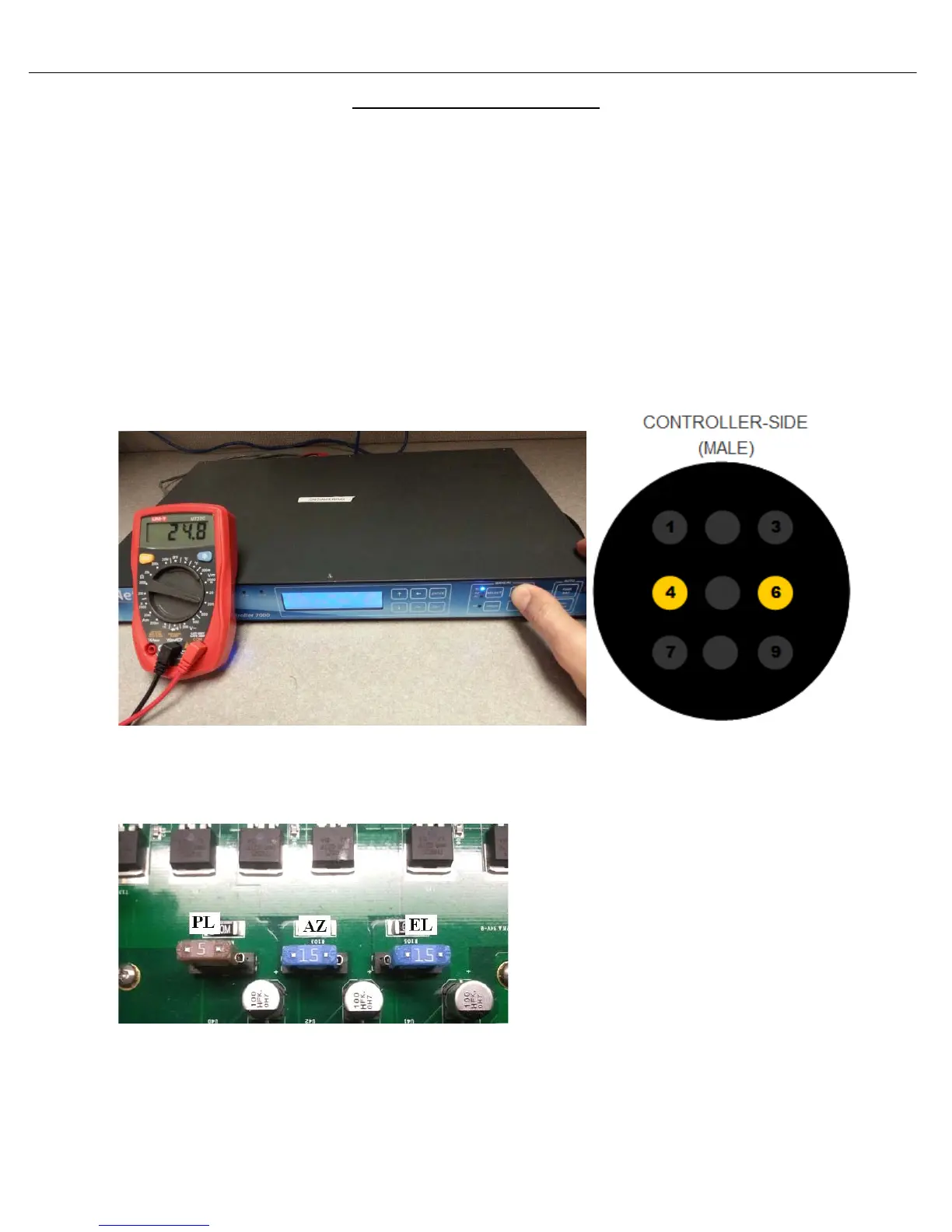
a. Verify if 7000 Controller is outputting 24VDC. Disconnect the motor cable from the back of the
controller, place the volt meter leads on pins 4 and 6 of the controller. Using the 7000 controllers
front panel, select Polarization with HI SPEED ON and hold +. Are you getting 24VDC?
b. If we are not getting voltage from the 7000 controller, please turn off the controller and verify
the 5A fuse has not blown. If the fuse is blown replace it and try again. If the fuse is not blown,
contact C-Com Technical Support for further assistance.
Warning High Voltage: Always remove power from the 7000 Controller prior to removing fuse.
Failing to do so can result in personal injury or damage to the controller.



 To Next Page