iNetVu Troubleshooting Guide - 1201 Flyaway
RF Signal Not Being Detected (Powering LNB from the Controller)
Step 2:
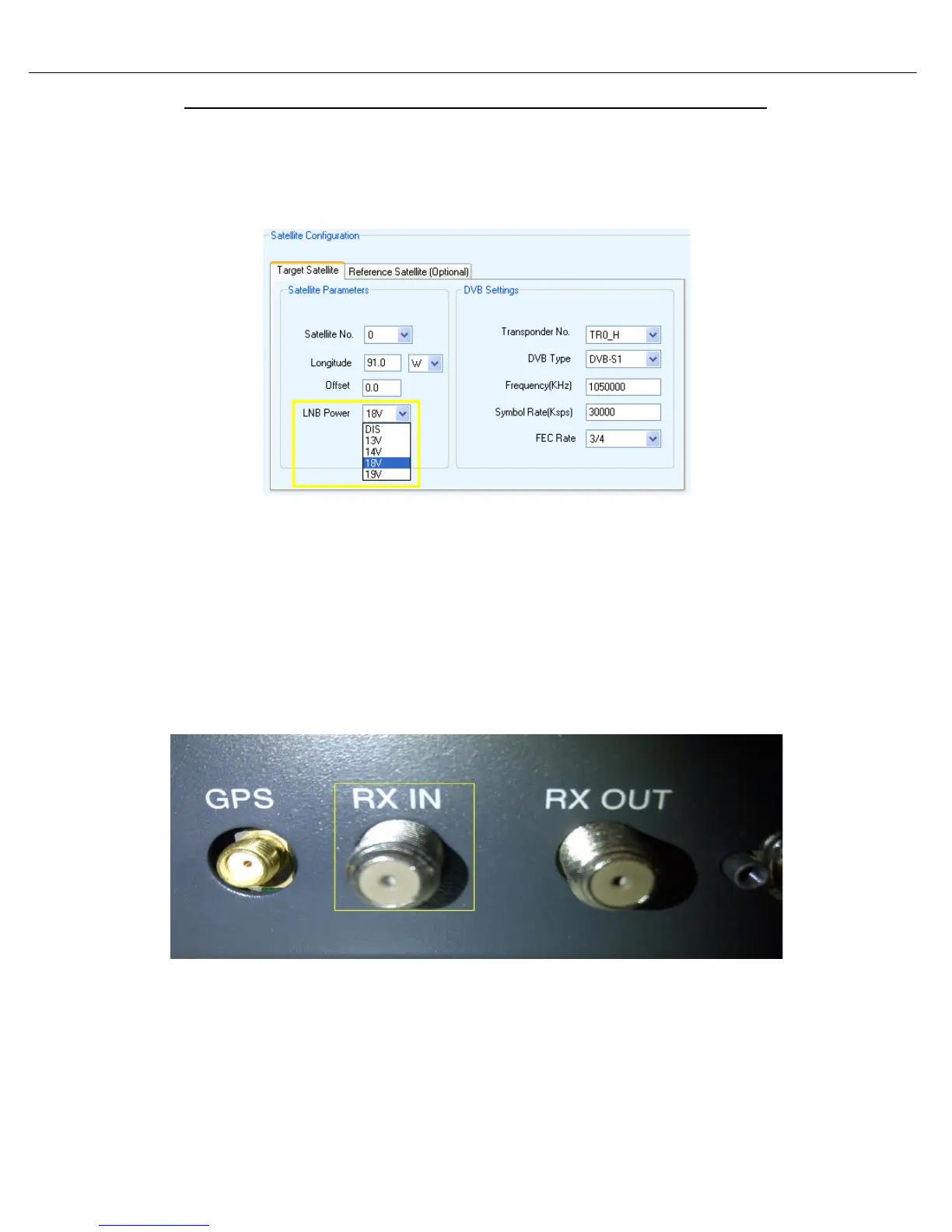
• Verify that the correct “LNB Power” voltage is selected in the iNetVu “Configuration” screen.
• If the incorrect voltage was selected or the option was disabled, please make the necessary
changes and click “Send All” then “Write EPROM” for the changes to take effect.
• If the RF signal is still flashing in RED and YELLOW, please proceed to step 3.
Step 3:
• Disconnect the coax from the “RX IN” port on the back of the controller and measure voltage
on the connector.
• If no voltage is shown or the voltage is not equal to what is selected in the “Configuration”
screen, contact C-COM Technical Support as the controller will need to be repaired.
Alternatively you may attempt to power the LNB from the modem until a replacement controller
has arrived. Please refer to the 7000 Series Controller Manual for more information.
• If voltage is shown and corresponds to the voltage selected in the “Configuration” Screen”
proceed to step 4.



 To Next Page