10
Getting Comfortable
Chair Setup
- When not in use for a long period of time, we recommend that the chair be covered, the power cord be coiled
and that the unit be placed in an environment free of dust and moisture.
- To avoid possible damage to product or injury to unsupervised children, always turn off power switch and
unplug massage chair from electrical outlet immediately after use.
CAUTION
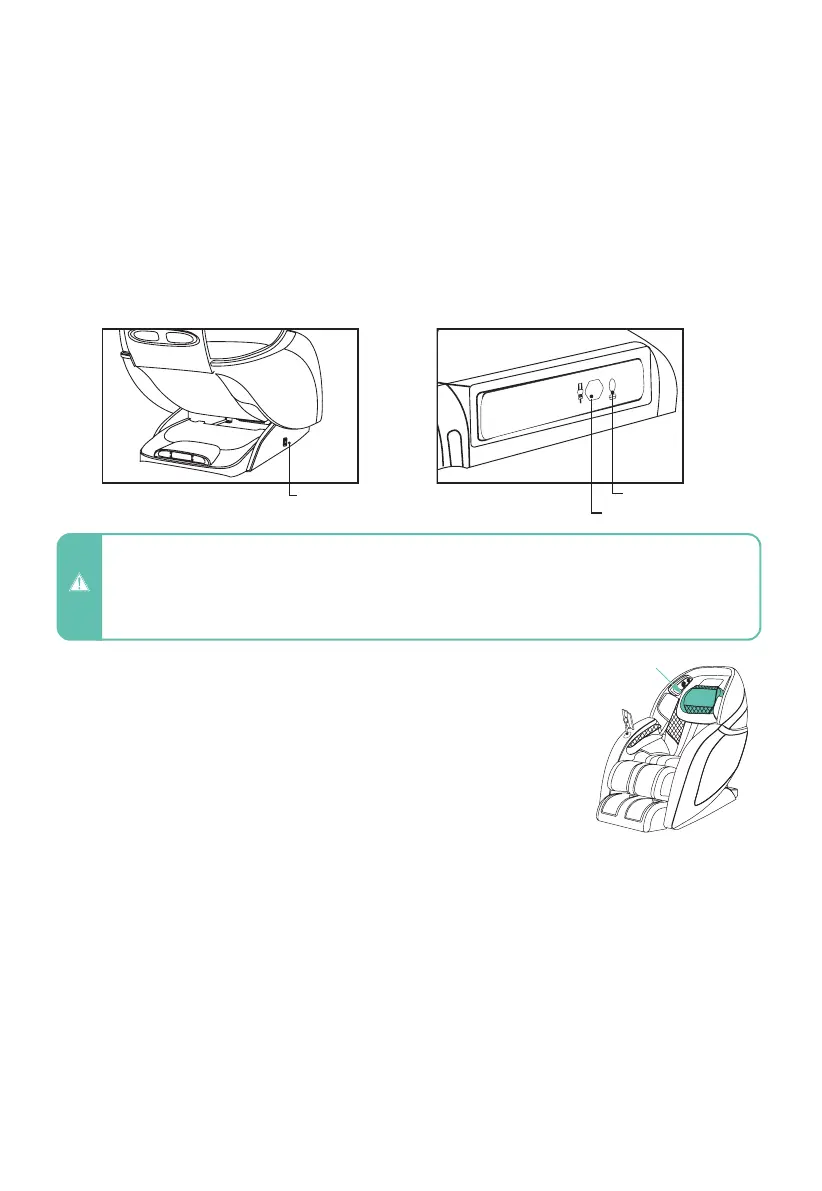
To power up the chair, flip the main power switch located on the back of the base of the
chair to ON. Ensure the electrical cord is connected to a 110V grounded outlet and plugged
into the power cord port located on the back of the base of the chair.
Main Power Switch
Take a seat in the chair and take note of where the neck pillow
rests on your neck. Adjust the pillow so that it rests comfortably
in the arch of your neck. Do this by removing it from the velcro,
aligning it, and then reattaching to the velcro once it is in the
desired position.
Adjust Pillow
TrueFit
TM
Body Scanning
Select any auto program. The chair will automatically begin scanning your body, mapping your
back, shoulders, and neck. During this process it is important to remain seated back into the
chair without lifting your head.
The scan can be viewed on the Tablet Remote screen. If fine tuning is needed just after your
body scan, wait for the shoulder adjust prompt to appear and then use the Back Adjustment
buttons to move the massage rollers up or down for the perfect shoulder kneading position.
Tube fuse
Main Power
Switch
Power cord port
To make the massage less intense, you can fold down the neck rest to provide more
cushioning between you and the massage mechanism in the seat back. To make the foot rollers
less intense, insert the foot pads that came with your chair into the foot bed of the footrest.
Reduce the Intensity of your Massage - Manually
Neck Pillow












 To Next Page