18
Set your Environment
Adjustments
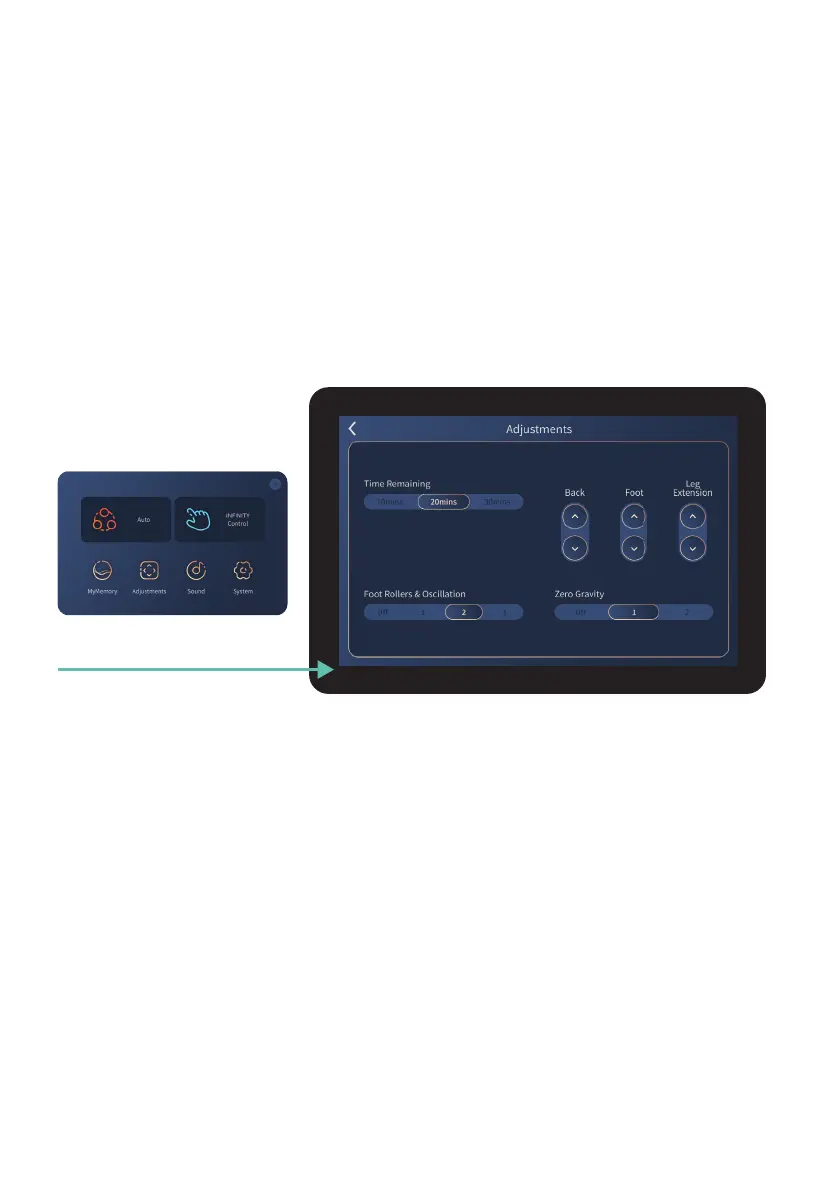
Tap Adjustments to enter the Adjustments display screen. While your massage program is
running, use this screen to make adjustments to time, foot & calf rollers, chair angles, or
zero gravity.
To return to the In-use screen, simply swipe right or tap the arrow on the Tablet Remote
screen, which will take you to the home page, and then tap ‘massage running screen’ at the
top center of your screen.
Tap Adjustments button
Time Remaining
Tap screen to select your desired massage timer length; 10 minutes, 20 minutes, or 30
minutes. 20 minutes is the default setting. The massage chair will turn off automatically and
reset after the timer is up.
Foot Rollers & Calf Oscillation
Control Complete
Calf
™
Calf Rollers & Oscillation
and choose your desired calf roller speed: 1 =
slow, 2, 3 = fast, or Off (deactivate
calf rollers & oscillation
).
Tap screen to select setting.
These controls enable you to fine tune the length and fit of specific parts of your chair. Tap
+ hold screen to adjust settings.
Back – controls the recline angle of the seat back.
Foot – controls the angle of the footrest.
Leg Extension – allows the chair to customize to your leg length.
Back/ Foot/ Leg Extension












 To Next Page