20
Set your Environment
White Noise
SoundsW hat is it?
Nature
Ocean Surf
Air Plane
Crickets
Thunderstorm
Car Ride
Rain
Windy Night
Fireplace
A constant, even loop of pure white noise to mask out distractions
Soothing ocean waves rolling onto the shore
Night time in the suburbs. Churping Crickets, water trickling from a pond, and faint
traffic noises
Quiet, light, refreshing rain falling to the ground
Refreshing sounds of small birds peacefully singing along a tranquil stream.
A Cessna propeller airplane motor idling
Calming inner-city traffic featuring cars, trucks, and motorcycles
Crackling of fire in a fireplace
Heavy rainstorm with thunder
Heard from inside a cabin, a howling wind blows constantly outside
Note: Bluetooth must be ON for sounds to work.
W
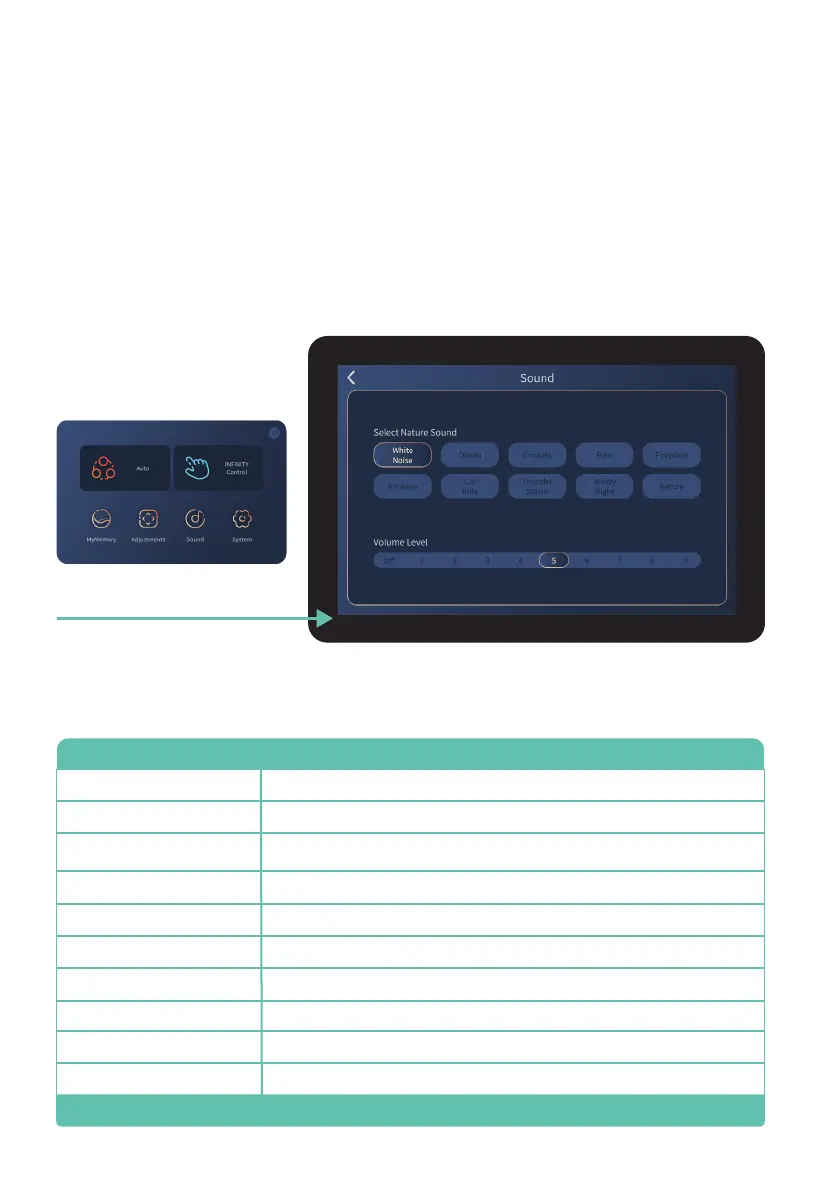
Tap Sound on the home display to enter the Sound display screen. Use this screen to select
and control the SootheMe™ Sound Therapy feature of your chair. The selected sound will play
from the speakers next to your head. To turn SootheMe™ Nature Sounds off, de-select the
activated sound. Note: Bluetooth must first be turned on in System screen (see page 20).
Sounds
Tap Sound button
Volume Level
Increase or decrease volume of SootheMe™ Nature Sounds. 1 = low, 9 = high, or Off. Tap
screen to select setting.
(See page 20).












 To Next Page