21
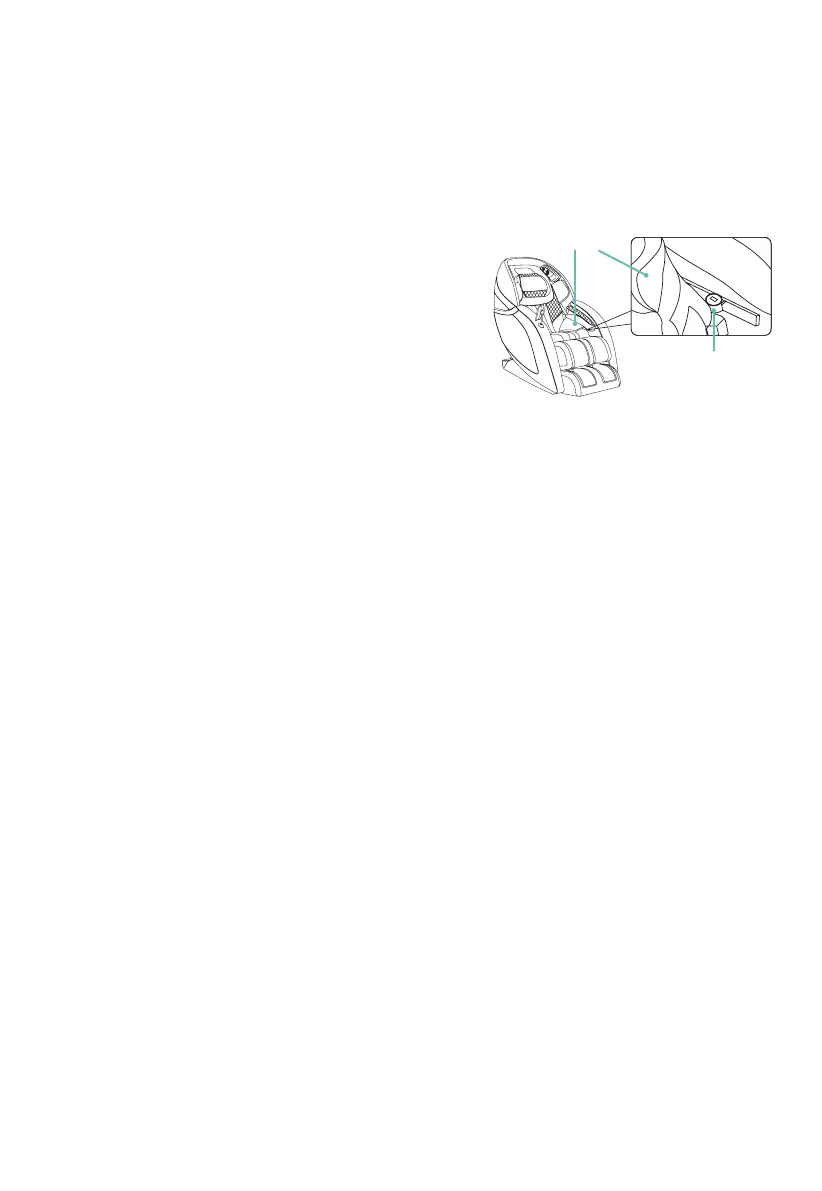
USB Charging Station
Your massage chair includes a USB-A port to charge
your phone or tablet while using the chair. This feature is
especially helpful when using the app to control the chair.
The port is located on the left hip side of the chair
behind the thigh airbag. To access, locate the thigh
airbag and pull it back, away from the chair to reveal the
USB port.
Android System Software (Android System V2.2 or later)
- Open the Google play store. In the search bar, search for ‘Infinity Massage Chair Palisade
Pro’. Click on the Palisade Pro app tile.
- Click “Install” to download and install the Palisade APK, then press Settings button on your
computer or Android device > press Wireless and Web Setting > Bluetooth > Scan Bluetooth
device > Palisade Pro, then pair.
- Start the Palisade Pro APK, press Settings menu > Bluetooth > and pair with the Palisade Pro
to link the APK
Apple iOS: (iPhone or iPad devices)
- Open the App Store. In the search bar, search for ‘Palisade Pro by Infinity’ to find the app.
Click “Get” at the top right corner to download and install the software.
- In your device settings, open Bluetooth and connect it to the massage chair.
- Please note: Only Apple equipment compatible with Bluetooth 4.0 can connect to the chair’s Bluetooth.
App Download & Installation
USB Charging Port
Thigh Airbag












 To Next Page