19
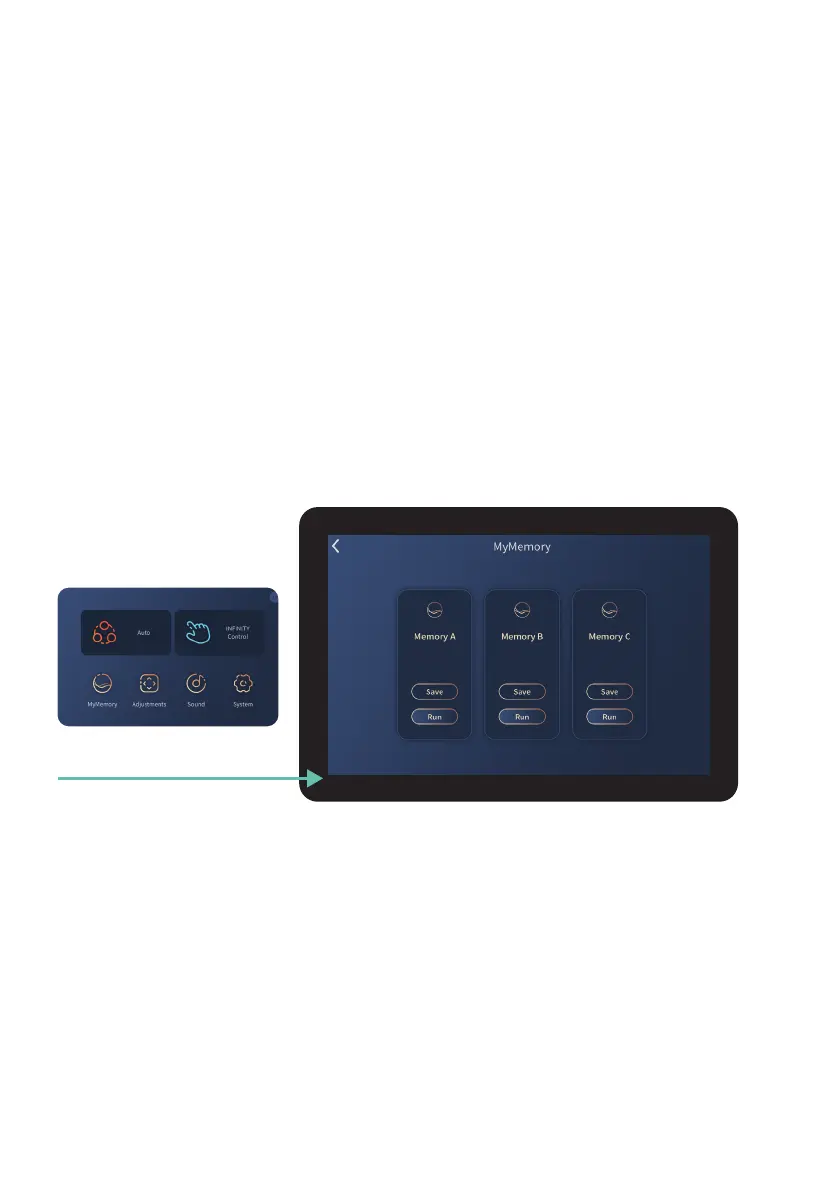
Tap MyMemory button
Weightless Zero Gravity Recline
Use this control to enter Weightless Zero Gravity Recline. Zero Gravity elevates your
feet up over your heart to improve overall circulation and reduces gravitational force on
your spine for a sense of weightlessness. Zero Gravity position 1 will put the chair into a
standard recline, Zero Gravity position 2 will recline the chair into complete Weightless
Zero Gravity Recline.
Your chair has the ability to save your favorite customized massage programs to memory.
To create a custom MyMemory program, you first need to set up the chair for what it is you
want to record. To do this, use Manual Settings to create a manual massage program with
all of your desired air, heat, speed, and intensity settings.
MyMassage
™
Memory Programs
Saving a Memory Program
To save a massage program, select MyMemory from Home Display, then tap the save button
to save the current massage settings to memory. There are 3 MyMemory storage slots.
Running a Memory Program
Once a memory program is saved, tap the ‘Run’ button on the screen underneath the
program you wish to run. If you hit save in a MyMemory program with a program already
saved, it will record over the previous setting.












 To Next Page