14
Taking Control
Auto Programs
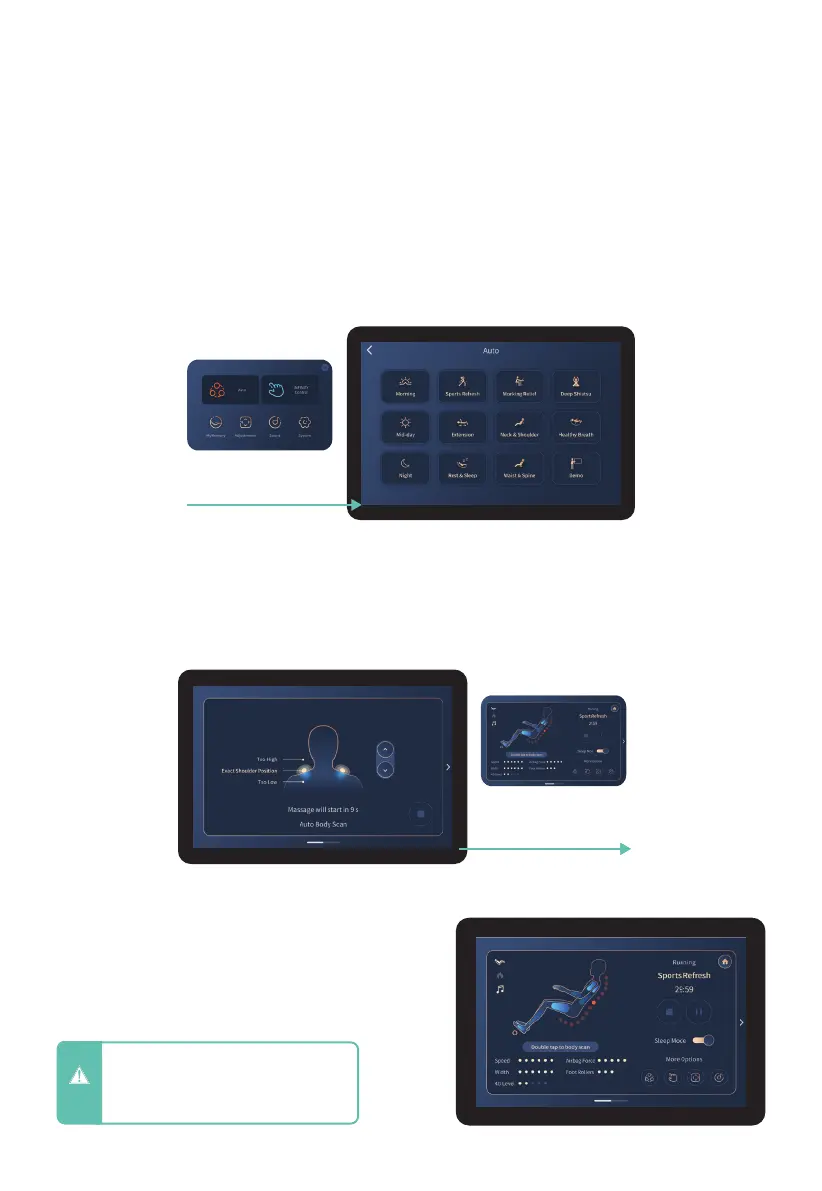
From the home display, tap the AUTO button to enter Auto Program Menu. Choose from
Morning, Sports Refresh, Working Relief, Deep Shiatsu, Mid-day, Extension, Neck &
Shoulder, Healthy Breath, Night, Rest & Sleep, Waist & Spine, or Demo. To enter the
program you desire tap the screen. Selected program will show on the In-use screen.
After adjusting your shoulder height, you
will be taken to the In-use screen where you
can observe all current settings and session
information.
After a Massage program is selected, you will be taken to the Body Scanning screen. Here
you can use the arrows to adjust the back mechanism up and down to match your specific
shoulder height. After the countdown timer has elapsed, your massage will start.
In-Use Screen
TrueFit
TM
Body Scanning
CAUTION
- Do not spill liquids on Tablet Remote
and avoid placing heavy objects on
Tablet Remote or power cord to
avoid damage or malfunction.
Tap Auto button
Massage Program will start
after Countdown timer












 To Next Page