24
Build your own
Have a particular spot that needs more work? Take the power of massage into your own
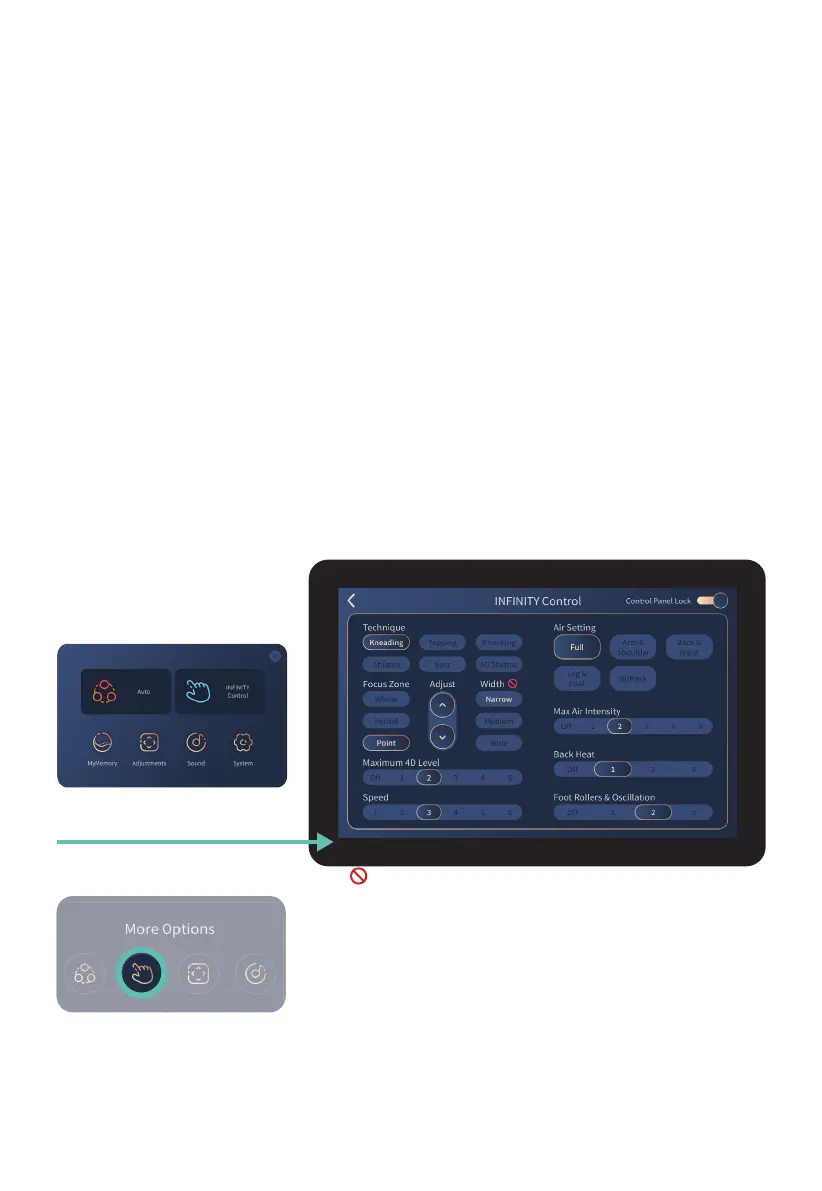
hands with Infinity Control. Tap Infinity Control on the home display to enter the Infinity
Control display screen. Use this screen to fully customize your own massage and find the
perfect treatment for you.
Your first selection on this screen will start your massage and take you to the massage in-
use screen. To return to the Infinity Control screen, tap the Infinity Control icon on the in-use
screen (2nd button under More Options). To return to the In-use screen, simply swipe right
or tap the arrow on the Tablet Remote screen, which will take you to the home page, and
then tap ‘massage running screen’ at the top center of your screen.
If you slide on the Control Panel Lock (top right corner of screen), this screen will not revert
back to the In-Use screen so you can make continuous adjustments.
Slide off to unlock again.
Use this screen to build your favorite sequences then save using the MyMassage™ Memory
setting on the Home display screen (see page 17).
Infinity Control
Tap Infinity Control button
Massage Technique
Controls the massage technique of the back mechanism. Select from: Knead, Tap, Knock,
Shiatsu, Sync, or 4D Shiatsu. Tap screen to select.
Note: appears when a feature is not available.
Return to Infinity Control screen from In-use screen:
Tap Infinity Control button under more options












 To Next Page