16
Set your Environment
Focus Zone
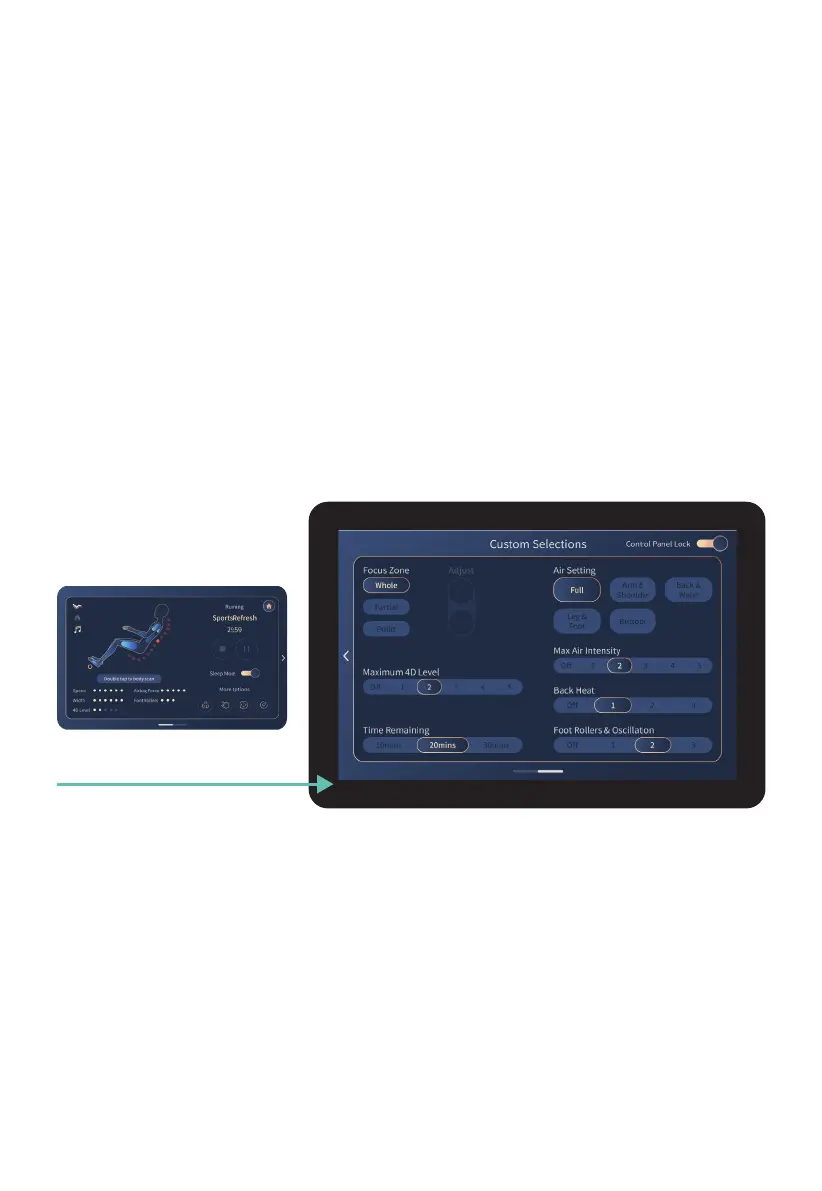
To personalize your massage to your exact needs, swipe left on the Tablet Remote from the
In-Use Screen to be taken to the Custom Selections screen.
The Custom Selections screen can be used to tailor your massage exactly to your needs.
Here you will have complete control over the duration, airbag settings/Intensity, foot rollers,
and back heat. To return to the In-use screen, simply swipe right or tap the arrow on the
Tablet Remote screen, which will take you to the home page, and then tap ‘massage
running screen’ at the top center of your screen.
If you slide on the Control Panel Lock (top right corner of screen), this screen will not revert
back to the In-Use screen so you can make continuous adjustments. Slide off to unlock again.
Custom Selections from Auto Programs
Controls the range of motion of the back mechanism, Whole travels the entire length of the
track, Partial travels a short distance and reverses direction for focused relief, Point stops
on the track for targeted relief. Tap screen to select setting.
Adjust
Partial and Point location can be fine tuned by using the Adjust setting. Press and hold
arrow up or arrow down buttons to control the location of the back mechanism.
Swipe Right from
In-Use Screen












 To Next Page