22
Settings
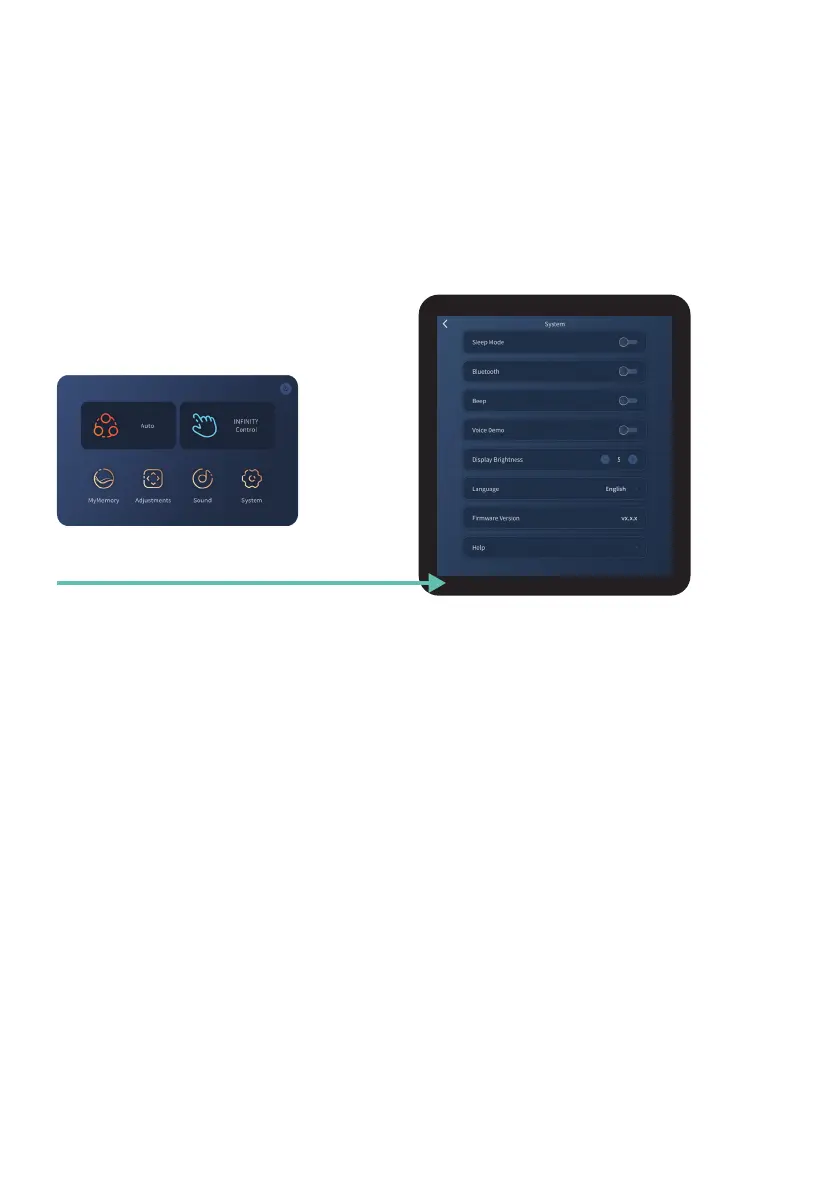
Tap System on the home display to enter the system display screen. Use this screen
to adjust and personalize your chair and Tablet Remote settings. Swipe up to see the
additional settings not visible on the screen, swipe down to go back to the top.
System
Tap System button
Bluetooth
Toggle your chair’s Bluetooth
®
setting: On or Off. Tap screen to toggle setting. Open
Bluetooth from audio device and pair with Palisade Pro to play music.
In order to use the chair app, play in-built sounds from your chair, or to play music from your
Bluetooth
®
enabled audio device, Bluetooth
®
must first be turned on.
Sleep Mode
Toggle your desired sleep mode setting: On or Off. Tap screen to select setting. When
sleep mode is on the chair will stop in the reclined position after Auto Programs, when sleep
mode is off the chair will return to a fully upright position after each Auto Program.
Voice Demo
Voice demo talks you through the functionality of the chair in the Demo auto program.
Toggle your desired voice demo setting: On or Off. Tap screen to select setting.
Beep
Toggle your Tablet Remote beep settings: On, or Off. Tap screen to select setting. When beep
setting is on, performing manual chair adjustments on the tablet remote will be accompanied
by an audible beep.













 To Next Page